
jaiodgneidkcpnnijbigkjoefgfbmhkk


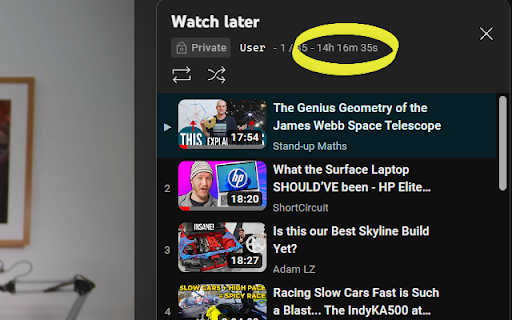


A Lightweight extension that displays the length of the current YouTube playlist A Lightweight extension that displays the length of the YouTube playlist you are viewing or watching. It works on both the Playlist viewing page, and the watching page, blending in with YouTube's existing stats. The display can be customized to your preference - these options are accessible from the extension's popup (as shown in the video above). Please leave your feedback and suggestions for any extra options you would like! For playlists longer than 100 videos, you will need to scroll to the final video on the Playlist view page for a full calculation. Unfortunately this will not work on the watch page as YouTube only loads up to 400 videos. Hover on the length displayed to view how many videos have been counted. If you like the extension please submit a review! Future plans: - More complex displays, showing progress through playlist in a more visual way etc. - More options (leave suggestions in your reviews!) - Display on the YouTube mini player. Known Bugs: - The duration display sometimes 'flashes' a few times when going into playlist view. Please report any issues via my email listed below in the Details section! Update Log: 0.1.11.3: HOTFIX for duration not displaying on Playlist view page due to YouTube update (again...). 0.1.11.2: HOTFIX for duration not displaying on Playlist view pages due to YouTube update. 0.1.11.1: HOTFIX for playback speed showing "(1x)" when not saved. 0.1.11: Added a setting to calculate playlist time based on playback speed (Thank you Noah W for the suggestion in your review!) Added a missing 'dot' separator in Custom Playlist view. Fixed 'Watch Later' playlist view not showing length until refresh. Fixed warning on playlists with 1000+ videos. 0.1.10: Fix duration not showing in Private Playlist viewing pages. 0.1.9: Fix broken length display on Watch Page (was showing 00:00:00). Fix Playlist Page not calculating the full length until scrolled for short playlists, only those longer than 100 require a scroll now - this cannot be changed due to YouTube's loading behavior. Fix console errors when watching a video with no active playlist/ queue. Fix wrong value being displayed when queue started while watching a video. Fix wrong video index being used after rearranging active playlist (for remaining time after current video). Add an indicator to show that the full playlist's length has not been calculate (and further details on hover. 0.1.8: Update 'YT' to 'YouTube' in listing name for better visibility. More concise listing Description. 0.1.7: Add Promo Video. Add Customization options: Hide seconds, Colon time format, Show duration remaining after/including current video (only on watch page). Fully style the extension Pop-up. 0.1.6: Add a basic popup UI, in preparation for new settings. Slight change to listing name for improved reach. New Store Images and Promo Tiles. 0.1.5: Fix NaN bug caused by Live and Premiere Videos. Fix bug where length was not being displayed after navigating from regular watch page. Add tooltip on hover to display how many videos have been counted in length. Some display adjustments. 0.1.4: Implement Support for YouTube's new UI update. Fix longstanding problem where page needs to be refreshed to display. Sleeker appearance to blend in with existing stats. Faster updating. 0.1.3: Add duration display to playlist viewing page. Some further optimizations. 0.1.2: Fix bug where duration is displayed twice. Duration displays more reliably without having to refresh. 0.1.1: Improve reliability when switching between playlists. 0.1.0: Initial version.

Youtube Playlist Analyser
YouTube Playlist Analyzer This extension will get and display the duration of YouTube playlist (max length 500) at multiple speeds… YouTube Playlist Analyzer This extension will get and display the duration of YouTube playlist (max length 500) at multiple speeds of your choice.

Youtube Playlist Guru: Search, Sort, Filter & Track Playlist Progress
Calculate playlist duration, search/sort/filter videos, and track your YouTube playlist watching progress—simple and fast. YouTube Playlist Guru - Search • Sort • Filter • Track Progress • Total Duration Supercharge your YouTube playlists with a fast, lightweight, and user-friendly tool designed for creators, learners, and binge-watchers. YouTube Playlist Guru helps you search, sort, filter, and track progress across any playlist, while accurately calculating total duration and remaining time based on your playback speed. Works seamlessly with YouTube’s Light and Dark themes. ❤️Why You’ll Love It 👉 Lightning fast & lightweight: Minimal overhead, smooth scrolling, instant operations. 👉 Clean, intuitive UI/UX: Purpose-built controls that feel native to YouTube. 👉 No sign-in or setup: Install and use directly on playlist pages. 🌟Core Features 🔎 Powerful Search 👉 Search by video title and channel name to quickly locate what you need in large playlists. ↕️ Pro Sorting (Both Ascending & Descending) 👉 By Index: Maintain original order or reverse it. 👉 By Title: A → Z or Z → A. 👉 By Channel Name: Group by creators instantly. 👉 By Video Duration: Shortest → Longest or vice versa. 👉 By Watching Progress: See not-started, in-progress, and completed in your preferred order. 🎯 Precision Filters 👉 By Video Index: Exact matches or ranges. 👉 By Channel: Include only selected creators. 👉 By Duration: >, ,

YouTube Playlist Duration Calculator
Find out the total duration or length of the YouTube Playlist (lectures, tutorials, music, video clips) and see how much you have watched (also displayed as a progress bar). Keep track of the lectures, musics videos, movie clips of playlists you are watching. Works perfectly with huge playlists as well. Hit refresh button when the instruction tells you. Once the time has loaded, there is no need to refresh. Just click on the icon to see the time and progress. When more than 100 videos are in the playlist, scroll down and load more videos to find out full length of the playlist.

YouTube Playlist Duration
Popup to show the duration of the YouTube playlist. An very lightweight extension to calculate & shows the total duration of the YouTube playlist in the popup of the extension. You will see the following the following displayed: - Videos counted (how many videos were used to calculate the total duration) - Average Duration of a video - Total duration of the playlist - Dropdown to choose playback speed which in turn shows the duration in that selected speed. 💡How to use: The script uses the DOM to calculate the length so there are no API calls to cause slow downs or pose security risks. After installing & enabling the extension, simply visit any YouTube playlist overview page (the URL should begin with 'https://youtube.com/playlist'). For example, https://www.youtube.com/playlist?list=PLC3y8-rFHvwisvxhZ135pogtX7_Oe3Q3A Or open a page where a video is being played from a playlist... The details can then be found within the extension pop-up.
