
bpojpijaddmjkblcbkhnhhgjecmfmgil
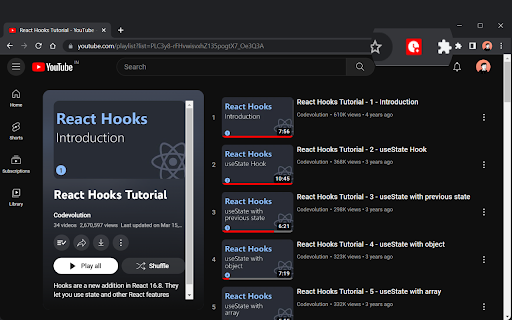


Popup to show the duration of the YouTube playlist. An very lightweight extension to calculate & shows the total duration of the YouTube playlist in the popup of the extension. You will see the following the following displayed: - Videos counted (how many videos were used to calculate the total duration) - Average Duration of a video - Total duration of the playlist - Dropdown to choose playback speed which in turn shows the duration in that selected speed. 💡How to use: The script uses the DOM to calculate the length so there are no API calls to cause slow downs or pose security risks. After installing & enabling the extension, simply visit any YouTube playlist overview page (the URL should begin with 'https://youtube.com/playlist'). For example, https://www.youtube.com/playlist?list=PLC3y8-rFHvwisvxhZ135pogtX7_Oe3Q3A Or open a page where a video is being played from a playlist... The details can then be found within the extension pop-up.

Pro YouTube Ad Blocker
Block ads on YouTube for a seamless viewing experience. Tired of sitting through ads before every video? Pro YouTube Ad Blocker removes all types of ads from YouTube and skips ads on Hotstar, giving you a clean, distraction-free viewing experience. 🎥 Video Ads — Pre-roll, mid-roll, and post-roll ads are gone 🖼️ Overlay Ads — No more banners popping up over your video 🏠 Homepage Banners — Clean homepage without promoted content 📄 Feed Sponsored Cards — Removes sponsored videos from your feed 🔍 Search Ads — No promoted results when you search 📌 Sidebar Ads — Blocks display ads next to the video player ⚡ Shorts Ads — Ad-free Shorts browsing 🛒 Merch & Promos — Hides merch shelves and promotional overlays ⏩ Automatically skips ads on Hotstar so you get straight to your content 🔘 Master toggle to enable/disable everything in one click 🎛️ Individual toggles for each ad category — block only what you want 💾 Settings sync across your devices ⚡ Lightweight — minimal impact on browser performance 🔒 Privacy-first — no data collection, no tracking, no analytics 🧩 Simple & clean UI — set it and forget it 🆓 Completely free Download now and take back your viewing experience! 🎉

YouTube Playlist Length - Duration Display
A Lightweight extension that displays the length of the current YouTube playlist A Lightweight extension that displays the length of the YouTube playlist you are viewing or watching. It works on both the Playlist viewing page, and the watching page, blending in with YouTube's existing stats. The display can be customized to your preference - these options are accessible from the extension's popup (as shown in the video above). Please leave your feedback and suggestions for any extra options you would like! For playlists longer than 100 videos, you will need to scroll to the final video on the Playlist view page for a full calculation. Unfortunately this will not work on the watch page as YouTube only loads up to 400 videos. Hover on the length displayed to view how many videos have been counted. If you like the extension please submit a review! Future plans: - More complex displays, showing progress through playlist in a more visual way etc. - More options (leave suggestions in your reviews!) - Display on the YouTube mini player. Known Bugs: - The duration display sometimes 'flashes' a few times when going into playlist view. Please report any issues via my email listed below in the Details section! Update Log: 0.1.11.3: HOTFIX for duration not displaying on Playlist view page due to YouTube update (again...). 0.1.11.2: HOTFIX for duration not displaying on Playlist view pages due to YouTube update. 0.1.11.1: HOTFIX for playback speed showing "(1x)" when not saved. 0.1.11: Added a setting to calculate playlist time based on playback speed (Thank you Noah W for the suggestion in your review!) Added a missing 'dot' separator in Custom Playlist view. Fixed 'Watch Later' playlist view not showing length until refresh. Fixed warning on playlists with 1000+ videos. 0.1.10: Fix duration not showing in Private Playlist viewing pages. 0.1.9: Fix broken length display on Watch Page (was showing 00:00:00). Fix Playlist Page not calculating the full length until scrolled for short playlists, only those longer than 100 require a scroll now - this cannot be changed due to YouTube's loading behavior. Fix console errors when watching a video with no active playlist/ queue. Fix wrong value being displayed when queue started while watching a video. Fix wrong video index being used after rearranging active playlist (for remaining time after current video). Add an indicator to show that the full playlist's length has not been calculate (and further details on hover. 0.1.8: Update 'YT' to 'YouTube' in listing name for better visibility. More concise listing Description. 0.1.7: Add Promo Video. Add Customization options: Hide seconds, Colon time format, Show duration remaining after/including current video (only on watch page). Fully style the extension Pop-up. 0.1.6: Add a basic popup UI, in preparation for new settings. Slight change to listing name for improved reach. New Store Images and Promo Tiles. 0.1.5: Fix NaN bug caused by Live and Premiere Videos. Fix bug where length was not being displayed after navigating from regular watch page. Add tooltip on hover to display how many videos have been counted in length. Some display adjustments. 0.1.4: Implement Support for YouTube's new UI update. Fix longstanding problem where page needs to be refreshed to display. Sleeker appearance to blend in with existing stats. Faster updating. 0.1.3: Add duration display to playlist viewing page. Some further optimizations. 0.1.2: Fix bug where duration is displayed twice. Duration displays more reliably without having to refresh. 0.1.1: Improve reliability when switching between playlists. 0.1.0: Initial version.

Youtube Playlist Duration Calculator
An extension to calculate & display the total duration of a youtube playlist. 💎 Features: - Calculate the total duration of a YouTube playlist - Sort small playlists (100 videos or less) by different criteria - Duration - View count - Upload date - Channel name After installing & enabling the extension, simply visit any youtube playlist overview page (the url should begin with 'https://youtube.com/playlist'). For example: https://www.youtube.com/playlist?list=PLrtg3MOb7tvG9h9rll5V9O96owfcBpROG The total duration of the playlist can then be found within the playlist information panel, located on the left-hand side of the page. You will see the following displayed: - Total duration (formatted as hh:mm:ss) - Videos counted (how many videos were used to calculate the total duration) - Videos not counted (how many videos could not be used to calculate the total duration)

YouTube Playlist Duration bar
Know exactly how long your YouTube playlists are — and how far you've come. YouTube doesn't tell you how long a playlist is, or how much of it you've watched. This extension fixes that instantly. WHILE WATCHING A PLAYLIST VIDEO ━━━━━━━━━━━━━━━━━━━━━━━━━━━━━━━ • Total playlist duration • Watched time so far • Progress percentage (shown as a number and a visual bar) • Remaining time until the playlist ends Everything updates live as you watch — no page reloads needed. WHILE BROWSING A PLAYLIST PAGE ━━━━━━━━━━━━━━━━━━━━━━━━━━━━━━━ • Total duration of all videos in the playlist • Video count displayed at a glance WORKS EVERYWHERE ━━━━━━━━━━━━━━━━ ✔ Public playlists, private playlists, Watch Later, Liked Videos ✔ Dark mode and light mode — matches YouTube's theme automatically ✔ Updates in real time when videos are added, removed, or reordered ✔ No sign-in required, no permissions beyond YouTube
