
hfkcllpkaefjfaiiobanmfkabkncfike
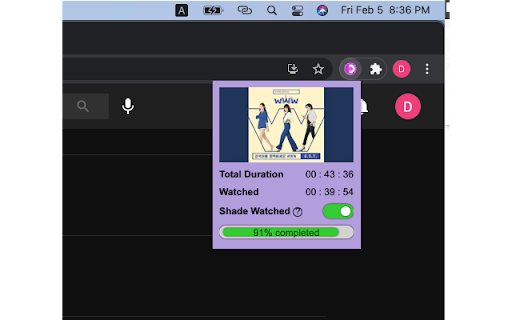
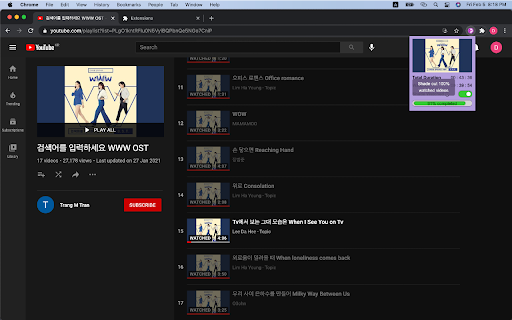
Find out the total duration or length of the YouTube Playlist (lectures, tutorials, music, video clips) and see how much you have watched (also displayed as a progress bar). Keep track of the lectures, musics videos, movie clips of playlists you are watching. Works perfectly with huge playlists as well. Hit refresh button when the instruction tells you. Once the time has loaded, there is no need to refresh. Just click on the icon to see the time and progress. When more than 100 videos are in the playlist, scroll down and load more videos to find out full length of the playlist.

Youtube Playlist Duration Calculator
An extension to calculate & display the total duration of a youtube playlist. 💎 Features: - Calculate the total duration of a YouTube playlist - Sort small playlists (100 videos or less) by different criteria - Duration - View count - Upload date - Channel name After installing & enabling the extension, simply visit any youtube playlist overview page (the url should begin with 'https://youtube.com/playlist'). For example: https://www.youtube.com/playlist?list=PLrtg3MOb7tvG9h9rll5V9O96owfcBpROG The total duration of the playlist can then be found within the playlist information panel, located on the left-hand side of the page. You will see the following displayed: - Total duration (formatted as hh:mm:ss) - Videos counted (how many videos were used to calculate the total duration) - Videos not counted (how many videos could not be used to calculate the total duration)

YTExplore - Calculate Playlist Duration
Explore YouTube Find complete details of YouTube Channels | Videos | Playlists Check YouTube Playlist duration and other important metrics easily. Check total number of videos and hours of a YouTube Channel. YTExplore is a YouTube Playlist Length Checker, Channel, Video & Playlist Analyzer It not only shows the playlist duration but also show several other important metrics like the number of the channels in that playlist, view count, channels having the highest/lowest video in the playlist and many more promising metrics. How to use it: * Click on the extension. Enter the Channel/Video/Playlist ID or URL in the input field and click on Calculate Metrics. * Go to any Playlist on YouTube. You will see a button Calculate Playlist Length, click on it. * You can even analyze a channel or videos. Go to Channel or Video page and you will see Analyze button, click on it.

TrackMyCourse: YouTube Playlist Progress Tracker
Turn YouTube playlists into courses. Track with checkmarks, progress bar, total and watched duration, and completion percentage. TrackMyCourse is a YouTube playlist progress tracker that turns playlists into structured courses. Stay organized with progress bars, checkmarks for watched videos, total and watched durations, invested time tracking, and clear completion percentages. 📊 Progress Bar & Completion Percentage – Instantly see how much of a playlist you’ve completed ✅ Checkmarks for Watched Videos – Mark videos as watched and keep your learning organized ⏱️ Duration Tracking – Track both watched and total time, plus invested time spent learning, for better planning 🔄 Dynamic Playlist Scanning – Automatically detects and scans videos, even in large playlists 📦 Import/Export Progress – Back up your courses and progress as JSON files and restore anytime, across browsers or devices 🏠 Homepage Course Overview – View your recent courses directly on YouTube's homepage for quick access 🎯 Focus Mode – Distraction-free learning by hiding recommendations and providing a toggle to show/hide comments only when needed 🔗 Cross-Course Video Matching – See if a video is part of other courses you're tracking, with automatic progress sync 🖥️ Popup Dashboard – See all playlists you’ve started, organized into 'In Progress' and 'Completed' courses for easy tracking 🎨 Seamless YouTube Integration – Minimal design, fully embedded in your YouTube interface 💾 Local Storage – All data is stored safely in your browser. No account required Whether you’re learning coding, languages, school or college subjects, or any skill through YouTube, this extension turns scattered playlists into a structured learning experience. Never lose track of what you’ve completed or where to continue next. 🎯 Who Should Use This Extension? 👩🎓 Students & Self-Learners – Track academic courses, tutorials, and lecture series. 👨🏫 Educators – Help students follow a clear learning path on YouTube. 🎥 Content Creators – Offer your audience a more professional, course-like experience on your playlists. TrackMyCourse respects your privacy. All progress is stored locally in your browser ✅. We do not collect, store, or share any personal information. Your learning data stays safe and private while you use the extension. Install TrackMyCourse today and make your YouTube learning journey productive, organized, and fun 🎉

YouTube Playlist Duration and Timetable Calc
In the vast universe of YouTube, where playlists are galaxies waiting to be explored, the "YouTube Playlist Duration and Timetable… In the vast universe of YouTube, where playlists are galaxies waiting to be explored, the "YouTube Playlist Duration and Timetable Calculator" emerges as your guiding star. Whether you're a YouTube enthusiast craving an organised binge-watch or a budding developer with an appetite for learning, this extension is your ticket. Calculate Playlist Duration: Forget the cumbersome manual tallying! With a single click, discover the entire duration of any YouTube playlist. How? Our expert content.js delves deep into YouTube playlist page, extracting the length of each video and presenting you with a grand total. Generate a Viewing Timetable: Ever wanted to split your viewing over several days? Just key in your daily viewing limit, and voila! A custom viewing schedule is laid out for you. What is the magic behind this? Our interactive popup.js takes your input, couples it with the playlist's data, and churns out a day-wise viewing plan. Sleek User Interface: The user experience is paramount. Our popup.html provides a clutter-free, intuitive interface, and the styles.css ensures it's as pleasing to the eye as it is functional. Every button, every shade, and every layout choice was made keeping you, the user, in mind.
