
ipdijnmjlphfibadhfaklogopdnplhpa
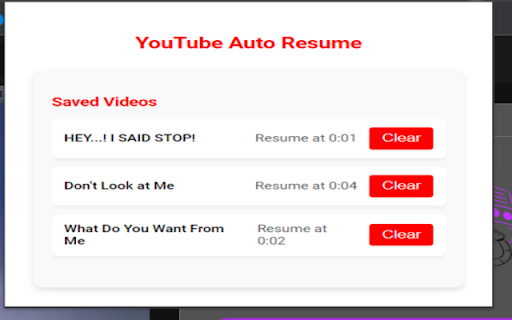

This extension automatically resumes YouTube videos from where you last played them. This extension allows you to automatically resume YouTube videos from where you left off.

YT Watch Later Assist
Bulk Add and Delete YouTube Watch Later and Liked videos automatically Add a playlist to your Watch Later in one click. Remove all your Water Later videos in one click. Remove all your Liked videos in one click How it works: ➡ Add Playlist to Watch Later ♦ When you will open a playlist listing page you will see a button "Add this playlist to watch later" above the video lists. Just click on that. ♦ If you are watching the playlist, you will see "Add this playlist to watch later button" above the playlist box. Just click on that. ♦ When you are in playlist page or watch, click on YT Watch Later Assist icon and click on "Add this playlist to watch" button ➡ Remove all Watch Later videos ♦ When you will open Watch Later page you will see a button "Remove all videos" above the video lists. Just click on that. ♦ OR click on YT Watch Later Assist icon and click on Remove all Watch Later videos button. ➡ Remove all Liked videos ♦ When you will open Liked videos page you will see a button "Remove all videos" above the video lists. Just click on that. ♦ OR click on YT Watch Later Assist icon and click on Remove all Liked videos button. For any issue, report to us via email. Thank you!

YouLoop - Replay your favorite video parts
Chrome extension to loop specific parts of your YouTube videos Easily loop specific parts of your favorite online videos with YouLoop. Introducing YouLoop, a powerful Chrome extension designed to enhance your video watching experience. Whether you're learning a new skill, enjoying music videos, or analyzing specific scenes, YouLoop allows you to loop precise segments of any online video effortlessly. ➤ Custom Loop Points: Set start and end points for looping any part of a video. ➤ Easy to Use: Intuitive interface seamlessly integrates with your video watching experience. ➤ Perfect for Learning: Ideal for practicing musical instruments, language learning, or going over educational content repeatedly. ➤ Entertainment and Analysis: Enjoy your favorite video parts on loop or analyze specific scenes in-depth. With YouLoop, you have the ultimate control over how you watch online videos. Get ready to loop, learn, and enjoy! 📪 Contact us: Any questions or suggestions? Please contact us at 💌 kaitodevstore@gmail.com We value your input and are here to assist you in making the most of our tools.

Easy Resume - Video Manager for YouTube
An extension that provides auto-resume functionality and an easy to access watchlist for YouTube Have you ever tried to finish a YouTube video you started watching earlier, but couldn't find it? Maybe it's a show you love, but all the episodes look the same. Or you can't find exactly where you left off. YouTube's built-in history feature... leaves much to be desired. The YouTube Easy Resume extension provides an easy-to-access watch history list through a simple interface. Once you install the extension, **pin it in your toolbar** and you'll be able to open a dropdown to see YouTube videos you didn't finish, jump right back to where you were watching, and access the content you want. When you resume a video it will start playing right where you left off. You can also tweak the settings to change what videos show up in the extension. Do you want it to only include videos that are longer than 5 minutes? Or to only list videos you've watched for more than two minutes? Easy peasy. All your video history is stored locally, no one else has access to what you watch. Besides, we would never judge you for watching four-hour-long action figure unboxing videos. You do you. This extension was made by the web team in the Annenberg Media newsroom to make watching YouTube a better experience. It's a labor of love, something we wanted to use ourselves, and wanted to share with the world. Digital Development Lead: Gautam Rajan Graphics: B Digital production supervisor: Graham Clark

YouTube Shorts Normal Player
Plays YouTube Shorts in the normal YouTube player so you can rewind the videos. This free add-on for Google Chrome loads all videos from YouTube Shorts in the normal YouTube player for a better user experience. The simple browser extension allows you to rewind videos and view the YouTube Shorts like they were normal YouTube videos. This Chrome extension also lets you block the AI dubbing on YouTube Shorts. It's very simple and there aren't any distracting features -- it just does one thing: lets you watch YouTube Shorts in the normal video player. To manually view a YouTube Short in the regular YouTube player, take the video ID and change the URL from a path like `/shorts/1234` to a path like `/watch?v=1234`. This extension does the URL redirect for you automatically so you don't have to think about it.
