
jnnbaimhjkojbpaeaejjdecpljheogcn
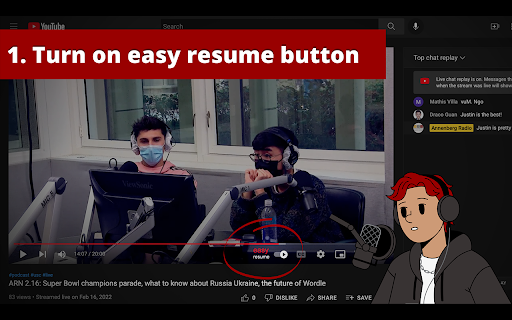


An extension that provides auto-resume functionality and an easy to access watchlist for YouTube Have you ever tried to finish a YouTube video you started watching earlier, but couldn't find it? Maybe it's a show you love, but all the episodes look the same. Or you can't find exactly where you left off. YouTube's built-in history feature... leaves much to be desired. The YouTube Easy Resume extension provides an easy-to-access watch history list through a simple interface. Once you install the extension, **pin it in your toolbar** and you'll be able to open a dropdown to see YouTube videos you didn't finish, jump right back to where you were watching, and access the content you want. When you resume a video it will start playing right where you left off. You can also tweak the settings to change what videos show up in the extension. Do you want it to only include videos that are longer than 5 minutes? Or to only list videos you've watched for more than two minutes? Easy peasy. All your video history is stored locally, no one else has access to what you watch. Besides, we would never judge you for watching four-hour-long action figure unboxing videos. You do you. This extension was made by the web team in the Annenberg Media newsroom to make watching YouTube a better experience. It's a labor of love, something we wanted to use ourselves, and wanted to share with the world. Digital Development Lead: Gautam Rajan Graphics: B Digital production supervisor: Graham Clark

YouTube Auto-Resume
This extension automatically resumes YouTube videos from where you last played them. This extension allows you to automatically resume YouTube videos from where you left off.

Bookmarker for YouTube™
Maximize your YouTube viewing experience with Bookmarker for YouTube™. Save, organize and pick up where you left off. With the YouTube Bookmarker & Resumer, you can easily bookmark your favorite videos and resume watching from where you left off, without having to search for the video again. This extension comes with a host of features to enhance your YouTube viewing experience, including adding notes to bookmarks and searching previously added bookmarks. Whether you're a casual YouTube viewer or a dedicated content creator, it is the perfect tool to help you stay organized and never miss a moment of your favorite videos. 1.Bookmarking: Store and sort as many videos as wanted to be reviewed at later time. 2. Resuming: Pick up where you left off with progress tracking across sessions. 3. Organized Video Bookmarking: Organize bookmarked videos into folder or tag of choice. 4. Export Bookmarked Videos: Export or retrieve your List of videos that you bookmarked. 5. Timestamped Shareable Links: Add and post clickable links that will only start at the given time. 6. Cross-Device Sync: The other feature is that you can easily sync bookmarks and settings into multiple devices that you own. 7. Add Notes: Add notes to bookmarks to quickly remember the material. ◉ Install the extension ◉Once installed, navigate and open the video you want to save. ◉Wait for the video to start playing, and then click on the Bookmark icon adjacent to the volume control option ◉ Click the "Bookmark icon" to add the bookmark to your list. ◉To access your saved bookmarks, click the extension icon and select the bookmarks you want from the menu. ◉You can add notes to saved bookmarks or delete them with one click ◉ To resume watching a video from where you left off, go to your bookmarks list and click on the time stamp. Disclaimer: It's important to note that the YouTube Bookmarker browser extension is not associated with YouTube or its parent company, Google. It is an independent third-party tool that provides a bookmarking feature for YouTube videos.

video resumer
This extension automatically resumes the video you were watching when you last closed the tab. I made this extension because https://addons.mozilla.org/en-US/firefox/addon/video-resumer does not work on Android. (It is marked as "Compatible with Firefox for Android", but it does not actually resume videos on YouTube.com on Android. This extension /does/ work on YouTube.com and Android.)

Youtube Timestamp Saver
It helps you save timestamps in Youtube videos Are you tired of losing track of those golden moments while watching YouTube videos? My YouTube Timestamp Bookmark Extension is here to make your video-watching experience smarter and more efficient. ★ The Problem: We've all been there – watching multiple videos, absorbing valuable insights, and suddenly realizing we've stumbled upon a gem of information. The only hitch? We can't recall where it was in the video. Cue the frustrating hunt through endless playback. ★ The Solution: Introducing my YouTube Timestamp Bookmark Extension – your shortcut to hassle-free video bookmarking. Say goodbye to endless scrolling and searching. With a simple click on the "Bookmark Icon" button within the YouTube player, you can instantly mark that crucial moment. ★ Key Features: - Sync with Google Account: Seamlessly integrate your bookmarks with your Google account, ensuring accessibility across devices and platforms. - Effortless Search: Easily locate specific bookmarks across all your bookmark videos with an intuitive search function. - Customization: Personalize your bookmarks by giving them custom names. No more generic timestamps – now you'll know exactly what each bookmark represents. or you can omit ★ What Sets Me Apart: My commitment to continuous improvement means that I'm open to your feedback and suggestions. Your support fuels my development, and I'm dedicated to enhancing your YouTube experience. ★ Stay Tuned: As interest in my extension grows, I have exciting plans for additional features. Your valuable feedback will help shape the future of this tool, so join me on this journey. Don't let those enlightening YouTube moments slip through the cracks. Try my YouTube Timestamp Bookmark Extension today and unlock a more organized, efficient way to revisit your favorite video insights. Disclaimer: I didn't own any icons used in this extension, I used lordicon for this.
