
ipdedoclomgliinjpbneckgichmeljgk


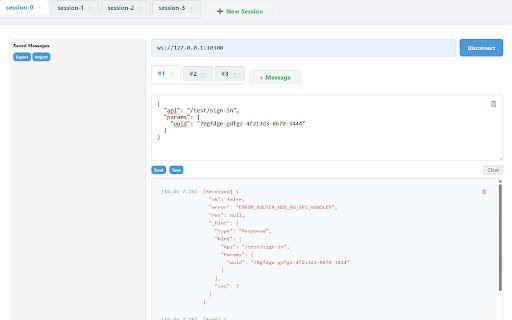
A developer tool to test WebSocket messages with saved message presets. WebSocket Kong is a web-based tool designed for efficient and reliable real-time WebSocket testing and development. It provides robust features including the ability to manage multiple WebSocket sessions, send, save, and copy JSON messages, edit messages across multiple tabs, and monitor activity through a structured split-pane log interface. Additionally, users can export saved JSON messages to a file for backup or sharing purposes, and import them at any time to restore previously stored data. A convenient Clear button is also provided to instantly clean the log message panel for better readability during debugging or testing. - Special thanks to ‘ Yunsu Jang‘

PieSocket - WebSocket & SocketIO Test Client
Test Websocket & SocketIO connections with ease, supports both secure (wss) and unsecure (ws) protocols. Test, debug, and monitor WebSocket connections directly from your browser — no external tools or servers needed. Whether you're building real-time chat apps, live dashboards, trading platforms, or multiplayer games, PieSocket WebSocket Tester gives you everything you need to inspect WebSocket traffic with speed and precision. Supports ws:// and wss:// Full support for both secure (wss) and unsecured (ws) WebSocket protocols. Works with any WebSocket server. Auto-Reconnect Configure automatic reconnection with custom retry limits and intervals — simulate real-world client behavior effortlessly. Heartbeat / Ping Support Keep connections alive with configurable heartbeat messages sent on a timer. Perfect for testing keep-alive logic on your server. JSON Pretty-Print Received messages are automatically parsed and formatted for readability. Toggle between raw and pretty-printed views. Log Filtering & Search Filter logs by type (sent, received, error, info) and search across all messages in real time. Export Logs Download full session logs as a timestamped .log file for sharing with teammates or filing bug reports. Live Connection Stats Track bytes sent, bytes received, message count, and connection duration — all updated live. Dark Mode Easy on the eyes during long debugging sessions. Perfect for:

Advanced WebSocket Client
Construct custom Web Socket requests and handle responses to directly test your Web Socket services. Advanced WebSocket Client is a Google Chrome extension designed to help construct custom WebSocket requests and handle responses for directly testing your WebSocket services. It supports the JSON request/response format, and its main feature is that you don't have to strictly follow RFC formatting rules. You can use single quotes, double quotes, or no quotes for string keys and values, as well as trailing commas in object literals. Additionally, it supports both single-line and block comments, just like in JavaScript.

Simple WebSocket Client
Construct custom Web Socket requests and handle responses to directly test your Web Socket services. Simple WebSocket Client is an extension for Google Chrome to help construct custom Web Socket requests and handle responses to directly test your Web Socket services.

Quick WebSocket Client with Socket.IO
Construct custom Web Socket requests and handle responses to directly test your Web Socket services,Includes Socket.IO support. v0.0.2.1 Release for Socket.IO support. - 🔌 Easy WebSocket Connection Management - Quick connect/disconnect with WebSocket endpoints - Connection status monitoring - Detailed connection state logging - 🔌 Support Socket.IO Connection - Quick connect/disconnect with Socket.IO endpoints - Support for both event subscription - Support event and message - 📝 Advanced Message Handling - Support for both text and binary messages - Built-in JSON formatting and validation - Message history with timestamp and direction - Save frequently used messages for quick access - 💾 Persistent Storage - Auto-save connection history - Save favorite messages for reuse - Quick access to recent connections - 🎨 Modern User Interface - Clean and intuitive design - Real-time message updates - Compact message display - Dark/Light theme support ## Perfect for - Web developers testing WebSocket APIs - Backend developers debugging WebSocket services - QA engineers validating WebSocket implementations - Anyone working with WebSocket-based applications 1. Enter your WebSocket URL (e.g., ws://localhost:8080) 2. Click "Connect" to establish connection 3. Send text or binary messages 4. View real-time responses 5. Save frequently used messages for quick access 6. Monitor connection status and history - Built with React and TypeScript - Uses native WebSocket API - Supports all modern browsers - Zero external dependencies for core functionality - Secure local storage for saved data Perfect for developers who need a reliable, feature-rich WebSocket testing tool right in their browser.
