
gobngblklhkgmjhbpbdlkglbhhlafjnh
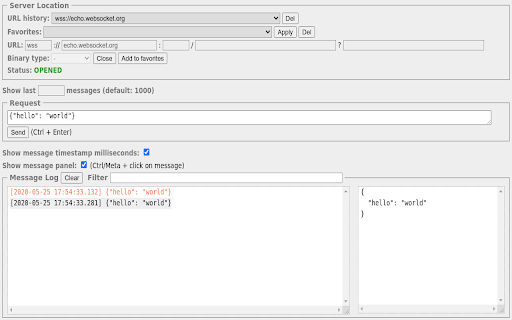
Construct custom Web Socket requests and handle responses to directly test your Web Socket services. Simple WebSocket Client is an extension for Google Chrome to help construct custom Web Socket requests and handle responses to directly test your Web Socket services.

STOMP WebSocket Client
Web client for interacting with WebSocket servers using the STOMP protocol (Simple Text Oriented Messaging Protocol) STOMP WebSocket Client Web client for interacting with WebSocket servers using the STOMP protocol. - Basic Features ✅ STOMP WebSocket connection to any server ✅ Topic subscription ✅ Message sending to destinations ✅ Display of received messages with JSON formatting 🔄 Automatic reconnection with backoff: - Reconnection attempts with progressive delay - Configuration of maximum number of attempts 📊 Message History: - Message storage in localStorage - Filtering by topic and search - Export messages in JSON format

PieSocket - WebSocket & SocketIO Test Client
Test Websocket & SocketIO connections with ease, supports both secure (wss) and unsecure (ws) protocols. Test, debug, and monitor WebSocket connections directly from your browser — no external tools or servers needed. Whether you're building real-time chat apps, live dashboards, trading platforms, or multiplayer games, PieSocket WebSocket Tester gives you everything you need to inspect WebSocket traffic with speed and precision. Supports ws:// and wss:// Full support for both secure (wss) and unsecured (ws) WebSocket protocols. Works with any WebSocket server. Auto-Reconnect Configure automatic reconnection with custom retry limits and intervals — simulate real-world client behavior effortlessly. Heartbeat / Ping Support Keep connections alive with configurable heartbeat messages sent on a timer. Perfect for testing keep-alive logic on your server. JSON Pretty-Print Received messages are automatically parsed and formatted for readability. Toggle between raw and pretty-printed views. Log Filtering & Search Filter logs by type (sent, received, error, info) and search across all messages in real time. Export Logs Download full session logs as a timestamped .log file for sharing with teammates or filing bug reports. Live Connection Stats Track bytes sent, bytes received, message count, and connection duration — all updated live. Dark Mode Easy on the eyes during long debugging sessions. Perfect for:

EODHD Ticker Prices Stock Crypto Market FOREX
Extension provides data via WebSockets on US exchanges, FOREX and cryptocurrencies EODHD Real-Time Stocks Prices Data Bar and Crypto Currency Convertor Chrome Extension With our extension you'll be able to track Real-Time prices for: Stocks Forex Pairs Cryptocurrencies To get full coverage of 150,000+ tickers | 20000+ ETFs | 600+ indices | 1100+ forex pairs | 120+ CRYPTO pairs, in just a few clicks from 70+ Exchanges all around the world, you should subscribe to the EOD Historical Data service and get your personal API key. ➡️ https://eodhd.com Explore the full documentation to learn more about all available symbols, exchanges, and API methods. ➡️ https://eodhd.com/financial-apis Steps To Install The Extension: 1. Click the extension icon in the browser toolbar. 2. After installation, choose the newly added extension. 3. In the extension window, click the gear icon. 4. Select "Settings" to customize your preferences. Easy Navigation: If you don’t have an EODHD account, click the “register” link on the page to access the respective website. Complete your registration on the site and return back. Enter your API key in the field or use the provided DEMO key. Setting Up Displayed Tickers: Access extension settings by clicking the gear icon in the extension window. In the "Ticker List" section, choose tickers for the auxiliary window. Save your selections by clicking "Save". Personalize with Colors: Customize Colors: Choose a color scheme for a unique look. Easy Process: Access settings, pick preferred colors. Showcase Your Style: Create an extension that reflects your personality and individuality. Custom Widget and Currency Choice: Interactive Display: Access crucial data through a personalized widget on your desktop. Currency Customization: Choose your preferred currency for the widget display, ensuring instant access to the latest information. Real-Time Updates: The widget will auto-refresh, delivering up-to-the-minute exchange rates and essential data. Finalizing Setup and Saving: Save Your Preferences: After making your selections, ensure to save by clicking the "Save" icon. Ready to Go: Now you can enjoy the extension with your customized settings all set.

Socket.IO Test Client
Socket.IO dev tool for developers to test Socket.IO based APIs. Main features: 1. Request history 2. Logs 3. Listeners 4. Pass custom headers
