
enmpedlkjjjnhoehlkkghdjiloebecpn
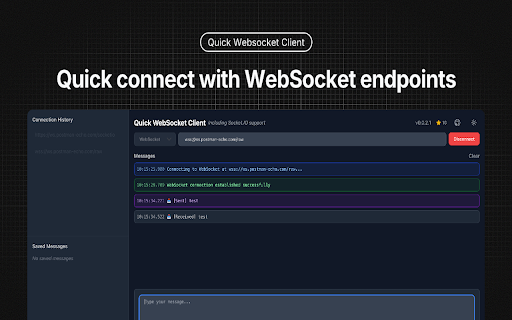


Construct custom Web Socket requests and handle responses to directly test your Web Socket services,Includes Socket.IO support. v0.0.2.1 Release for Socket.IO support. - 🔌 Easy WebSocket Connection Management - Quick connect/disconnect with WebSocket endpoints - Connection status monitoring - Detailed connection state logging - 🔌 Support Socket.IO Connection - Quick connect/disconnect with Socket.IO endpoints - Support for both event subscription - Support event and message - 📝 Advanced Message Handling - Support for both text and binary messages - Built-in JSON formatting and validation - Message history with timestamp and direction - Save frequently used messages for quick access - 💾 Persistent Storage - Auto-save connection history - Save favorite messages for reuse - Quick access to recent connections - 🎨 Modern User Interface - Clean and intuitive design - Real-time message updates - Compact message display - Dark/Light theme support ## Perfect for - Web developers testing WebSocket APIs - Backend developers debugging WebSocket services - QA engineers validating WebSocket implementations - Anyone working with WebSocket-based applications 1. Enter your WebSocket URL (e.g., ws://localhost:8080) 2. Click "Connect" to establish connection 3. Send text or binary messages 4. View real-time responses 5. Save frequently used messages for quick access 6. Monitor connection status and history - Built with React and TypeScript - Uses native WebSocket API - Supports all modern browsers - Zero external dependencies for core functionality - Secure local storage for saved data Perfect for developers who need a reliable, feature-rich WebSocket testing tool right in their browser.

Simple WebSocket Client
Construct custom Web Socket requests and handle responses to directly test your Web Socket services. Simple WebSocket Client is an extension for Google Chrome to help construct custom Web Socket requests and handle responses to directly test your Web Socket services.

WebSocket Proxy
Monitor, log, and modify WebSocket messages in real-time with a powerful proxy and testing tool. WebSocket Proxy is an essential tool for developers, QA specialists, and security professionals. It allows you to easily intercept, inspect, and manipulate WebSocket traffic, making it perfect for testing and debugging WebSocket connections in real time. Key Features: - Real-Time Traffic Interception: Monitor WebSocket messages as they flow between the client and server. - On-the-Fly Data Manipulation: Modify WebSocket messages before they are sent or received. - Comprehensive Logging: Keep detailed logs of all WebSocket messages for easy troubleshooting and debugging. Last changes: - The icon on the toolbar indicates that the connection is available - Bug fix How to Use 1. Open DevTools: Go to the WebSocket Proxy tab. 2. View Messages: See all WebSocket messages if a connection exists. 3. Modify with JavaScript: Edit the message variable as needed. 4. Apply Changes: Click Run to apply your code before sending messages. Who Is It For? 🧑💻 Developers: Quickly debug and optimize WebSocket interactions in your applications. 💪 QA Engineers: Ensure WebSocket communications are functioning correctly by testing edge cases and performance. 😎 Pentesters: Intercept and analyze WebSocket traffic to identify vulnerabilities and ensure security.

WebSocket Kong Client
A developer tool to test WebSocket messages with saved message presets. WebSocket Kong is a web-based tool designed for efficient and reliable real-time WebSocket testing and development. It provides robust features including the ability to manage multiple WebSocket sessions, send, save, and copy JSON messages, edit messages across multiple tabs, and monitor activity through a structured split-pane log interface. Additionally, users can export saved JSON messages to a file for backup or sharing purposes, and import them at any time to restore previously stored data. A convenient Clear button is also provided to instantly clean the log message panel for better readability during debugging or testing. - Special thanks to ‘ Yunsu Jang‘

Simple WebSocket Client
Construct custom Web Socket requests and handle responses to directly test your Web Socket services. Construct custom Web Socket requests and handle responses to directly test your Web Socket services.
