
ipapgphigaobpigfgkdiiceadnphankg
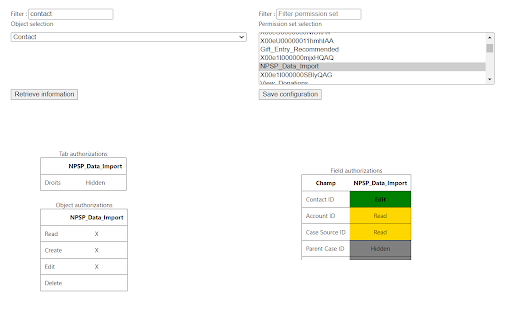
Control your Permission set object security Productivity tool for Salesforce administrators to inspect and manage permission sets. With the move from profiles to permission sets in the Spring'26 release, this extension is a must for Salesforce administrators. With this extension, you'll be able to choose objects and set permissions, then set permissions: at the tab, object (read, create, edit, delete) and field level. The extension will also allow you to deploy these permissions to another organization you are connected to.

Salesforce Permission Set Manager
🔍 Salesforce Permission Set Manager A productivity-boosting Chrome extension for Salesforce Admins and Developers. This tool makes it easy to view and update field-level security (FLS) in permission sets—no more hours spent clicking through Setup! 🔑Key Features 🔎 Instant Field Access Visibility ✅ View all field permissions (Read/Edit) granted by a permission set in one consolidated view ⏰ No more digging through multiple Setup menus—get immediate visibility into who can access what 🛠️ Bulk Edit Mode 🛠️ Modify field permissions (Read/Edit) across multiple permission set simultaneously 🛠️ Apply changes to standard and custom fields with a single click 🔎 Smart Filtering & Search ⚡Supports Lightning Experience only. 🤔Why Use This Extension? 👍Save 70%+ time on permission set and FLS management 👍Reduce errors and ensure correct access is granted 👍Improve governance with full visibility into field permissions 👍Simplify deployments by verifying permission changes instantly

Salesforce Tool Suite
Enhance your Salesforce productivity with our comprehensive toolkit tailored for administrators, developers, architects, and consultants. This all-in-one solution enables you to compare profiles and permission sets, manage debug logs, and explore schemas seamlessly on your device. Your data remains secure, stored exclusively on your local machine. 1. Reports - Profile and Permission Set Comparison: Analyze and compare profiles and permission sets across different Salesforce organizations. - Metadata Export: Export critical components such as classes, triggers, process builders, flows, validation rules, Visualforce pages, and workflow rules to Excel for streamlined analysis. - Super User Report: Quickly identify potential security vulnerabilities in your Salesforce org by auditing privileged users. - Approval Process Details: Access and export approval process configurations effortlessly. 2. Debug Logs - Hierarchical Log Viewer: Delve into Salesforce's core with an organized log viewer. - Tail Logs: Monitor real-time logs without additional installations or configurations. - Trace Flags and Debug Levels Management: Efficiently manage trace flags and debug levels. - User-Specific Debugging: Instantly debug errors reported by specific Salesforce users. 3. Schema Explorer - Schema Navigation: Navigate Salesforce schemas without memorizing fields or relationships. - SOQL Query Builder: Construct complex SOQL queries with ease. - Data Management: Sort, filter, edit records in batches or inline, and export data to Excel. 4. Event Monitoring - Comprehensive Event Logs: Monitor and download logs for over 50 critical Salesforce events. - Exclusive API Access: Leverage features not available in standard Salesforce setup. 5. Salesforce Tools - Apex Testing: Execute test suites and obtain code coverage metrics. - Bulk Management: Efficiently manage validation rules, workflow rules, fields, and objects in bulk. - Object Limits Monitoring: Stay informed about Salesforce object limits. - Bulk Operations: Create or delete multiple fields or objects simultaneously. - Report and Dashboard Management: Clone, delete, and manage reports, dashboards, flows, and record types in bulk.

Salesforce Profile Reader
*This extension is still in beta version. Functions may be added or deleted, or the screen design may be changed significantly. Lists various permissions for each Salesforce profile/permission set. [How To Use] When you open Salesforce, the icon for this extension will be enabled. If you click the icon, the extension screen will open in another tab. The user must have API access authority. A Salesforce session must exist at the time the extension is opened. [Main Functions] The following can be retrieved for each profile/permission set, listed, and compared on the screen: - System Permissions - Object Permissions - Field-Level Security - Page Layout Assignment (profile only) - Apex Class Access - Visualforce Page Access - Tab Settings - App Settings - Login Restriction (profile only) - Permission Set Group (permission set only) - Prmission Set Assignment (permission set only) [SUb Functions] - Profile Filtering - Excel/CSV Export - Sortable Column - User List of the Profile/Permission Set You can also see how permissions are summarized by permission set group or by user. For Permission Set Group Summary, the Permission Set Group (blue underline) is displayed in the leftmost fixed column and the Mute Permission Set (red underline) is displayed in the last column. For User Summary, Summary (green underline) is shown in the leftmost fixed column and Profile (light blue underline) is shown right next to it. Permission set groups are underlined in blue. The user's permission summary is calculated internally, so please report any errors. *This extension does not have an update function. However, it is safe to use in a production environment. [Note] Each function makes multiple API requests for each information retrieve/reload (varies depending on the number of profiles and target functions). Please pay attention to the API usage limit. For organizations with a large number of profiles and permission management targets, it may take time to retrieve information. Please let me know of any bug reports or requests in the evaluation comments for the time being. [Limitations] If the number of profiles is up to about 100 and the number of objects is up to about 400, it will take some time, but results can be retrieved. It is unknown whether it can be acquired in a higher environment. "Permission set assignment" is not likely to work for large organizations that use Experience Cloud. [Updates] 2024/03 Simple display of connection status is now available and slightly improved error handling in ver. 0.8.2 2024/03 Added support for permission sets in ver.0.8.0

Salesforce Permission Comparator
Helps to compare the permission between any user, profile, permission set or permission set group. Salesforce Permission Comparator Chrome Extension is designed to streamline to compare the salesforce permissions.This extension offers a comprehensive suite to compare the permissions among the users, profiles, permission sets and permission set groups. With intuitive functionalities and seamless integration into your Salesforce workflow, this extension empowers developers to compare the Object level Permissions, User permissions, Setup entity permissions such as Apex class, Apps, Connected Apps, Visualforce Page etc. In this document, we'll provide a concise overview of the extension's key features. Here you can select any user, profile, permission set and permission set group of at most 3. For example you can also selected 1-user, 1-profile, 1-permission set. Means that any combination as per your use case. 1. Search:- Here you can search any user, profile, permission set and permission set group. 2. User Tab:- It contains the list of user with classified active and inactive users. 3. Profile Tab:- It contains the list of all standard and custom profiles. 4. PermissionSet Tab:- It contains the list of permission sets. 5. PermissionSetGroup Tab:- It contains the list of Permission Set Groups. Here you can see the permissions for selected user, profile, permission set and permission set group. The checked checkbox denoted as access and its vice-versa for unchecked checkbox. This section basically classified into below three sections. 1. Object Permission:- It shows you all standard and custom object permissions showing as Read, Edit, Created, Delete, ViewAllRecords and ModifyAllRecords. 2. User Permissions: Basically It shows all the user-level permission such as general user permission etc. 3. Setup Entity Permissions:- It shows you setup entity user permission. Basically we show you below four permissions which are- 1. Apex Class 2. Apps 3. Connected App 4. Visualforce Page. Note: To perform all the activity mentioned above, tool will be used to access the active session id from browser for respective salesforce org.
