
iolfinldndiiobhednboghogkiopppid
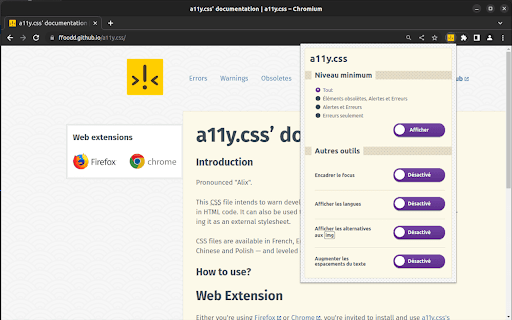


a11y.css provides warnings about possible risks and mistakes that exist in HTML. First a11y.css was a bookmarklet inserting a stylesheet into the page. This CSS file intends to warn developers about possible risks and mistakes that exist in HTML code. It can also be used to roughly evaluate a site's quality by simply including it as an external stylesheet. This extension does the same, plus adds some tools: — Outline focus (keyboard navigation) — Show languages used (relies on lang attributes) —Check alt and title attributes on images You can submit your bugs on github. Original bookmarklet code: Gaël Poupard Extension code: Stéphane Deschamps Thanks to Anthony Ricaud and Mathieu Pillard for their help!

Assistant RGAA
Extension de navigateur permettant d'auditer des pages web en suivant le référentiel RGAA. L'extension propose la liste complète des critères et tests des référentiels RGAA 3.0 2016 & 2017 ainsi que des référentiels 4.0 & 4.1, le référentiel général d'accessibilité pour les administrations de l'État français. Ce référentiel est une adaptation opérationnelle des règles internationales d'accessibilité (WCAG 2.0 pour le RGAA 3 et WCAG 2.1 pour le RGAA 4). Pour chaque test du RGAA, l'extension présente : * une liste d'instructions permettant de conclure sur le statut conforme ou non d'un test * la liste des modifications appliquées à la page par la fonctionnalité de test de l'assistant. L'extension dispose d'une page d'aide expliquant plus en détail sa construction et son fonctionnement. L'extension peut être positionnée à différents endroits du navigateur (à droite, à gauche, en bas) ou ouverte dans une fenêtre séparée.

A11y quick check
A11y Quick Check is a testing tool that exposes accessibility issues to provide a high level check to help meet WCAG and coding best practices. Every effort has been made to ensure the checks accurately identify both invalid code practices and failures in meeting the WCAG Guidelines. However, some false positive reporting may occur. False positives and reported bugs are fixed when identified. Version: 2501.2025.6.1 View the 'About A11y Quick Check' link at the foot of the extension for the changes log.

ARIA DevTools
Easily spot missing ARIA labels, misused ARIA roles, and incomplete keyboard support in your web applications. Creating accessible web applications is difficult. It gets even harder if you don't understand how people with disabilities use computers. With ARIA DevTools you see your website the way screen readers present it to the blind users. All page elements are presented according to their explicit or implied ARIA roles. This includes headings, images, tables and form items beyond others. It's now easy to spot missing ARIA labels, misused ARIA roles, and incomplete keyboard support. This makes testing and development of accessible websites easier.

Accessibility Insights for Web
Accessibility Insights for Web helps developers quickly find and fix accessibility issues. The default keyboard shortcut to launch Accessibility Insights for Web is [Ctrl+Shift+K]. If that doesn't work, follow these instructions: 1. Select Shift+Alt+T to move focus to the Chrome address bar 2. Select the Left arrow key to move focus to the Accessibility Insights for Web extension. 3. Select the Space key to open the extension.
