
dneemiigcbbgbdjlcdjjnianlikimpck
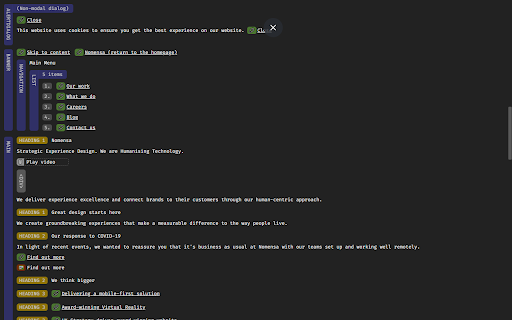
Easily spot missing ARIA labels, misused ARIA roles, and incomplete keyboard support in your web applications. Creating accessible web applications is difficult. It gets even harder if you don't understand how people with disabilities use computers. With ARIA DevTools you see your website the way screen readers present it to the blind users. All page elements are presented according to their explicit or implied ARIA roles. This includes headings, images, tables and form items beyond others. It's now easy to spot missing ARIA labels, misused ARIA roles, and incomplete keyboard support. This makes testing and development of accessible websites easier.

DigitalA11Y Tublets
DigitalA11y Tublets aid developers, testers, and designers in viewing accessibility information on web pages. Introducing DigitalA11Y Tublets, your go-to companion for swiftly identifying accessibility flaws in code semantics. Whether you're a developer, accessibility expert, or any professional in the accessibility sphere, this extension is tailor-made for you! What sets DigitalA11Y Tublets apart? It empowers you to: 1.Illuminate semantic structures like tables, landmarks, headings, and lists. 2.Pinpoint form fields and relevant defects. 3.Highlight images with or without alt text, aiding in evaluating the meaningfulness of alt text values. 4.Spotlight CSS background images, enabling you to assess the necessity for text alternatives. 5.Assist in conducting keyboard testing with focus highlights. 6.Highlight anchor tags lacking href attributes. 7.Identify elements utilizing the tabindex attribute. 8.Recognize elements employing the HTML title attribute. 9.Facilitate testing for WCAG 2.1 SC 1.3.5 Autocomplete, ensuring proper autocomplete attributes in form fields. 10.Aid in testing WCAG 2.2 SC 2.5.8 Target Size (Minimum). 11.Support testing for WCAG 2.1 SC 1.4.12: Text Spacing. 12.Simplify evaluating the focus order of web pages with intuitive ease. 13.Identify the language of the page and its segments. What more does it offer? It's absolutely free! This tool is a time-saver during manual accessibility audits. For novices and non-screen reader a11y testers, it's the ideal starting point! Remember, DigitalA11Y Tublets is here to streamline your accessibility analysis process, making it efficient and accessible for all.

taba11y - Tab order accessibility testing
Visualise tab order with ease taba11y calculates the tab order of all elements and displays it visually, either by drawing a path or by highlighting the elements. It has many options to suit every situation. Tab order is important for a wide range of users, from keyboard-only to screenreader users. By ensuring that the tab order is logical, you can provide a great user experience for as many people as possible.

HeadingsMap
To show, browse and audit (for accessibility and SEO) the headings structure The extension generates a document map or index of any web document structured with headings, allowing direct access to content by clicking on any of its items. It now also displays the Landmarks analysis. Although the extension was initially meant to assist web developers, consultants, and accessibility auditors, it turned to be useful for many users, facilitating the reading and navigation in long structured pages Features: * Lists headings with optional information about their levels and any breaks in the correct hierarchical structure. * Lists sections with header information, including optional details about structural errors. * Lists the landmarks and can identify details about them, and optionally details about structural errors. * Provides information from the main document and documents within frames, featuring a document selector when multiple documents are present. * Clicking on headers scrolls the document to the corresponding position and highlights it. * Detects changes in the DOM and updates content as necessary, with an option for manual refresh. * Allows collapsing of the header list by levels. * CSS outline for identifying headers or sections when clicking the tree. * Does not display hidden headers or sections (hidden from assistive technologies). * If a header or section is an anchor, the link in the results points to it. This is useful for copying directly from the tree using the browser's contextual menu. Optionally, it shows anchor-links that copy the link to the clipboard when clicked. * Two themes available.

Accessibility Insights for Web
Accessibility Insights for Web helps developers quickly find and fix accessibility issues. The default keyboard shortcut to launch Accessibility Insights for Web is [Ctrl+Shift+K]. If that doesn't work, follow these instructions: 1. Select Shift+Alt+T to move focus to the Chrome address bar 2. Select the Left arrow key to move focus to the Accessibility Insights for Web extension. 3. Select the Space key to open the extension.
