
inimkjdmamffckpngolbncgkiidfgkgi
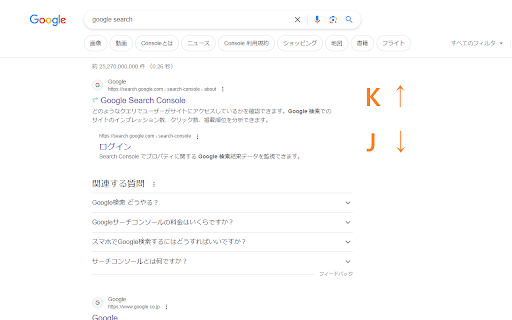
vim-like keyboard shortcuts for search page Add Vim-like keyboard shortcuts for search page in Google. ## Kyes Select next link Select previous link Go to next page Go to previous page Open link Open link in new tab Open link in new window Focus on search bar You can also set keybindings with Ctrl key combinations. Please open settings by clicking extension icon.

Google Scholar Button
Lookup scholarly articles as you browse the web. This extension adds a browser button for easy access to Google Scholar from any web page. Click the Scholar button to: - Find full text on the web or in your university library. Select the title of the paper on the page you're reading, and click the Scholar button to find it. - Transfer your query from web search to Scholar. Press the Scholar button to see top three results; click "full screen" at the bottom of the popup to see them all. - Format references in widely used citation styles. Press the quote button below the result to see a formatted reference and copy it into the paper you're writing. - Save the article to your Scholar library, so you can read it or cite it later. Press the blue star below the result to save it, or the gray star at the bottom to see all saved articles. Library links work best when you're on campus. To configure them for off-campus use, visit Google Scholar Settings at https://scholar.google.com/scholar_settings (you may need to login with your library password or to set up your browser to use a library proxy; please visit your library's website or ask a local librarian for assistance). To search the US case law, click the gear icon at the bottom of the popup, and configure your preferred collection in Google Scholar Settings. By installing this extension, you agree to the Google Terms of Service and Privacy Policy at https://www.google.com/intl/en/policies/.

Google search results shortcuts
Keyboard shortcuts for google search results J/K(Down/Up): Navigate links H/L(Left/Right): Navigate page /: Focus input field G + [A/I/V/M/N]: [All/Image/Videos/Maps/News] G + shift-V: verbatim search

SheetKeys
SheetKeys adds powerful keyboard shortcuts to Google Sheets, in the spirit of the Vim text editor. If you are a project manager, programmer, finance person, or just someone who uses spreadsheets a lot, this can greatly increase your efficiency in Google Sheets. After installing, you can see and customize all of the keyboard mappings by typing "?" while on a Google Sheets page. Here is a partial list of shortcuts, and their default key assignments: Scroll half page down Scroll half page up g,g Scroll to the top of the sheet G Scroll to the bottom of the sheet i Edit cell a Append to cell (edit but, starting at the end) u Undo Redo o Insert a row below the cursor and edit it O Insert a row above the cursor and edit it s Insert a row below the cursor S Insert a row above the cursor d,d Delete the current row (or selected rows/columns) x Delete cell contents y,y Copy the current row (or selected rows/columns) y,c Copy cells p Paste ;,a,l Align left ;,a,c Align center ;,a,r Align right ;,w,w Wrap cell ;,w,w Overflow the cell ;,w,c Clip the cell Other: ? Show the help dialog ;,w,f Toggle full screen ;o Open URL in cell in a new tab

My Web Shortcuts
Click buttons in websites with keyboard shortcuts to navigate faster Introducing My Web Shortcuts 🌏💻by browsergadgets.io — Navigate the web ! A useful extension that lets you create your own keyboard shortcuts to click on stuff in websites. No more endless clicking around; now you can do that using simple keyboard strokes. 😉 You can set up shortcuts for your most used elements, making browsing faster and way more convenient. Skip the hassle, forget hunting for elements and jump straight to what you need with just a tap of a key. ⚡ Get ready to take control of your browsing with My Web Shortcuts—it's all about making your online journey smoother and simpler. 🌾🎐 Join our Discord for Live Support and more: https://browsergadgets.io/discord
