
infelliamaojdnajfcebdpigbjkbndod
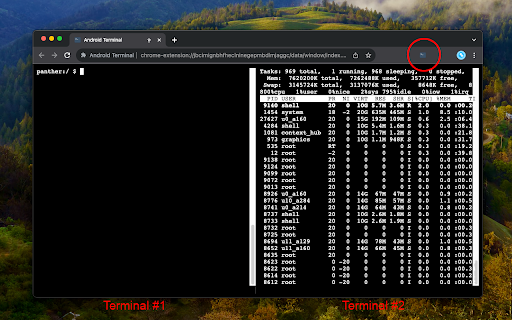
Access your USB-connected Android terminal without installing ADB This extension establishes an ADB-compatible connection with your Android device, eliminating the need for any native applications to be installed. It's designed to operate across various desktop environments, whether you're on Windows, Linux, macOS, or Chrome OS. Remarkably, the extension is written entirely in JavaScript, making it free from any native executables. Here are some of the key functionalities offered by this extension: 1. Multiple Terminal Windows: Easily open multiple terminal views to connect with your Android device, facilitating efficient debugging and interaction. 2. File Transfer: Streamline sending and receiving files between your desktop computer and the Android device. 3. Screenshot Capture: Capture screenshots of the current screen view on your Android device and store them on your desktop computer. 4. Application Backup: Perform comprehensive backups of your Android device, including all or select installed applications and their associated data. 5. Debugging with "logcat": Use the "logcat" command to debug your Android device directly from your desktop, enhancing your development capabilities. This extension serves as a compelling alternative to traditional native ADB (Android Debug Bridge) applications, offering a more accessible and platform-agnostic solution. If you already have the native ADB installed and want to explore this extension, ensure there are no ongoing communications with the ADB server by executing the "adb -kill-server" command. Then, refer to the instructions on the extension's homepage to get started seamlessly.

Browser terminal
Extension that allows you to open a native shell in the browser The extension wont work on its own, complete the installation at https://github.com/ayes-web/browser_terminal/blob/main/installation.md

Chrome Terminal
A command line interface for chrome. *Important Note*: For a listing of possible commands, type HELP. For information about a specific command, type HELP . A "terminal" for chrome which implements common chrome tasks as command line functions. For a more user-friendly bookmark opening experience, check out SMP Bookmark Opener: https://chromewebstore.google.com/detail/smp-bookmark-opener/fkmeadklbnpemgmonhnlbadgpcpflibd - tab - open a new tab or bookmark - tab new - tab new google.com - tab open Google - close an open tab - tab close Google - tab close -i 1652151025 - view info about open tabs - tab ls - tab info Google - tab info -i 1652151025 - select a tab - tab activate Google - tab activate -i 1652151025 - tabgroup - add ungrouped tabs to new or existing group - tabgroup new Google - view open tab groups - tabgroup list - bookmark - save a new bookmark - bookmark new - bookmark new Google - bookmark new -rq Google - Remove query params before saving - bookmark new -i 1652151025 - Save new bookmark from tab ID - open a bookmark - bookmark open Google - view existing bookmarks in current folder - cd Bookmark bar/ - ls -al - delete a bookmark - rm Google - view details about a bookmark - bookmark info Google - bookmark info -i 65 - find - find a bookmark or open tab based on given search term using asterisk (*) as a wildcard - find Google/ *ke*p* - find -s *keep - find -i *keep - find -t keep - history - list recent history - history ls - history ls google - reopen - List recently closed tabs/windows - reopen ls - reopen ls google - Reopen recent tabs/windows - reopen - reopen -s (silent - does not activate the tab or remove from recent tab history) - reopen Google - reopen -i 1652151025 - google - open a google search in new tab - google search term

Android emulator MyAndroid
Run an android emulator and your Android games and apps you like more. This extension allows users to use an Android emulator and run any Android app or game directly on their Chrome browser. The Android emulator MyAndroid offers a wide range of features that enhance the Android app and gaming experience on Chrome. These features include: 1. Android Emulator: With this extension, users no longer need to switch between their Android device and PC to access their favorite apps or games. The integrated Android emulator provides a seamless experience on the Chrome browser, allowing users to enjoy their desired applications without any compatibility issues. 2. Quick Boot: Taking advantage of the top features in Android, the Android emulator MyAndroid includes a Quick Boot option. This feature enables lightning-fast start-up times, eliminating the tedious wait traditionally associated with launching an Android emulator. 3. Retain App State: Ensuring convenience and efficiency, the extension supports retaining the state of previously opened apps or games. Users can effortlessly switch between multiple applications without losing their progress or data. 4. Advanced Input and Controls: The Android emulator MyAndroid offers a range of input and control options, mimicking various aspects of touch screen devices. Users can easily interact with apps or games through the emulator using a mouse, keyboard, or joystick for a more immersive and enjoyable experience. 5. Multi-Platform Support: Our extension provides compatibility across different platforms, including Windows, Mac, and Linux, allowing users to access the emulator regardless of their operating system. To install and use the Android emulator MyAndroid, follow these simple steps: Step 1: Open your Google Chrome browser. Step 2: Navigate to the Chrome Web Store. Step 3: Search for “Android emulator MyAndroid" in the search bar. Step 4: Click on the extension and select "Add to Chrome". Step 5: Wait for the installation to complete, and then click on the extension icon in your browser toolbar. Step 6: The Android emulator will launch within the extension window, ready for you to run any desired app or game. The Android emulator MyAndroid opens up a new realm of possibilities for Android app and game enthusiasts. By providing an advanced Android emulator within the Chrome browser, users can seamlessly access and enjoy their favorite applications without the need for a separate Android device. With features such as Quick Boot, state retention, and multi-platform support, this extension guarantees a delightful and convenient user experience. • File Manager Integration for Android Files This extension allows users to automatically detect Android files, such as APK or APKX, while browsing the web and open them directly in the MyAndroid file manager to be run in the Android emulator MyAndroid.

Linux Commands - Basic Cheatsheet
Learn Linux commands with our cheatsheet. Find basic, file management, networking, and system commands. 🚀 Learn Linux commands effortlessly with this quick-reference cheatsheet. This Chrome extension provides easy access to essential Linux commands for file management, networking, and system administration. 1️⃣ 🖥️ Basic Linux Commands: Quickly find and master commonly used Linux commands. 2️⃣ 📂 File Management Commands: Manage your files and directories like a pro. 3️⃣ 🌐 Networking Commands: Troubleshoot and configure network settings easily. 4️⃣ 🛠️ System Commands: Monitor and manage processes and system resources. 5️⃣ 📅 Daily Linux Tips: Receive a new Linux tip every day to enhance your skills. 6️⃣ 🎯 Terminal Practice Mode: Simulate typing commands directly in the extension for practice. 🤔 Why Install This Extension? ✔️ 📜 Comprehensive Cheatsheet: Access a wide variety of Linux commands in one place. ✔️ 🔍 User-Friendly Interface: Search and filter commands by category effortlessly. ✔️ 🗓️ Daily Tips: Stay sharp with daily updates to improve your command-line expertise. ✔️ 🖱️ Practice Mode: Test and enhance your Linux knowledge in a simulated environment. 🔗 Install the Linux Commands extension today and take your Linux skills to the next level! 💻
