
imilbobhamcfahccagbncamhpnbkaenm
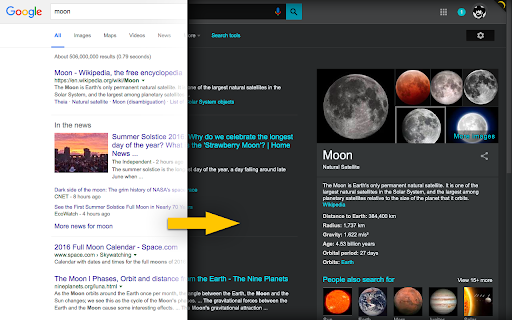

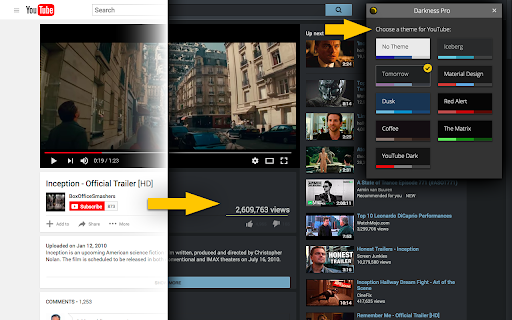
Darkness is discontinued and no longer works. You can remove it from your browser's Extensions page. As of July 2025, Chrome no longer supports the older extension system Darkness was built on. As a result, Darkness can no longer be used. To remove Darkness from your browser: 1. Go to chrome://extensions 2. Search for "Darkness" 3. Choose "Remove" Thank you for using Darkness over the years. About Darkness (historical): Darkness provided handcrafted dark color themes for popular websites, including Google, Facebook, YouTube, Gmail, and others.

Dark Theme for Facebook™
A schedulable and customizable dark theme for facebook.com and messenger.com This extension provides a native dark theme for both facebook.com and messenger.com. It applies the native coloring by altering the original colors to bring a dark appearance. This theme is customizable from the options page. Also, the user can inject custom CSS styles into these websites to improve the styling and make it more personalized. You can turn the dark theme on and off from the toolbar button (action button). Also, it is possible to set a schedule (e.g., night-time duration only) to automatically turn the extension on and off. Features: 1. Uses the original theme 2. Does not invert colors 3. Supports single-click on and off feature 4. Supports schedule on and off 5. Does not mess up the original theme 6. Supports user styling -- Note that this theme is only meant to improve Facebook usage and has nothing to do with Faebook.com. It is a free, open-source project.

Deluminate
Invert the luminance of a website to make it easier on the eyes. * Fix bug where everything breaks on the upgrade for some users with old settings. * Update to Manifest V3 as required by Google * Add cloud sync for settings * Introduce dark mode autodetection * Configure different inversion modes based on URL path * Fix flashing scrollbar issue * Many assorted tweaks to smart invert mode * Cosmetic updates Invert the brightness of the web without changing the colors! Useful as a night mode to darken most bright web sites (like Google), or just for making the web soothing black instead of glaring white. Similar to the "High Contrast" or "Hacker Vision" extensions, but tries not to ruin images by blowing out the contrast or changing the colors. Warning: because of the way this extension inverts the luminance of rendered pages, it may cause noticeable slowdowns for some users. If this happens, you may prefer another extension that uses custom CSS to set the default background and text color of web pages.

Ink for Google™
Get your favourite Google sites a new coat of paint. Update their look with Material Design Ink for Google allows to change the icons used on Google websites. You can choose between the modern gradient/glass set, use the old colorful google material 2 set, or go for the classic material design icons! In addition to the icons, Ink for Google improves the look of well-known Google websites like Search, Gmail and Calendar. It unifies them under the guidelines defined by the Material Design team at Google. Ink takes inspiration from the visual style of Android apps and their newest websites to create a better and consistent experience across all of these services. Ink currently works on most Google websites, even websites which already have material design. On those websites, it improves the design to better match the guidelines. This extension requires the permission to read and change your data on google.com sites to make the visual changes. See something that you think needs a visual tweak? Click the Ink icon to send us some feedback or to report a bug.

Lunar Reader: Dark Theme & Night Shift Mode
Dark theme and night shift mode for every website. Care your eyes, use Lunar Dark Reader for night and daily web browsing. Lunar Dark Reader extension will put dark theme on all websites, suitable for those work at night and dark reader for online news or book reading. ★ What will you get from Lunar Dark Reader extension: 1) An easy way to create dark mode on every website. In addition, you can customize your dark theme visual from Brightness, Contrast, to Saturation. 2) A night shift mode which changes the website's color to warmer, making it much more pleasing to watch. You can choose to use either dark theme or night shift mode, or both. You can also quickly activate these modes with simple keyboard shortcuts. 3) You can set up schedule for each dark theme and night shift mode, and decide when you want to auto-activate dark theme. ★ Our Lunar Dark Reader extension is safe to use, as it complies with Google's policy: https://lunarreader.com/privacy/ ★ Note: Remember to disable any similar dark theme or night shift mode extension to prevent compatibility issues. UPDATE 2026.4.4: Lunar Reader updated to manifest v3 with improvements and bugfixes.
