
ilocemicofmmgmnjhbndclknaljidaon
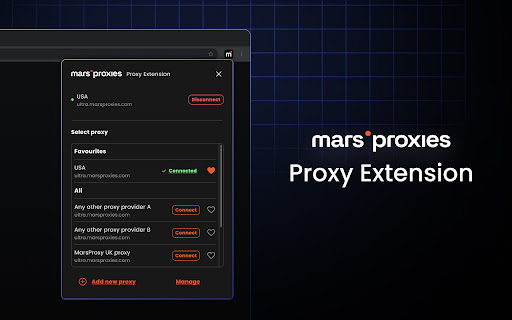


MarsProxies provides a simple way to access the Internet through a proxy server. MarsProxies Chrome Extension—your go-to solution for effortless proxy management directly within your browser. Key Features: · Unlimited Proxy Profiles: Add and switch between an unlimited number of proxies without wasting time or slowing down. · Seamless Compatibility: Supports HTTP/HTTPS and SOCKS5 proxy servers from any provider, ensuring smooth integration with your existing services. · Enhanced Privacy: Manage and maintain IP rotation and multiple custom sessions to avoid IP blocks and bans. Why Choose MarsProxies? At MarsProxies, we're committed to simplifying the complex world of proxies. Our Chrome Extension embodies this mission by offering a user-friendly interface that caters to both beginners and experienced users. Whether you're into gaming, sneaker copping, web scraping, or accessing restricted content, our extension provides the tools you need for a seamless online experience. Getting Started is Easy: 1. Download: Get the MarsProxies Chrome Extension from the Chrome Web Store. 2. Configure: Add your proxy credentials effortlessly—our intuitive setup ensures you're up and running in no time. 3. Manage: Easily switch between proxies and profiles with a single click, enhancing your browsing efficiency. Take control of your online privacy and access with the MarsProxies Chrome Extension—your gateway to a more secure and versatile internet experience.

Proxidize Proxy Extension
Best Proxy Extension: Top Rated & Featured by Chrome The Best Proxy Extention - Top Rated & Featured by Chrome For Both HTTP(s) and SOCKS Proxies. Manage and switch between multiple proxies quickly and easily with the Proxidize proxy extension. The Proxidize proxy extension has been designed from the grounds up to be the best the easiest to use proxy extension. Adjusting proxy settings has never been more convenient. Consider the Proxidize proxy extension as an updated and modernized version of the traditional "Proxy Settings" interface, crafted to be more straightforward, faster, and significantly more efficient, with a special focus on optimizing for Chrome. Forget about navigating through the complex advanced section in Chrome's settings. Avoid the repetitive process of filling in and clearing the proxy configuration dialog in your operating system. Simply configure all your proxies with the Proxidize proxy extension, and switch between them effortlessly with just a single click. Features: 1. HTTP(s) proxies support 2. SOCKS v4 and SOCKS v5 support 3. Auto detect of backconnect IP 4. Auto detect proxy country 5. Test proxy before connecting 6. Easily import manually or bulk import via paste 7. Import via CSV file 8. One-click switching between proxies 9. Easy search and filter 10. Display custom columns 11. Auto detects HTTP(s) or SOCKS proxies 12. And more!

Oxylabs Proxy Extension
Oxy® Proxy Extension is not only free but also works with any proxy provider of your choice. Enable your proxy without having to jump through settings and menu options. Why should you use the Oxy® Chrome Extension? By using a proxy server that acts as an intermediary between your computer and the internet, you can hide your real location or access websites that would otherwise be blocked. For example, you can send requests from a different country and access websites that are not available in your current location. With the Oxy Proxy extension, you can simplify your proxy management. All you need is a couple of clicks, and that’s it! Features and benefits: * Add and switch between multiple proxies * One-click connection * Use multiple proxy providers while using only one extension * Maintain the same IP address for multiple requests * Switch between any proxy type or HTTP(S) and SOCKS protocols * Add unlimited proxies * WPAD: proxy information is not displayed in the request header. How to set up Oxy® Proxy Extension? 1. Download and add the extension to your browser 2. Open the application 3. Add your proxy profile 4. Connect with one click For more detailed integration instructions, see our documentation: https://developers.oxylabs.io/proxies/integration-guides/3rd-party-integrations/oxy-proxy-extension-for-chrome Don’t have a proxy provider yet? Try Oxylabs, a premium proxy service. We offer Residential Proxies, Dedicated Datacenter Proxies, Shared Datacenter Proxies, and Mobile Proxies. To explore these options thoroughly, register and check out our dashboard here: https://dashboard.oxylabs.io/en/ If you have a feature request or want to report a bug, get in touch with us at info@oxylabs.io.

Proxy Pac Switcher
Save and switch between multiple Proxy Auto-Config (PAC) profiles with one click. Tag, sort, and organize unlimited PACs. This extension helps you easily set the proxy using a PAC (Proxy Auto Configuration) URL or text. ### Added - PAC validity check — verify whether the current PAC configuration is correct. - Display the user's global (public) IP address.

BP Proxy Switcher
Change your proxies with one click With our Chrome proxy addon, you can easily load your proxy list from the clipboard or a URL and switch between them with a single click. Display the country for each proxy.Clear the cache before switching to a new proxy. Automatically reload the current tab when changing proxies. Rotate proxies automatically at intervals you specify. Exclude certain URLs from using the proxy. Block specific URLs from loading. Note: Due to Chrome's limitations, it's not possible to set a different proxy for each tab. The proxy will be applied across the entire Chrome profile.
