
bapeomcobggcdleohggighcjbeeglhbn
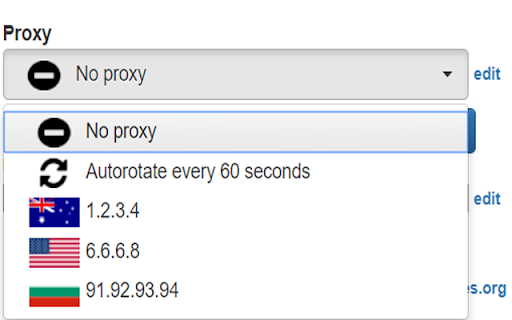
Change your proxies with one click With our Chrome proxy addon, you can easily load your proxy list from the clipboard or a URL and switch between them with a single click. Display the country for each proxy.Clear the cache before switching to a new proxy. Automatically reload the current tab when changing proxies. Rotate proxies automatically at intervals you specify. Exclude certain URLs from using the proxy. Block specific URLs from loading. Note: Due to Chrome's limitations, it's not possible to set a different proxy for each tab. The proxy will be applied across the entire Chrome profile.

EditThisCookie (V3)
EditThisCookie is a cookie manager. You can add, delete, edit, search, protect and block cookies! EditThisCookie is a cookie manager. You can add, delete, edit, search, protect, and block cookies! Inspired by the lack of good cookie managers in Google Chrome, I developed this small, simple, and extremely useful extension that allows you to do anything you'll ever need to do to cookies! Delete any cookie Edit any cookie Add a new cookie Search a cookie Protect a cookie (read-only) Block cookies (cookie filter) Export cookies in JSON, Netscape cookie file (perfect for wget and curl), Perl::LPW Import cookies in JSON Limit the maximum expiration date of any cookie

Oxylabs Proxy Extension
Oxy® Proxy Extension is not only free but also works with any proxy provider of your choice. Enable your proxy without having to jump through settings and menu options. Why should you use the Oxy® Chrome Extension? By using a proxy server that acts as an intermediary between your computer and the internet, you can hide your real location or access websites that would otherwise be blocked. For example, you can send requests from a different country and access websites that are not available in your current location. With the Oxy Proxy extension, you can simplify your proxy management. All you need is a couple of clicks, and that’s it! Features and benefits: * Add and switch between multiple proxies * One-click connection * Use multiple proxy providers while using only one extension * Maintain the same IP address for multiple requests * Switch between any proxy type or HTTP(S) and SOCKS protocols * Add unlimited proxies * WPAD: proxy information is not displayed in the request header. How to set up Oxy® Proxy Extension? 1. Download and add the extension to your browser 2. Open the application 3. Add your proxy profile 4. Connect with one click For more detailed integration instructions, see our documentation: https://developers.oxylabs.io/proxies/integration-guides/3rd-party-integrations/oxy-proxy-extension-for-chrome Don’t have a proxy provider yet? Try Oxylabs, a premium proxy service. We offer Residential Proxies, Dedicated Datacenter Proxies, Shared Datacenter Proxies, and Mobile Proxies. To explore these options thoroughly, register and check out our dashboard here: https://dashboard.oxylabs.io/en/ If you have a feature request or want to report a bug, get in touch with us at info@oxylabs.io.

Decodo(Smartproxy) Extension
Decodo(Smartproxy) extension Start using proxies in seconds with Chrome Proxy Extension Say goodbye to the hassle of navigating through Chrome settings and the complexity of constantly adjusting the proxy configuration dialog in your operating system. Effortlessly bring all the essential proxy features into your Chrome browser with the Decodo extension. Chrome Proxy Extension works with any proxies with no added cost. Don’t have proxies yet? Try ours. https://decodo.com/proxies/residential-proxies/pricing Download the extension and access all the benefits: ✓ Residential, ISP, mobile, and datacenter proxies support ✓ Compatibility with any proxy provider ✓ Instant proxy access & setup ✓ Ability to save an unlimited number of proxy profiles ✓ No CAPTCHAs or IP bans ✓ 24/7 tech support As a bonus, the tool includes extra features designed specifically for Decodo proxy users: ✓ Advanced targeting of 195+ locations ✓ Sticky or rotating connections Explore other handy resources: - Help docs: https://help.decodo.com/docs/decodo-chrome-extension - 24/7 tech support LiveChat: https://direct.lc.chat/12092754 - More about the extension: https://decodo.com/apps/proxy-extension - Firefox Proxy Add-on: https://addons.mozilla.org/en-US/firefox/addon/smartproxyextension/ - Privacy Policy: https://decodo.com/legal - License Agreement: https://decodo.com/legal/license-agreement

Link Grabber
An easy to use extractor or grabber for hyperlinks on an HTML page Extract links from an HTML page and display them in another tab. Permissions Required: Link Grabber requires permission to copy links to the clipboard. No other special permissions are required. Features: * No usage information / analytics are collected from you * Use either browser action button or context menu item to activate * Configurable list of blocked domains * Filter links by substring match * Copy links to clipboard * Show/hide links that appear more than once on the page * Show/hide links to the same origin as the source page * Group links by domain
