
hdemabfejemmmicoabglpocdmmkjphpo
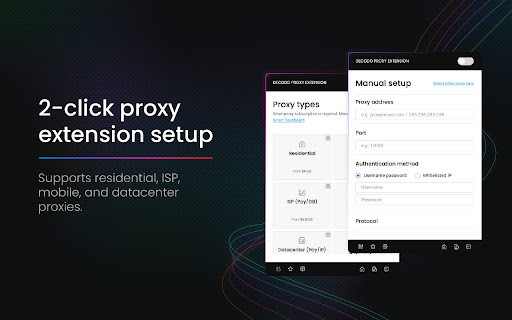


Decodo(Smartproxy) extension Start using proxies in seconds with Chrome Proxy Extension Say goodbye to the hassle of navigating through Chrome settings and the complexity of constantly adjusting the proxy configuration dialog in your operating system. Effortlessly bring all the essential proxy features into your Chrome browser with the Decodo extension. Chrome Proxy Extension works with any proxies with no added cost. Don’t have proxies yet? Try ours. https://decodo.com/proxies/residential-proxies/pricing Download the extension and access all the benefits: ✓ Residential, ISP, mobile, and datacenter proxies support ✓ Compatibility with any proxy provider ✓ Instant proxy access & setup ✓ Ability to save an unlimited number of proxy profiles ✓ No CAPTCHAs or IP bans ✓ 24/7 tech support As a bonus, the tool includes extra features designed specifically for Decodo proxy users: ✓ Advanced targeting of 195+ locations ✓ Sticky or rotating connections Explore other handy resources: - Help docs: https://help.decodo.com/docs/decodo-chrome-extension - 24/7 tech support LiveChat: https://direct.lc.chat/12092754 - More about the extension: https://decodo.com/apps/proxy-extension - Firefox Proxy Add-on: https://addons.mozilla.org/en-US/firefox/addon/smartproxyextension/ - Privacy Policy: https://decodo.com/legal - License Agreement: https://decodo.com/legal/license-agreement

Proxy Switcher and Manager
Manage and switch between multiple proxy types (SOCKS, PAC, and Direct) with profile support "Proxy Switcher and Manager" extension brings the power of proxy management to your browser. Using this extension, you can configure your browser to use a proxy server without altering your operating system's network. The toolbar icon indicates the current type of proxy your browser is using (No Proxy Mode (Direct), Auto-detect Proxy Mode, Manual Mode (SOCKS and HTTPS), and PAC Script Mode). The extension is designed such that no resource is used while the panel is closed. Features: 1. Supports profiles to store multiple proxy servers and switch between them when needed 2. Supports inline PAC script 3. Supports refreshing the PAC script from a remote server 4. Displays failed resources and the reason they failed 5. Supports badge text and toolbar color to differentiate between proxy profiles Notes: 1. The toolbar icon is an indicator of the current proxy type. Place your mouse over the toolbar button to get more info. 2. The badge text displays the number of failed resources. Opening the panel, you can check these resources by pressing the "Error Log" button (this feature is disabled by default). 3. It is possible to search for free transparent or anonymous proxy servers in the manual proxy tab. Why do I need this extension to alter my proxy? By using a proxy server that sits intermediary between your computer and the internet, you can hide your real location or access websites that would otherwise be blocked. Proxy Switcher and Manager is an open-source project.

FoxyProxy
Easy to use advanced Proxy Management tool for everyone FoxyProxy is an open-source, advanced proxy management tool that completely replaces Chrome's limited proxying capabilities. No paid accounts are necessary; bring your own proxies or buy from any vendor. The original proxy tool, since 2006. WHAT IS IT? FoxyProxy is a Chrome and Firefox extension which switches an internet connection across one or more proxy servers: 1. by point-and-click of colored icons 2. by URL (define URL patterns with wildcards or regular expressions) 3. by browser tab - set individual proxies per tab: assign up to 4 proxy servers for use on 4 different tabs. FoxyProxy automates the manual process of editing your browser's proxy settings. * Customize colors and country flags to make it easy to see which proxy is in use * Proxy per tab, by URL, or by point-and-click of colored icons * Import/Export all of your settings, or just URL patterns, to share with others (fixed in 8.0 and above) * Select a proxy specifically to use in Incognito Mode * Keyboard shortcuts * Globally exclude any domain from proxying * Create patterns with wildcards or regular expressions. A pattern tester is included. * (optional) Automatically synchronize all of your proxy settings with your other Chrome instances when you use Sync. * Turn WebRTC on/off to further limit discovery of your IP address * Built-in predefined selections for tor, privoxy, and psiphon * Extensive built-in help Source code is at https://github.com/foxyproxy/browser-extension FoxyProxy has been owned and developed consistently by the same team since 2006. It has never been sold and never will. * downloads: Required to export the extension settings to a file. Users can import that file to other Chrome/Firefox instances, or share it with colleagues, in order to keep the same settings. It can also be backed up and used later. * proxy: The core function of the extension is to allow users to set the proxy server used by the browser. * storage: Required to store proxy server settings (hostname, port, username, and which proxy server is enabled by the user). * tabs: Required so that users can set separate proxies to use per tab. It is also needed for "QuickAdd" to quickly add a URL pattern that applies to the current/active tab. It is also used to open a URL to getfoxyproxy.org where there is online help. webRequest: Required to authenticate with proxy servers via webRequest.onAuthRequired webRequestAuthProvider: Required to authenticate with proxies servers via webRequest.onAuthRequired * browsingData: Required so the extension can delete cookies, indexedDB, and localStorage when requested by the user on the Options page (Delete Browsing Data button) privacy: Required so the extension can call browser.privacy.network.webRTCIPHandlingPolicy to turn on/off webRTC in Chrome (Limit WebRTC checkbox in Options page) * host permission: Required to proxy all webRequests and provide proxy server authentication. is used because users may choose to load any/all URLs through proxy servers (chrome.webRequest.onAuthRequired and chrome.webRequest.onAuthRequired.addListener) . Required to proxy all webRequests and provide proxy server authentication. Also needed to get accounts details from FoxyProxy servers, if requested by the user with the Import FoxyProxy Account on the Import tab. ** No remote code is used in this extension. **

Webshare Proxy Extension
Free proxy server extension by Webshare A free proxy extension built by Webshare for fast, no-setup proxy management in your browser. Connect, switch, and change IP address with one click. Works with any Webshare plan. Free proxy to start, paid plans when you scale: Sign up and get 10 free proxy servers, no credit card required. The extension works with the free tier and every paid Webshare plan. A simple proxy switcher built into Chrome: Skip the system settings. The Webshare proxy switcher runs in your browser toolbar. Pick a proxy, click Connect, and your Chrome traffic routes through it. Click Disconnect to return to your normal connection. A proxy manager that syncs with your account: The built-in proxy manager loads your full Webshare proxy list automatically. Search and filter by country or IP. Add or refresh proxies in the Webshare dashboard, and the extension picks up the changes. Works with every Webshare proxy type.Pick the proxy that fits your workflow. The extension supports all of them: * Datacenter Proxies — fast and affordable, hosted on datacenter networks. 400,000+ IPs across 50+ countries. Plans from $2.99/month. * Static Residential (ISP) Proxies — residential IPs from networks like Comcast, AT&T, and Sprint. 60,000+ IPs, harder to detect than datacenter. Plans from $6/month. * Rotating Residential Proxies — undetectable IPs from real residential devices. Up to 80 million IPs from 195 countries. Plans from $3.50/month. A reliable IP switcher across 195 countries: Use the IP switcher to connect through US, UK, Germany, France, Japan, Canada, Australia, and 50+ other locations. Useful for bypassing geo-restrictions, managing social accounts, ad verification, SEO checks, and market research. The easiest proxy for Chrome to set up 1. Install the proxy for Chrome extension from the Chrome Web Store 2. Log in to your Webshare account (or sign up for free) 3. Pick a proxy and click Connect That's it. No credentials to copy, no ports to configure. Privacy-first: We don't sell your browsing data. Webshare's privacy practices are audited and certified against leading third-party industry standards.

IPRoyal Proxy Manager
IPRoyal Proxy Manager allows you to easily control all your proxies in your Browser The IPRoyal Proxy Manager is your ultimate tool for seamless proxy configuration and management in Google Chrome. This free extension empowers you to control all your proxies and proxy profiles effortlessly, with no need to adjust your system settings. Key features: - Add, configure, and manage proxies directly within the extension - Log in to IPRoyal to access and configure residential proxies - Select country, state, city, protocol, rotation, and all other options - View your remaining residential proxy traffic in real time - Switch between proxies instantly and set favorites for quick access - Search through your configured proxies for effortless management With the full functionality of the IPRoyal dashboard at your fingertips, the IPRoyal Proxy Manager is your one-stop solution for proxy configuration and control. Avoid geo-restrictions, blocks, and bans while enjoying truly unrestricted internet access - all with just a few clicks.
