
gcknhkkoolaabfmlnjonogaaifnjlfnp
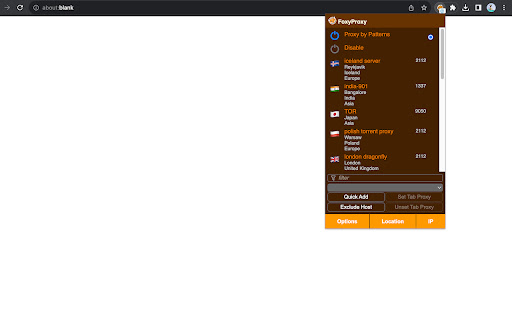
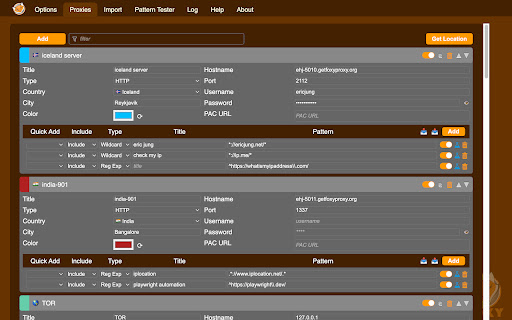


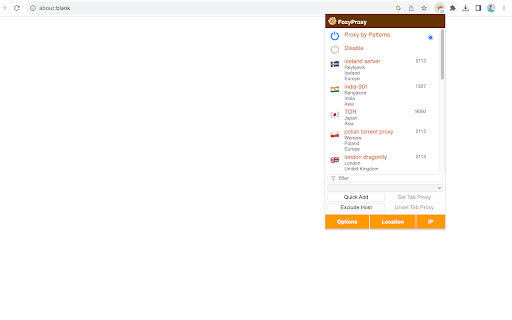
Easy to use advanced Proxy Management tool for everyone FoxyProxy is an open-source, advanced proxy management tool that completely replaces Chrome's limited proxying capabilities. No paid accounts are necessary; bring your own proxies or buy from any vendor. The original proxy tool, since 2006. WHAT IS IT? FoxyProxy is a Chrome and Firefox extension which switches an internet connection across one or more proxy servers: 1. by point-and-click of colored icons 2. by URL (define URL patterns with wildcards or regular expressions) 3. by browser tab - set individual proxies per tab: assign up to 4 proxy servers for use on 4 different tabs. FoxyProxy automates the manual process of editing your browser's proxy settings. * Customize colors and country flags to make it easy to see which proxy is in use * Proxy per tab, by URL, or by point-and-click of colored icons * Import/Export all of your settings, or just URL patterns, to share with others (fixed in 8.0 and above) * Select a proxy specifically to use in Incognito Mode * Keyboard shortcuts * Globally exclude any domain from proxying * Create patterns with wildcards or regular expressions. A pattern tester is included. * (optional) Automatically synchronize all of your proxy settings with your other Chrome instances when you use Sync. * Turn WebRTC on/off to further limit discovery of your IP address * Built-in predefined selections for tor, privoxy, and psiphon * Extensive built-in help Source code is at https://github.com/foxyproxy/browser-extension FoxyProxy has been owned and developed consistently by the same team since 2006. It has never been sold and never will. * downloads: Required to export the extension settings to a file. Users can import that file to other Chrome/Firefox instances, or share it with colleagues, in order to keep the same settings. It can also be backed up and used later. * proxy: The core function of the extension is to allow users to set the proxy server used by the browser. * storage: Required to store proxy server settings (hostname, port, username, and which proxy server is enabled by the user). * tabs: Required so that users can set separate proxies to use per tab. It is also needed for "QuickAdd" to quickly add a URL pattern that applies to the current/active tab. It is also used to open a URL to getfoxyproxy.org where there is online help. webRequest: Required to authenticate with proxy servers via webRequest.onAuthRequired webRequestAuthProvider: Required to authenticate with proxies servers via webRequest.onAuthRequired * browsingData: Required so the extension can delete cookies, indexedDB, and localStorage when requested by the user on the Options page (Delete Browsing Data button) privacy: Required so the extension can call browser.privacy.network.webRTCIPHandlingPolicy to turn on/off webRTC in Chrome (Limit WebRTC checkbox in Options page) * host permission: Required to proxy all webRequests and provide proxy server authentication. is used because users may choose to load any/all URLs through proxy servers (chrome.webRequest.onAuthRequired and chrome.webRequest.onAuthRequired.addListener) . Required to proxy all webRequests and provide proxy server authentication. Also needed to get accounts details from FoxyProxy servers, if requested by the user with the Import FoxyProxy Account on the Import tab. ** No remote code is used in this extension. **

DotGit
An extension for checking if .git is exposed in visited websites An extension for checking if .git is exposed in visited websites - Check if a .git/.svn/.hg folder exists for each site you visit - Check if a .env file exists for each site you visit - Check if a .DS_Store file exists for each site you visit - Check if the site is open source (github/gitlab) - Check if the site has security.txt - You will be notified when a folder is found - List of exposed sites found - Download the entire .git folder in zip format, even if the files are not listed on the site - View .git/config with one click - Options for: colors, notifications and downloads Some checks are turned off by default, open the settings to turn them on Source code: https://github.com/davtur19/DotGit

Hack-Tools
The all in one Red team extension for web pentester HackTools, is a web extension facilitating your web application penetration tests, it includes cheat sheets as well as all the tools used during a test such as XSS payloads, Reverse shells and much more. With the extension you no longer need to search for payloads in different websites or in your local storage space, most of the tools are accessible in one click. HackTools is accessible either in pop up mode or in a whole tab in the Devtools part of the browser with F12. - Dynamic Reverse Shell generator (PHP, Bash, Ruby, Python, Perl, Netcat) - Shell Spawning (TTY Shell Spawning) - MSF Venom Builder - XSS Payloads - Basic SQLi payloads - Local file inclusion payloads (LFI) - Data Encoding - Obfuscated Files or Information - Hash Generator (MD5, SHA1, SHA256, SHA512, SM3) - Useful Linux commands (Port Forwarding, SUID) - RSS Feed (Exploit DB, Cisco Security Advisories, CXSECURITY) - CVE Search Engine - Various method of data exfiltration and download from a remote machine

Vulners Web Scanner
Tiny vulnerability scanner based on vulners.com vulnerability database. Passively scan websites while you surf internet! Tiny vulnerability security scanner based on vulners.com vulnerability database. It provides you ability to passively scan websites that you surf, on known vulnerabilities.

Proxy Switcher
Proxy Switcher is an extension that helps you easily switch proxies from toolbar popup UI. Simply open toolbar popup and click on the desired category. There are five categories available to choose from. Moreover, badge icon color changes according to the chosen category. Once the proxy is set, a notification popup shows you the current state. This addon supports PAC proxy as well. Moreover you can white-list any domain or website through toolbar popup UI. In order to white-list a domain, please add the desired domain to the bypass area in toolbar popup. For example, to white-list - https://www.example.com - please add - *example.com - to the filed. Please note that all the entries should be comma separated. Once you filled the bypass area, please mark the related checkbox as well (the checkbox next to the Bypass category). To set PAC proxy, please add a PAC URL or SCRIPT to the designated area (PATH input area). Please note that a PAC path should have a certain format. For example if your PAC file is located in - C:// - folder (on windows machine), please write - file:///C:/pac.data - in the PATH area. If you do not know how to write a PAC file, please read this (https://en.wikipedia.org/wiki/Proxy_auto-config) Wikipedia page. Once you made a correct PAC file, please add it to the PATH field. Note: To switch the popup interface theme to dark, please press the moon icon on the bottom toolbar. To report bugs, please fill the bug report form in the addon's homepage (https://mybrowseraddon.com/proxy-switcher.html).
