
dcokccgklilfbehagkdnmlpcdonfopeh
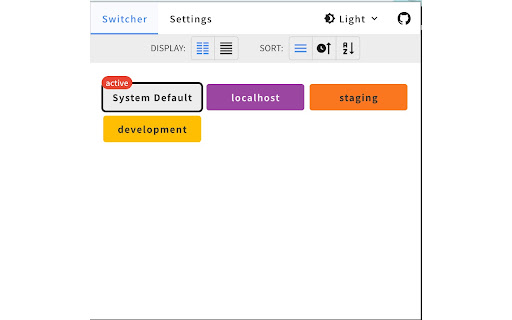
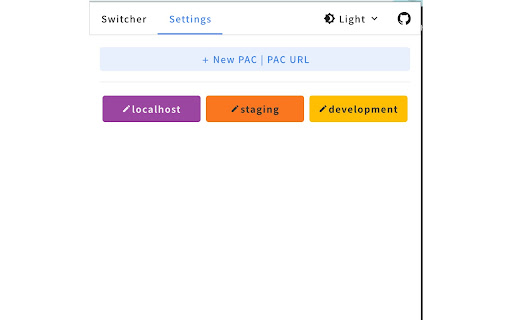
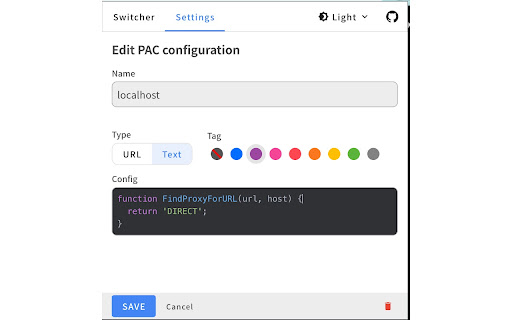
Save and switch between multiple Proxy Auto-Config (PAC) profiles with one click. Tag, sort, and organize unlimited PACs. This extension helps you easily set the proxy using a PAC (Proxy Auto Configuration) URL or text. ### Added - PAC validity check — verify whether the current PAC configuration is correct. - Display the user's global (public) IP address.

Simple Proxy Switcher
A simple add-on to quickly switch your proxy servers Currently only supports http/s proxy

LeetSox Proxy Manager
Proxy Manager is a user-friendly Chrome extension that allows you to easily manage your proxy settings directly from your browser. Proxy Manager is a user-friendly Chrome extension that allows you to easily manage your proxy settings directly from your browser. Whether you need anonymous internet access or want to configure a proxy for a specific web service, this extension simplifies the process. 1. Easy Enable and Disable: - Simply enter the IP address and port of your proxy server, and, if necessary, provide a username and password. - Click the "Turn On Proxy" button to instantly activate the proxy server. - Click the "Turn Off Proxy" button to revert to regular internet connectivity. 2. Authentication Management: - The "Use Authentication" option lets you input proxy server credentials if required. 3. Intuitive Interface: - Simple text fields and checkboxes make the extension user-friendly, even for beginners. 1. Install the extension from the Chrome Web Store. 2. Enter the IP address and port of the proxy server. 3. Optionally, enter the username and password. 4. Click "Turn On Proxy" to activate the proxy server. 5. Click "Turn Off Proxy" to deactivate the proxy and return to regular connectivity. Proxy Manager provides a quick and straightforward way to control your proxy server directly from your browser. Manage your online security and privacy with ease!

Proxy SwitchyOmega 3 (ZeroOmega)
Manage and switch between multiple proxies quickly & easily. Manage and switch between multiple proxies quickly & easily. 1. Forked from Proxy SwitchyOmega 2. Suitable for manifest V3 version 3. Use Gist sync option 4. Support custom theme(light/dark/auto mode)

PACify | The Proxy Manager
Complete proxy manager for Chrome. Create, edit, and switch between PAC scripts, manual proxies, and system configurations easily. PACify — The Modern Proxy Manager for Chrome Take complete control of your browser's proxy settings with PACify, the most intuitive and powerful proxy configuration manager for Chrome. Whether you're a developer, IT professional, or privacy enthusiast, PACify makes managing proxies effortless. • Zero Learning Curve — Interactive onboarding guides you through setup • Switch Instantly — Change proxies with one click or keyboard shortcuts • 100% Private — All data stays on your device, no tracking, no analytics • Open Source — Fully transparent, community-driven development Multiple Proxy Modes Configure any proxy type Chrome supports: • PAC Scripts — Write custom scripts or load from URL with auto-refresh • Manual Proxy — HTTP, HTTPS, SOCKS4, SOCKS5, and FTP • Auto-Proxy Rules — Route traffic based on URL patterns • System Proxy — Use your OS proxy settings • Auto-Detect (WPAD) — Automatic proxy discovery Professional PAC Editor • Syntax highlighting with error detection • Smart code completion • Real-time validation • Built-in templates and documentation • Auto-refresh from URL (15 min to 24 hours) Quick Switch • One-click proxy switching from toolbar popup • Color-coded profiles for instant recognition • Drag-and-drop organization • Keyboard shortcuts for power users Work faster with built-in shortcuts: • Ctrl+N — Create new proxy • Ctrl+K — Quick search • ? — Show all shortcuts • Esc — Close dialogs • Real-time error logging and troubleshooting • System status panel (active proxy, storage usage) • Export logs for debugging • User-friendly error messages Your privacy matters. PACify: • Stores all data locally on your device • Never transmits data to external servers • Contains no tracking or analytics • Is fully open-source for transparency View our complete privacy policy within the extension. 👥 Perfect For • Developers — Test apps across different network configurations • IT Administrators — Manage corporate proxy policies • Security Professionals — Conduct network assessments • Remote Workers — Switch between office and home proxies • Privacy Enthusiasts — Manage multiple proxy setups English, Japanese, German, Chinese, Spanish, French, Korean, Portuguese, Hindi, Bengali, Russian, and Romanian. • First-run onboarding tutorial • Keyboard shortcuts help modal • Privacy policy page • Enhanced diagnostics panel • Simplified, cleaner URLs Take control of your proxy settings today. Install PACify — it's free, private, and powerful.
