
ilgclabmhgbhfoohngmjadlfmbagmlnf


View ActiveCampaign contact information from anywhere on the Web. Bring ActiveCampaign into your Gmail inbox! Meaningfully connect and engage with your customers. Go beyond sales automation to optimize your customers’ experiences — while closing more deals, faster. The ActiveCampaign extension brings the power of ActiveCampaign’s customer experience automation into your Gmail inbox. Seamlessly manage your marketing and sales processes, and control your email marketing, marketing automation, and CRM without even switching tabs. A CRM THAT STAYS UP TO DATE & ORGANIZED As you qualify your leads and opportunities, you can automatically create a new deal record in ActiveCampaign. As the deal progresses, you can move it through the stages of your pipeline. As you collect additional information about the contact or opportunity you can add that information to their contact record. You’ll never have to worry if your CRM is current. THE DATA YOU NEED, WHEN YOU NEED IT Have all your contact data at your fingertips, right in your inbox next to the message you are typing. You’ll see your contact’s social network profiles, any tags you’ve applied, custom field values, any automated processes they are currently involved in, and open deal records associated with them. TIME-SAVING AUTOMATION MADE EASY Without leaving Gmail, you’ll be able to trigger sequences of automated actions. When you learn what product a prospect is interested in, you can drop them into an automated follow-up sequence with targeted content and offers to move your sales process along faster. If a contact schedules an appointment, you can drop them into an automation that automatically reminds them one hour before and then follows-up with them after to see if they have any additional questions. Choose from hundreds of pre-built automations that you can use with just a few clicks. CUSTOMER SUPPORT If you have a suggestion or concern, please visit and send us a message: http://www.activecampaign.com/contact/ We’ll respond quickly. ActiveCampaign's category-defining Customer Experience Automation Platform (CXA) helps over 150,000 businesses in 170 countries meaningfully engage with their customers. The platform gives businesses of all sizes access to 750+ pre-built automations that combine transactional email and email marketing, marketing automation and CRM for powerful segmentation and personalization across social, email, messaging, chat and text. Over 70% of ActiveCampaign's customers use its 870+ integrations including Microsoft, Shopify, Square, Facebook and Salesforce. ActiveCampaign scores higher in customer satisfaction than any other solution in Marketing Automation, CRM and E-Commerce Personalization on G2.com and is the Top Rated Email Marketing Software on TrustRadius. Pricing starts at just $9/month. Start a free trial at ActiveCampaign.com.

Teamwork.com
Teamwork.com is the only platform for profitably managing client projects, with complete operations control and project management. With Teamwork.com’s Chrome extension, you can enhance your workflows by easily tracking your time and managing your tasks from any webpage. Key features: - Track time: Start the timer and create time logs from any website. - Instant task creation: Add detailed tasks as you work form any webpage. - Effortless project creation: Create projects without having to open the Teamwork.com app. How to install the Chrome extension: 1. Click Add to Chrome. 2. In the popup, click Add extension. 3. Click the Teamwork.com extension icon at the top of your browser window. 4. Log in to your Teamwork.com account. 5. Start logging time, adding tasks, and creating projects seamlessly.

Nimble Prospector
Lead Capture, Data Discovery, and CRM that works on every web page Nimble Prospector helps you create targeted lists of prospects, influencers, potential investors, and more within seconds -- from anywhere you work on the web. Don't have a Nimble account? Start your free 14-day trial at www.nimble.com/register. With Nimble Prospector 2.0, you can: - Easily build prospect lists from anywhere you work. From multiple pages across their browser, within your inbox, and across your favorite business applications. Easily create lists of conference speakers, influencers, employees from a company website, and more. Additionally, teams can make actionable lists from their LinkedIn, Twitter, and Facebook contacts. - Log notes, add tasks, attach files, and set Stay in Touch reminders to an existing contact record, or create a new contact record, to always follow up with your follow-through. - Easily view all interaction history (including past emails, Twitter conversations, events, deals, tasks, and more) to always stay up to date with next steps with key contacts. - Easily tag multiple contacts for quick list building, contact organization, and easy segmentation. - Target businesses using company profiles: including biography, industry, number of employees, year founded, keywords, company type, revenue, ticker, CEO name, address, and phone number. - Qualify prospects using auto-generated contact profiles which include biography, location, keywords, work experience, education, and social profiles - Discover verified business contact details, including email addresses, phone numbers, and address from any website, social network, or business web applications.

Bonjoro
Free HD screen recorder for Chrome Free HD screen recorder for Chrome. Capture, share, and track videos in seconds. 🎥 Record (HD as standard) Record and share unlimited HD webcam videos or screen recordings, 100% free! Includes HD recording as standard 🙌 🎨 Customize Customize your videos with your own branding, and add call-to-actions buttons to encourage viewers to take that next step. NEW for 2021: You can now embed apps like Calendly, Youtube, and Google Forms right below your screen and webcam recordings using Bonjoro’s Next Gen video templates 💥 🚀 Share Share your videos with colleagues and customers quickly and easily by embedding a thumbnail into your emails, or sharing across the web with a simple link. 🎯 Track See when someone watches or interacts with your recordings, and follow up at the perfect moment. **************************** 📣 BIG NEWS 📣****************************** No video storage limits. No video duration limits. And HD recording as standard! We’ve unlocked HD video and unlimited videos for free users 🎉 ****************************************************************************** ⭐⭐⭐⭐⭐ SO easy to use and it just plain works. I've been looking for an app like this for a while. ✨Bonjoro Chrome Basic - Free forever 🆓 ✨ ✅ Free screen and webcam recording ♾️ Unlimited videos 🙌 HD recording as standard 🎯 Track video plays 📥 Embed in emails 🗺️ Instantly share anywhere 🔐 Secure storage Upgrade to custom branded videos and custom CTAs from just $15p/m! ✨Bonjoro Chrome Pro - starts at $15p/m ✨ ✅ Free screen and webcam recording ♾️ Unlimited videos 🙌 HD recording as standard 🎯 Track video plays 📥 Embed in emails 🗺️ Instantly share anywhere 🔐 Secure storage ➕ Custom branding ➕ Custom CTAs

Copper CRM for Gmail and LinkedIn
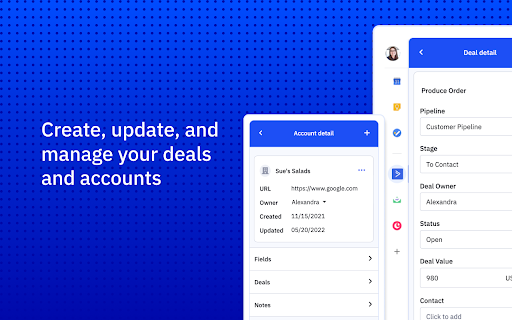
You live in Google Workspace™. So should your CRM. Copper is the recommended CRM for Google Chrome™ users, loved by over 30,000+ customers globally. This Chrome extension makes Copper CRM available natively from anywhere on the web, including Gmail™, Google Calendar™, Google Meet™, LinkedIn™, and more. If you don’t already have Copper, downloading and installing this CRM in Gmail extension will start a FREE 14-day trial of Copper – no credit card necessary. Copper CRM is embedded into Google Workspace™ (formerly G Suite) apps to help you: - Create and update leads, opportunities, people, companies and tasks directly from Gmail™, Google Calendar™, Google Meet™, or any website - Automatically populate contact details from Gmail™ into Copper - See all conversations, files and tasks across your team in one place - Track when someone has opened your email, and what they’ve clicked - Connect emails to specific Copper records - Activate Copper email templates, bulk emails, and more - Add leads while browsing company websites or LinkedIn™ for faster prospecting - Pin the Copper extension in Chrome to access CRM data wherever you work Spend less time in your CRM software and more time managing relationships with a CRM Gmail™ integration that lets you focus on what matters: people. MORE ABOUT COPPER CRM Copper is the only CRM made for Google Workspace™. A Recommended for Google Workspace app, Copper works instantly with native integrations with Google Workspace™ and Chrome. Designed for people whose business relies on relationship-building, Copper functions seamlessly in the background so you can focus on growing faster. MANAGE THE ENTIRE CUSTOMER JOURNEY Copper isn’t just for sales. It helps teams manage every stage of the customer journey, from adding leads and moving them through your sales pipeline, to executing projects and driving repeat business. ZERO DATA ENTRY Copper records are automatically populated with your Gmail™ data, so you never have to add leads, contacts, or accounts manually. Copper also automatically attaches any files and Google Docs™ attached to you and your team’s emails. MANAGE FROM YOUR INBOX Copper’s native Google Workspace™ integration allows you to nurture relationships and close deals from Gmail™. Plus, Copper looks and feels exactly like Google Workspace™ apps so there’s no coaching or training needed. GET GOING INSTANTLY Implementing Copper is so fast and easy, you’re up and running in minutes. All data is automatically populated from Gmail™, and it’s easy to configure from there. No more wasted budget on endless customizations and costly “solution providers” for what should be a simple task. AUTOMATED WORKFLOWS Copper streamlines your business processes with automation. Email automation within contacts and pipelines ensures that leads, clients, and projects never slip through the cracks. Set up automated follow-ups, reminders, and email sequences so your team stays on track without the manual work. Spend less time in your CRM software and more time managing relationships with a Gmail™ CRM integration that lets you focus on what matters: people.
