
hjnogdfopgmfniajiofiafhffkpeehjm

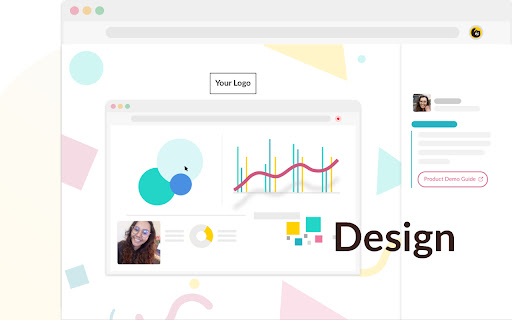

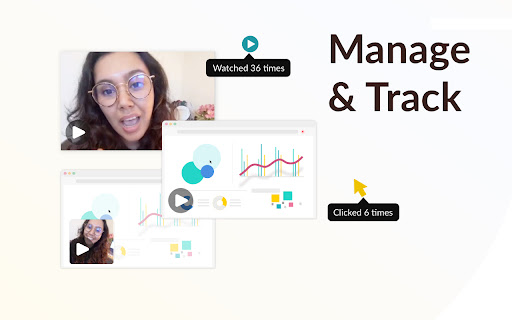
Free HD screen recorder for Chrome Free HD screen recorder for Chrome. Capture, share, and track videos in seconds. 🎥 Record (HD as standard) Record and share unlimited HD webcam videos or screen recordings, 100% free! Includes HD recording as standard 🙌 🎨 Customize Customize your videos with your own branding, and add call-to-actions buttons to encourage viewers to take that next step. NEW for 2021: You can now embed apps like Calendly, Youtube, and Google Forms right below your screen and webcam recordings using Bonjoro’s Next Gen video templates 💥 🚀 Share Share your videos with colleagues and customers quickly and easily by embedding a thumbnail into your emails, or sharing across the web with a simple link. 🎯 Track See when someone watches or interacts with your recordings, and follow up at the perfect moment. **************************** 📣 BIG NEWS 📣****************************** No video storage limits. No video duration limits. And HD recording as standard! We’ve unlocked HD video and unlimited videos for free users 🎉 ****************************************************************************** ⭐⭐⭐⭐⭐ SO easy to use and it just plain works. I've been looking for an app like this for a while. ✨Bonjoro Chrome Basic - Free forever 🆓 ✨ ✅ Free screen and webcam recording ♾️ Unlimited videos 🙌 HD recording as standard 🎯 Track video plays 📥 Embed in emails 🗺️ Instantly share anywhere 🔐 Secure storage Upgrade to custom branded videos and custom CTAs from just $15p/m! ✨Bonjoro Chrome Pro - starts at $15p/m ✨ ✅ Free screen and webcam recording ♾️ Unlimited videos 🙌 HD recording as standard 🎯 Track video plays 📥 Embed in emails 🗺️ Instantly share anywhere 🔐 Secure storage ➕ Custom branding ➕ Custom CTAs

Group Collector
Group Collector allows you to get new Facebook group member information and convert them to leads in your email marketing software. Collect, Convert, Sort, and Extract your New Facebook Group Member Answers. Extract facebook group members information when they join your facebook group. Group Collector allows you to Collect Emails and Answers From your New Facebook Group Members and convert them into leads in your favorite email marketing software On Autopilot without wasting time & money. By using Group Collector, you can send Leads to the Google Sheet and your favorite Email Marketing Software. You do not need to copy and paste the member's email addresses when approving them in your group. It will build your email list on Autopilot, and you will be able to make more money from your group. ✔️ Works with both New and Old Facebook UI ✔️ Auto Approve Members ✔️ Unlimited Facebook groups ✔️ Most affordable price in the market ✔️ Facebook Group automatic approval ✔️ Zapier is not required We give you access to a dashboard where you will be able to view, edit, and export Facebook Group Members Data. Note: This extension is not affiliated with Facebook or Google in any way.

Tailwind: Pinterest Marketing & Scheduling
Pin from anywhere fast! Tailwind's extension is the ultimate time-saving, productivity-boosting Pinterest marketing tool. Pin from anywhere fast! Tailwind's Chrome extension is the ultimate time-saving, productivity-boosting Pinterest marketing tool for small business owners, ecommerce stores, and content creators. 🚀 Pin anywhere, Pin instantly Say goodbye to the tedious process of downloading/uploading images, switching between tabs, and copy/pasting. With the Pinterest extension, you’ll create and schedule Pins directly from any website with just a click, without leaving the page! ✨ Effortless Pin creation Hover over any image, click 'Schedule,' and watch the magic happen. Our intuitive interface makes Pinterest marketing a breeze, freeing up your time to focus on other things. 🏆 Trusted by thousands of small businesses Join the hundreds of thousands of entrepreneurs, ecommerce stores, and content creators who've built their Pinterest marketing with Tailwind. Our users have generated over one billion free, targeted clicks to their websites! “I was not getting a lot of views until I started using Tailwind to schedule my pins. I joined some Communities and scheduled pins using this efficient extension. As a result, my viewership has skyrocketed from 5,800 monthly viewers in mid-September (when I joined) to 267,000 monthly viewers in mid-November, which is a lot of growth in just two months!” - Elizabeth Ruelas 🔥 Key features: * Start a new Pin with one-click from any website * Bulk image selection for rapid content creation * Access Tailwind’s award-winning Pin Scheduler without switching tabs Click “Add to Chrome” to grow your website traffic faster, and get your Pinterest marketing done in half the time, with the free Tailwind Pinterest Marketing & Scheduling extension!

ClickUp: Tasks, Screenshots, Email, Time
ClickUp is a productivity platform that makes your personal and work lives more productive, saving you time. ClickUp's revolutionary Chrome Extension replaces five separate apps, virtually allowing you to do anything! 1. Create Tasks & Save Websites as Tasks 2. Time Tracking: Easily attach time to ClickUp tasks 3. Screenshots: Capture, mark up, and edit screenshots 4. Email: Create tasks and attach emails to tasks 5. Notepad ClickUp is free forever for up to 100MB of files storage. Installing the Chrome Extension 1. Click ADD TO CHROME 2. Click Add extension in the next popup 3. Click the ClickUp extension icon at the top of your browser window. 4. Log in to your ClickUp Account 5. Select the Workspace(s) that should have access Creating a new task 1. Select the "New Task" tab 2. Write a title for your task 3. Add assignees and a due date 4. Write a description for your task. (Pro tip: Use Markdown Shortcuts in your description fast rich text editing) 5. Click Create New Task Bookmark a site as a task 1. Click on the Bookmark tab 2. This automatically sets the page title & URL as the task title 3. You can also add a description here 4. Then you'll also be given the option to attach a screenshot of the website to the task by clicking Include screenshot Set a Default List Save a default destination for tasks making this the fastest way to add new tasks! Simply locate a task in the extension and select it to begin tracking time. From the Time Spent window, you are able to view time logged on recent tasks and even remove time that was accidentally logged. Back in the ClickUp task, the time has been logged, and we can even start the extension's timer from within the task. Screenshots: capture, mark up, and edit screenshots Capture Capture your entire browser tab or select a certain area to add to a task or download to your computer Attach Attach the file to an existing task or create a new one Mark Up The extension grants you extremely detailed mark up functionality: Paintbrush - draw what you want on top of the screenshot - set a color and brush size Arrow, line, circle, square - quickly add shapes to highlight areas of the screenshot - set a color and brush size Text - add notes right onto a screenshot - set a color, size, and substrate (background) Blur - select an area of the screen you would like to remain hidden. Numbers - drop increasing numbered markers on your screenshot - dragging and dropping allows you to create a box with the number - perfect for sharing steps with a team member Pointer - select things you've already added to the screenshot and make adjustments Undo / Redo Attach to comments 1. Take a screenshot with the Chrome Extension 2. With the screenshot still in the extension, open a task in ClickUp 3. Open the comment editor 4. Click the "Chrome attachment" button Email: Create tasks and attach emails to tasks Capture an email Click the Add to ClickUp button in your email to generate a full HTML record of the email. Attach emails to tasks and create tasks from emails ClickUp will attach the email to a task or create a brand new one with the email attachment included so you can quickly view, jump back, or download the email! For more info, check out our doc on attaching emails to ClickUp! You can also access your ClickUp notes from any page. Open the extension to the Notepad tab, and all of your notes are available from ClickUp. Your notes will sync across all your devices. Use Markdown Shortcuts and Rich Text in any note. When hovering over a note, you will be able to rename the note, archive, delete, and convert the note to a task. While inside a note, at the bottom are the options to see earlier versions of the note, open the fullscreen editor, as well as the option to convert the note to a task. The ClickUp button gives you quick access to the Notepad, Bookmarks, Screenshots, Time Tracking, and creating a task from any webpage. To move the button, click and drag it to any spot on the page. To hide the button, hover over the x icon. You can choose to hide the button for the current session, always for the current website you're on, or turn them off all together.

Calendly: Meeting Scheduling Software
Schedule meetings without the hassle. Never get double booked. Calendly works with your calendar to automate appointment scheduling. With any Calendly account (free or paid plans), you can use Calendly’s extension for Chrome to: - Access Calendly in one click from anywhere on the web - Find and share your scheduling links - View and manage your meetings - Keep track of your contacts and meeting history - Book meetings in real time, including follow-ups and handoffs - Add available time slots directly into your emails - Create one-off meetings, single-use links, and group meeting polls - Integrate with Gmail, LinkedIn, Google Calendar, and more ABOUT CALENDLY Calendly simplifies personal and professional scheduling for more than 20 million users worldwide. Calendly delivers a robust and intuitive scheduling platform that helps our customers close deals, land candidates, build relationships, and grow their business—faster.
