
ilcfanajnoimdgeginodjmdpelcdohbi
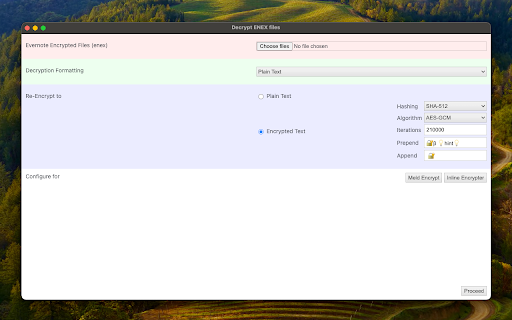
Decrypt encrypted strings in Evernote's 'enex' file and optionally encrypt in new format If you're considering transitioning from Evernote to a new note-taking application, it's essential to decrypt encrypted blocks in Evernote to make your notes accessible in the new application. This extension is designed to read one or multiple "enex" files and prompt for the Evernote password used to encrypt these blocks. Subsequently, the extension replaces the encrypted blocks with decrypted content. Additionally, users can instruct the extension to convert complex HTML blocks into text-only equivalents. If your new note-taking application supports encrypted blocks, you can also request the extension to generate a compatible block for seamless integration. Features: 1. Decrypts all encrypted embeddings in "enex" files. 2. Optionally replaces complex HTML blocks with text-only equivalents. 3. Re-encrypts each block using a user-defined encryption. Usage: 1. Decryption Process: - Upload one or multiple "enex" files to the extension. - Enter the Evernote password used for encrypting blocks. - The extension seamlessly replaces encrypted blocks with decrypted content. 2. Optional HTML Block Conversion: - Users can choose to convert complex HTML blocks to text-only equivalents for enhanced compatibility. 3. Re-encryption with User-defined Algorithm: - Specify your preferred encryption algorithm for re-encrypting each block according to your new application's requirements. This tool operates entirely offline, ensuring the encryption and decryption processes occur locally. No data is sent or received from any remote server, reinforcing user privacy and security throughout the entire process.

Text to Encryption Converter
Encrypt/decrypt text with a key into AES, SHA, MD5, Binary, Base64 and more! Do you want to encrypt or decrypt text using AES, MD5, SHA-256, DES? This is the perfect extension for that! Just select the encryption type, input your key and the text, and select encrypt or decrypt! If you wish to just translate to binary or base64, then you're covered by this extension! Please take note of the disclaimer in the extensions popup.

Wikipedia SidePanel by NNT
The Free Encyclopedia side panel The largest free encyclopedia in your sidebar! Quick search and convenient viewing in all tabs of one browser window. Search function in the context menu. The extension is available in the side panel menu. DISCLAIMER: This is not an official Wikipedia extension designed to improve usability

Redfin Zillow Sweetener
House research augmentations toolset for Redfin.com and Zillow.com Extension for browsing houses on Redfin.com and Zillow.com. The extension gives you extra links to "background check" the house, including criminal map, sex offender info from Department of Justice, High voltage transmission line map etc. These help you discover the metrics not found on Redfin/Zillow. On the top right there is a link to view the latest real estate news per state. It also lets user write comments/reviews about the house. And you are more than welcome to leave yours. House hunting should go beyond cold statistics and metrics.

ReClyp - Elegant Screen recordings and Video Editor
Record your screen, edit with cuts & zoom, and export in seconds ReClyp - The All-in-One Screen Recorder & Video Editor Record your screen. Edit it like magic. ReClyp lets you capture, edit, polish, and export clean, professional-looking videos without requiring any skill - all directly from your browser. 🎥 Effortless Screen Recording Start recording in one click. Capture your full screen, a tab, or a window, with or without webcam and mic, with smooth performance and no setup required. ✂️ Smart Editing & Auto Zoom ReClyp automatically applies smart zooms and let you cut to keep your videos clear and engaging. Trim, arrange, and enhance your recordings in seconds. 🎨 Custom Styling & Polish Apply visual styles, adjust layouts, and add finishing touches to make your videos presentation-ready. 🔊 Audio Control & Sound Management Fine-tune your audio with simple controls. Adjust volume levels, manage microphone and system sound, and create a clean listening experience. 🖼️ Import Media into Your Video Easily add external images, videos, and audio files to enrich your recordings and create more dynamic content. 🎨 Visual Effects & Enhancements Apply effects like blur, contrast, and visual adjustments to highlight important areas and improve overall clarity. 📝 Voice Transcription to Text Automatically convert your voice into text to create captions, transcripts, or written content from your recordings. 🎥 Built-in Webcam Add your webcam alongside your screen to create tutorials, demos, and walkthroughs that feel personal and engaging. 🌐 Browser-Integrated No app to install. ReClyp lives in your Chrome toolbar for instant access whenever you need it. 🛂 Free and no registration needed ReClyp is free to use and does not require any registration. Just have to install it and use it. Whether you’re creating tutorials, product demos, or quick walkthroughs, ReClyp makes screen recording fast, clean, and effortless.
