
ibobicacihoegapokkebfcmchlbnppon
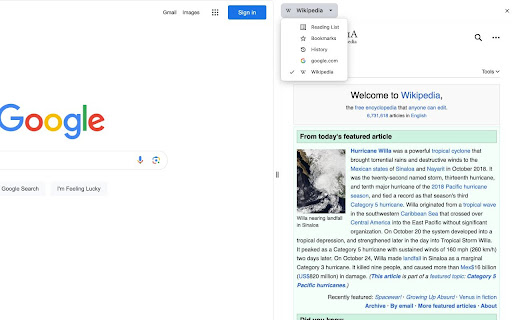

The Free Encyclopedia side panel The largest free encyclopedia in your sidebar! Quick search and convenient viewing in all tabs of one browser window. Search function in the context menu. The extension is available in the side panel menu. DISCLAIMER: This is not an official Wikipedia extension designed to improve usability

Wikipedia Search
Allows users to quickly search highlighted items on Wikipedia. Inspired by the "search Wikipedia" function on the kindle mobile… Allows users to quickly search highlighted items on Wikipedia. Inspired by the "search Wikipedia" function on the kindle mobile app.

PageOne
Collects and organizes your browsing history into annotable, portable, topic-based tree lists in Markdown If you feel the same during web browsing: - Piling lots of browser tabs and hesitate to close them? - Easily get distracted by irrelevant links on a web page? PageOne automatically collects and organizes your browsing history into tree lists, according to topics you set up. You can then review, annotate and export them into text-based Markdown format. - To help you stay in a single tab -- Your browsing history is organized into a tree list for easy tracking and jumping among links. - To help you get focused -- Reminds you the topic you set up before browsing/searching. - Annotate links on the organized browsing history list -- and export them to free Joplin notebooks as markdown! 1. Find PageOne light bulb icon on browser extension toolbar. 2. Click the icon and in the popup, input your topic or idea. Alternatively, open a new tab to show the same PageOne page. 3. Start searching/browsing under the topic by clicking the Google button. 4. Check back the browsing history tree anytime by clicking the light bulb icon. You can then add notes here or mark some history items as done. Visit our website for tutorial videos: https://sites.google.com/view/hyperfocal/pageone/en 1. Feel no worry browsing within a single page You can easily review your browsing history as a popup page by clicking the extension icon (a lightbulb) on browser. The browsing dependency are traced and well-organized into tree lists. 3. A list for a topic Allows to easily set and switch between topics. Let PageOne the default page to help you set a topic before browsing. (Or turn this off in Options pane). 4. Your search term as the topic Use the Google button to set topic and search at the same time. ☑ Check as done. Consider a browsing list as a TODO list for review. ☆ Star and highlight a URL. ✎ Take whatever note you want. 6. Sync with the free note taking app (Joplin) Freely edit your browsing history as a note in Markdown. One topic, one note. Allows both sync forward and backward! Joplin link: https://joplinapp.org/ 7. Use TabGroup to open multiple topics at the same time. 8. Dock as side-panel Turn on/off side-panel view in options page. ☆ Release notes: v1.1.4: - Search topic through the main topic inputbox. - Directly edit the tree lists in the Markdown view. v1.2: - With the new Chrome feature -- Side panel, PageOne can dock on the web browser. Just select PageOne from the drop-down list of the side panel. - Integrate with Chrome's tab groups -- your topic name is group name. With this you can keep topics in opened tabs and switch among them quickly. v1.3: - Improve tracking for history tree construction. - Add switch between pop-up or side-panel view.

Picture in picture by NNT
Switch videos into Picture-in-Picture (PiP) mode, allowing you to freely browse the internet or work on other web pages. Picture-in-Picture by NNT is an innovative browser extension designed to enhance your online video viewing experience. It provides a convenient feature to switch videos into Picture-in-Picture (PiP) mode, allowing you to freely browse the internet or work on other web pages without interrupting your video playback. 1. Picture-in-Picture mode: Effortlessly switch any video playing in your browser to Picture-in-Picture mode. Simply click the designated button or use a hotkey, and the video instantly becomes a floating window on top of all browser windows. 2. Customizable size and position: You can resize the floating video and move it to any location on your screen, ensuring maximum viewing comfort even when you have multiple tabs and windows open. 3. Compatibility with popular video hosting platforms: The extension works seamlessly with most popular video hosting and streaming services, allowing you to enjoy PiP mode on your favorite platforms. 4. Easy navigation: With this extension, you can freely browse the web, check your emails, read the news, and simultaneously watch videos in a convenient floating window. This makes your online life more versatile and productive. 5. Intuitive interface: Picture-in-Picture by NNT is designed with a focus on simplicity and user-friendliness. All functions are easily accessible through a small floating control panel. Don't miss the opportunity to enhance your online video viewing experience! Install Picture-in-Picture by NNT and enjoy comfortable content viewing without limitations. This extension will become your reliable companion for organizing work and entertainment while watching videos online.

Video volume booster by NNT
Video volume control with the ability to increase it up to 600 percent. Video volume control with the ability to increase it up to 600 percent! 1. Increases the volume up to 600 percent. 2. Preserves website volume settings and automatically applies them upon revisiting the page. 3. Does not block fullscreen mode for videos. 4. Hotkeys for more convenient control.
