
djgkfcmfplmfkpbmmomlaahlpglpjdpl
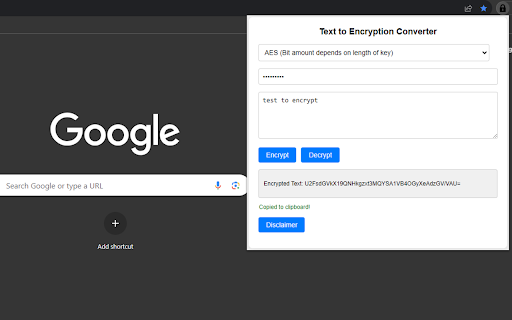


Encrypt/decrypt text with a key into AES, SHA, MD5, Binary, Base64 and more! Do you want to encrypt or decrypt text using AES, MD5, SHA-256, DES? This is the perfect extension for that! Just select the encryption type, input your key and the text, and select encrypt or decrypt! If you wish to just translate to binary or base64, then you're covered by this extension! Please take note of the disclaimer in the extensions popup.

Media File Viewer
Detect file types and open media with the correct MIME type on document sites. Media File Viewer – See documents and media with the correct type When you open files on large document sites, links often have wrong or generic types (like “application/octet-stream”). The browser then doesn’t know if something is a text file, image, or video, so it may download it, show a blank page, or fail to play it. Media File Viewer fixes that. It detects the real file type by reading the file’s content (magic bytes), then lets you open or preview the file with the correct type so you can view or play it properly. 1. Detect the real file type Click “Determine File Type of This Page” while you’re on a file or document page. The extension fetches the beginning of the file and checks its magic-byte signature (the same idea as the file command). It doesn’t rely only on the URL or the server’s Content-Type, so you get the actual format. 2. See what was detected You get: Detected MIME type (e.g. video/quicktime, audio/mp4) How it was detected (e.g. “Magic bytes (Content-Type was generic)”) HTTP status code and file size So you know what the file is before opening it. 3. Open with the correct type Use “Open in New Tab with Correct Type.” The extension rewrites the URL to use the correct file extension and opens it in a new tab. The server then typically serves it with the right MIME type, so the browser can display or play it instead of treating it as a generic download. 4. MOV handling Many document sites host .mov (QuickTime) files. Browsers usually can’t play them directly in a tab. The extension: Warns you when the detected type is QuickTime and explains that it can’t be shown in a normal tab. Suggests using the Video Preview tool or opening in a new tab to download and play in another app. 5. Video preview For video links, you can paste the URL into the “Video Preview” area and click “Load Video.” The extension fetches the file (using the page’s context so it works with the site’s access rules), then: If the format is natively playable, it plays in the built-in player. For MOV, it can convert the file in the browser (using FFmpeg.wasm) so you can preview it inside the extension without leaving the page. That way you can quickly check video content without downloading or opening external apps. Why install it Accuracy – Type is determined from file content, not from misleading URLs or generic server headers. Fewer failed opens – You see the real type first and open with the right extension, so the browser is more likely to display or play the file. Transparency – You see MIME type, detection method, status code, and size before opening anything. Video-friendly – file is detected and explained, and the Video Preview (with optional conversion) lets you watch videos in the extension. Scoped and simple – It only runs on the two supported document sites, so there’s no broad access to the rest of your browsing. If you often work with documents and media on justice.gov and run into wrong or generic file types, Media File Viewer is built to make viewing and playback reliable and predictable. How to use Go to a file or document URL on one of the supported sites. Open the extension popup and click “Determine File Type of This Page.” Check the detected MIME type and details. Use “Open in New Tab with Correct Type” to open the file with the correct extension, or use Video Preview and paste the URL to load and (if needed) convert and play video in the popup.

DataShielder HSM PGP
Sign, verify, encrypt and decrypt directly from your web browser Patented advanced segmented key automatic encryption system provides one-click data and message protection. This tool integrates seamlessly with both civilian and military applications, offering robust PGP encryption in AES-256. - One-click encryption: The patented segmented key system encrypts sensitive data with a single click, facilitating what is traditionally a complex process. - Patented Segmented Key Authentication: Features an innovative authentication system implemented through segmented keys, allowing users to combine segments flexibly. This approach improves the security, versatility, and simplicity of cryptographic operations. - Complete Key Pair Management: Includes a path manager for segmented key storage, allowing the use of multiple offline and/or online storage media, thus providing a high level of resilience and unlimited storage options without compromising security. - Serverless and database-free: Operates in real-time independently without the need for servers or databases, ensuring that all data remains under the user's control and significantly reducing potential security vulnerabilities. - Use of a secure AES-256 PGP key generator, with password protection and expiration date in ASC format. - Allows for outsourced use, ensuring compatibility with encryption and signature services that support ASC and/or P7S formats such as email client services. - Solution translated into 13 languages, ensuring a scalable and global deployment, adaptable to various technological environments. - Has a very low learning curve, facilitating its adoption across different technological contexts. - This solution also has a system of automatic encryption of data without clicking by simply dragging a file into a dedicated window of the extension. - Instantly encrypts messages via user-defined segmented keys, without ever saving the message in the clear, which is automatically replaced by the encrypted message. A "send email" button is also present next to the copy button, launching the default email system on the computer's operating system, automatically including the encrypted message. - Advanced Key Sharing for Encryption and Signing: Uses the PGP standard to secure encryption keys (AES-256, segmented keys, signing keys) with a password requiring a minimum of 12 characters, allowing users to securely share their keys using any means of communication. This provides a high level of flexibility and interoperability. - Opacity Control System for Reading and Writing: Combats prying eyes by requiring proximity to within inches of the screen to read or write. - Cold Wallet HSM PGP Seed Phrase: Integrates BIP39 technology to create and manage secure mnemonic phrases for crypto wallets, ensuring the security of your crypto assets even in offline environments. - Segmented Key Manager: Effectively manages encryption keys in a segmented manner, enabling high security standards and flexible key usage without compromising security. License and Installation: DataShielder HSM PGP requires a valid DataShielder Engine license, available from Fullsecure Andorra. Installation is required via the supplied software compatible with Windows and Apple systems: Download for Microsoft: https://freemindtronic.com/support/download/#datashielder-engine-microsoft Download for Apple: https://freemindtronic.com/support/download/#datashielder-engine-apple - "storage": This permission allows the DataShielder NFC HSM extension to save and retrieve local data on the user's computer. It is essential for preserving user preferences, settings, or any other information that the extension needs to maintain between sessions. - "nativeMessaging": This permission enables the DataShielder NFC HSM extension to communicate with native programs installed on the user's computer. It is often used to integrate functionalities that require interactions with the operating system or external applications. DataShielder HSM PGP offers security features that meet the demanding needs of modern cybersecurity environments, making it the first choice for those who are serious about protecting their sensitive data, communications, and digital assets.

Progress Tracker for Google Slides™
Tracks your progress through your Google Slides™ presentation to ensure your meeting stays on track. Now, you'll be able to set your meeting start and end time, and know if you're on track based on how far you are through your presentation slides with an unobtrusive floating indicator at the bottom-right of the screen. Keep presentations on track, time-box discussions appropriately, and ensure that you're able to cover everything you need to in the allotted time! 🟥 Your meeting is off track. 🟨 Your meeting is within one slide of being on track. 🟩 Your meeting is on track. Nicely done!

PCK Encrypt Decrypt
PCK Encrypt Decrypt is an encryption and decryption tool. It supports (1) Linux as a shell script, (2) Windows as a powershell script, and (3) has a Chrome Extension to run on web browser. It can encrypt and decrypt part of a text file. This is the Chrome Extension of PCK Encrypt Decrypt. https://github.com/philipckwan/pck_encrypt_decrypt/tree/main/ce-pck_encrypt_decrypt
