
ikcokfkfejahfhhidkgfmkllgghbbgon
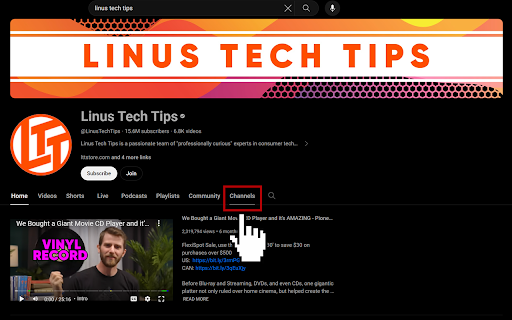
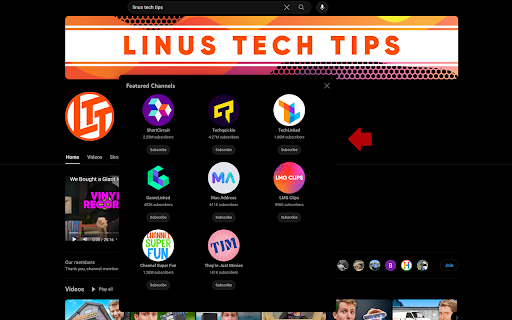
An alternative to the YouTube 'Channels' tab that was removed by YouTube. Missing the 'Channels' tab on YouTube channel pages? Look no further, this extension offers an alternative to bring this tab back! 🤩 👀 Instantly view all channels added by a YouTuber with just one click. 🚫 No more hassle of scrolling to find the 'Channels' section. 🛈 Background YouTube removed the 'Channels' and 'About' tabs from all channel pages in November 2023. Instead, YouTube channels can now showcase channels by adding them as a section on their homepage. Please note that this extension currently only works on the 'Home' tab for YouTube channels that have added this 'Channels' section.

Adblock for Youtube™
✓ Permissions: like common ad-blocking extensions we do need default permissions on every website to remove ads or popups for example on embedded videos and Youtube itself. ⓘ About Adblock for Youtube™ is a content filtering and ad blocking browser extension which blocks all ads on Youtube™. It allows users to prevent page elements, such as advertisements, from being displayed. Banner, Ad-Clips or even preroll ads you usually see before the actual video on Youtube are blocked by this extension. Features: + blocks ads, banner and popups + blocking of ads on external sites which loads Youtube.com + prevent preroll ads from loading on Youtube.com + you can also remove annotations from videos and musics (see options page). + loads videos and YouTube.com website faster. The technology is simply based on adblocking filterlists which blocks external ad urls on Youtube. We do not change anything on the website itself. Adblock for Youtube boosts the performance to load websites (without ads and tracking) It is free to download and use!

Remove YouTube™ Tab Number
Removes the number of notifications in parentheses that YouTube displays on tabs Would you prefer not to have your number of YouTube™ notifications on every YouTube™ tab? Do all of your YouTube™ tabs look the same when you have many tabs open? Don't want the number included in your bookmarks or saved links? Is it information that you don't need to be reminded about? If so, this simple Chrome extension will dynamically remove the number (and the parentheses) from any new YouTube™ tabs that you open after installing it. I'm finding it useful while there (currently) isn't an official setting to turn this number off. I've uploaded it here in case anyone else was also looking for the "off switch". Hope it helps.

Random YouTube Video
Customize, shuffle and play random videos from any YouTube channel. Do you have a favourite YouTube channel, but don't know what to watch? This extension is for you! The "Random YouTube Video" extension adds a "Shuffle" button to YouTube channel, video and shorts pages, which will play a truly random video from the current channel. Use the extension's popup to customize your experience even further! Level up your YouTube experience with these features: ✔ A new shuffle button that uses the native look and feel of YouTube - including dark mode - so it fits right in with the YouTube interface you're used to! ✔ Utilize a wide range of options to individualize your experience, such as ignoring shorts, only shuffling from the most recent videos or shuffling multiple videos into a playlist! ✔ A smart, 100% anonymous backend technology ensures that popular channels shuffle as fast as possible, no matter how many video uploads they have! ✔ ...and much more! Do you want to support the extension's development or say thank you? Consider donating or sponsoring the project on GitHub: https://ko-fi.com/nikkelm https://github.com/sponsors/NikkelM Do you have questions or feedback? Feel free to open an issue on the project's GitHub page: https://github.com/NikkelM/Random-YouTube-Video Latest changes: v3.1.14 - Added "before" filter options: You can now shuffle from videos uploaded before a given date or video ID, in addition to the existing "after" filters. - Fixed the shuffle button missing styling after a recent YouTube UI update. v3.1.13 - Added accessibility options: Under "Advanced Settings", choose to not show shuffle buttons on video or channel pages. - Added some smoothed animations to the popup when expanding and collapsing the advanced settings. v3.1.12 - Removed "tabs" permission from the extension, enhancing privacy. v3.1.11 - Changed the default settings to not open shuffled videos in a new tab. - Moved the informative text about remaining YouTube API quota to the advanced settings menu. - Updated the welcome page for a better experience. v3.1.10 - News page will no longer open after updating from v3.1.5 or an earlier version. v3.1.9 - Temporarily disabled the news feature. v3.1.8 - The button's tooltip may now show additional information on the shuffle status. - The extension will now show that a shuffle is still running when navigating within a channel. - Fixed a bug where an active shuffle would continue in the background when navigating to a different channel. - Fixed a bug where clicking the shuffle button while the shuffle was running would start a second shuffle at the same time. - Fixed a bug where the shuffle button would sometimes not be added to the page if it was opened directly from a new tab. - Fixed a bug where the playlist created by the extension would sometimes not be renamed correctly. - Fixed an animation bug when ignoring shorts and shuffling a channel with many videos from a shorts page. - Fixed the shuffle button not being added to the channel page if the browser is using a new YouTube UI. You can always view the full Changelog here: https://github.com/NikkelM/Random-YouTube-Video/blob/main/CHANGELOG.md

YouTube Rabbit Hole Sealant
Stop falling into YouTube rabbit holes! Hides YouTube's 'suggested videos' sidebar and the comment section. This Chrome extension hides some of YouTube's most attention-grabbing, time-wasting components: the 'suggested videos' sidebar and the comment section. Clicking the extension icon allows you to quickly toggle the following options: • Show or hide the 'suggested videos' sidebar • Show or hide the comment section
