
ijgfifaapciiglebbgbnbbafpkehjhdp
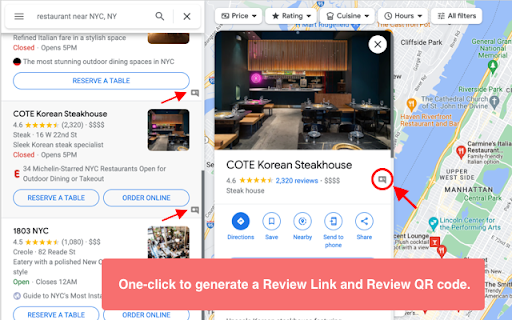


Generate Google review link and QR Code, then share the review URL and QR Code with your customers to grow your Google reviews. One-click to generate the Google review link from Google Maps, where customers can write reviews. Google reviews are a great way to show potential customers that you’re a trusted business. ✅ Generate a Google Review link, then share the link on social media like Twitter, Facebook etc. ✅ Generate a Google Review QR Code and print it on your menus, posters, checkout counters, receipts and other marketing materials, with a scannable QR code, customers can use their smartphone cameras to quickly look up your Google My Business page and submit photos and reviews of their experience.

GMB Page - CID & PlaceID Finder
This plugin will help you to find the CID & PlaceID of the GMB page. Designed in mind for Google Street View publishers, 'GMB Page - CID & PlaceID Finder' is an essential Chrome plugin that simplifies the process of identifying the CID (Customer ID) and PlaceID of businesses on Google Maps, for the case when you can not create a tour in GoThru because the Google Map business search function does not return the business you are looking for.

SEO Minion
SEO Minion helps you in your daily SEO tasks such as On-Page SEO analysis, Broken Link Checking, SERP Preview and more The tool helps you with the following tasks - (1) Analyze On-Page SEO - analyze the HTML of any webpage and view useful information that will help you optimize the On-Page SEO as well as alert you to any issues. (2) Highlight All Links - quickly see all the links (internal & external) for any webpage (3) Check Broken Links - check every link on a webpage and get a report of any links with issues (5) SERP Preview - preview your website on a real Google search result and update this in real time (6) Google search location simulator - view non-personalized google search results for one keyword on two different location/language combination. (8) HTML v/s DOM - analyze the differences between the HTML source code and the rendered DOM to check if your JS library is causing any SEO related issue (9) Analyze Structured Data - analyze the structured data on the webpage We add features based on user feedback. If you'd like us to add any new features, please email us at akash@seominion.com. You can view the change-log for every version update at https://seominion.com/news

Google Review Link Generator
This extension helps you easily find your Google place id and generate a Google review link for your business on Google Maps. Find the place id and generate the Google review link for any business on Google Maps. Follow the steps below in order to obtain your Google review link: 1. Find your business on Google 2. Click on the ReviewsOnMyWebsite extension 3. Copy your Google review link and share it with your customers

PlePer Local SEO Tools
Useful shortcuts and quick analyzes for Local SEO`s The extension offers collection of tools and shortcuts for Local SEO's. With this extension you get detailed information for every google my business listing in Maps, Local Finder, Knowledge panel and making four different analysis based on maps search results. Listing details returned by the extension: Name / Address / Phone / All Categories / Verification status / Attributes / Coordinates / All important Google ID’s (CID, Place ID, Knowledge Graph ID) / Export function / Pin function / Links to popular business directories, search engines, different website analysis tools (Speed Test / Mobile Friendly Test / Whois information / Domain backlink analysis etc ). For US listing direct link to corespondig Secretary of state business lookup website. Four different analyzes when searching in Maps: - Categories - top categories used, average categories per listing, max categories per listing; - Reviews - average rating and reviews, maximum/minimum rating and reviews, listings without reviews; - Attributes - all the attributes used; - Business Hours - when business are open and the average business hours; Pin function - the listing information on any website with keyboard combination (CTRL + ALT + E). Easiest way to compare / enter data anywhere. The chrome extension is plug and play - no settings or configuration needed! Instructions: 1. Install the extension 2. Open in new tab google maps 3. Make a search and you will see the analyses. 4. Select any listing from the results and you will see the details.
