
ijfkmffnodjkcllhmbimamggiobmicmh

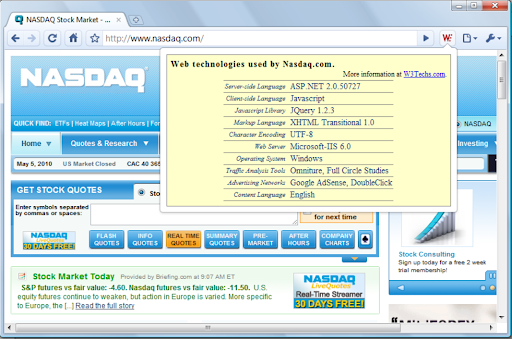
Shows which web technologies the current site is using. The W3Techs extension shows with one mouse click which web technologies the current site is using. The technologies shown include content management systems, server-side and client-side programming languages, JavaScript libraries, web servers, operating systems, web hosting providers, DNS server providers, email server providers, content delivery networks, SSL certificate providers, traffic analysis tools, advertising networks and more. Additionally, you get background information and warnings on potential quality problems of the site. Version 1.3 ensures compatibility with future Chrome versions.

IP Address and Domain Information
The Ultimate online investigation tool! See detailed information about every IP Address, Domain Name and Provider. This extension displays detailed information about the current website. The information can be used for online investigation and SEO purposes. See IP info like (IPv4 and IPv6): location, DNS, whois data, routing, domain neighbors, blacklists and ASN information. Including a shortcut to Your public IP Address (myIP info). See domain info like: Alexa en Quantcast ranking, DMOZ info, social media activity, WOT ranking, whois data and PageRank of every domain. See provider info like: BGP, IPv4 subnets, IPv6 subnets, connected providers (peers), hosted nameservers, hosted domains, number of spam hosts, bogon subnets and whois data. ******************* This extension is also available for Firefox, Opera and Safari. https://addons.mozilla.org/en-US/firefox/addon/ip-address-and-domain-info/ https://addons.opera.com/extensions/details/ip-address-and-domain-information/ http://www.macupdate.com/app/mac/39018/ip-address-information

Checkbot: SEO, Web Speed & Security Tester 🚀
Checkbot is a powerful website testing tool that tells you how to improve the SEO, page speed and security of your website. Checkbot crawls 100s of pages at the same time checking for 50+ common website problems based on web best practices recommended by Google and Mozilla. These checks include: 📊 SEO TESTS: Broken link checker, missing or long page titles/descriptions/headings, duplicate page content, HTML/CSS/JavaScript validator, canonical URLs, image ALT tags, robots.txt, URL naming, mobile friendly pages, deprecated web features, 404 pages, meta tags, temporary/meta redirects, thin pages & sitemap setup. 🚀 PAGE SPEED TESTS: Minification, network compression, resource caching, render blocking or duplicate CSS/JavaScript, excessive inlining of CSS/JavaScript, redirecting URLs & redirect chains. 🔒 WEB SECURITY TESTS: Security headers, HTTPS and mixed content checker, HSTS with preloading, content sniffing, iframe restrictions & password forms security. See https://www.checkbot.io/guide/ for the 50+ web best practices Checkbot will test for you to help make your site faster, more secure and rank higher in search results. 🏆 HubSpot, Best Chrome Extensions 2021 - "Checkbot combines technical SEO with modern security to help you analyze both how safe and how optimized a website is for search engines" https://blog.hubspot.com/marketing/best-chrome-extensions 🏆 Einstein Marketer, "11 Must-Have Google Chrome Extensions (for Marketers, Entrepreneurs and Businesses)...If you own a website, this Chrome extension is going to help you supercharge your load speed, rank higher in Google and improve the security" https://www.einsteinmarketer.com/chrome-extensions-marketers/ 🏆 Product Hunt, #3 Product of the Day award https://www.producthunt.com/posts/checkbot-for-chrome The free version lets you check unlimited small websites as often as you want but you need to upgrade to run website audits with these features: - Advanced crawl settings to exclude pages by URL pattern, type, folder and subdomain See https://www.checkbot.io/#pricing for more. Follow Checkbot for updates: Visit https://www.checkbot.io/faq/ for support, answers to frequently asked questions and to give feedback. Checkbot will ask for the "Read and change all your data..." permission for the sole purpose of crawling and testing the websites you ask Checkbot to check. This is currently the most restrictive permission we can ask for that allows this and Google has also reviewed this extension to check it follows best practices on requesting permissions. Your regular browsing will be unaffected: Checkbot does not observe or modify anything outside of the Checkbot tab. If you still have concerns, you can opt to create a new Chrome user profile to install Checkbot inside of to isolate it from your regular browsing.

SEO Analysis & Website Review by WooRank
Instant SEO analysis and website reviews for SEO, mobile, usability and social media. The freshest data when and where you want it. SEO Analysis and Website Review by WooRank is a free Chrome extension that instantly provides a deep review of a domain’s on and off-site site data to give a complete picture of a website’s optimization. The SEO Analysis and Website Review extension will analyze the website you’re currently visiting in your browser and generate a clear, actionable report to highlight any issues impacting the reviewed site's accessibility, readability, usability and findability. The WooRank data available in the extension will help you improve your own website’s marketing performance. You can also review someone else’s website to view a competitor’s backlinks or see what technology a potential sales lead is using on their site. Data analyzed by the extension includes: - Search engine optimization - Structured data - Mobile-friendliness - Usability - Website technologies - Backlinks - Social media - Website traffic You can refresh the data in your website’s SEO analysis, so your website reviews will always be accurate, up to date and using the freshest data. The analysis that comes from the WooRank extension is perfect for: - Website owners who want to improve their own sites - In-house marketers optimizing a site for a campaign - Freelancers and agencies working on client sites - Sales teams looking to learn more about a prospect’s website for a pitch - Anyone doing research on competitors - Developers who want to validate their work The extension is available to anyone to use for free. There’s no account sign up or activation or permissions required. WooRank takes your privacy seriously, the only data it sees is the URL of the website you’re currently viewing in your browser the moment you click the extension. The SEO Analysis and Website Review extension by WooRank doesn’t spy on users to collect any data on usage, browser history or track their movements around the web. And since WooRank only read websites, the extension can’t add any badges, icons, banners or anything else to a website. So no impact on anyone’s load times. How to Install and Use the SEO Analysis and Website Review Extension by WooRank: Installing and using the extension is super fast and easy. In the chrome web store, simply click the “Add to Chrome” button in the upper right corner and then click the “Add extension” button that pops up. To analyze a website using the extension, click on the WooRank icon in your browser. If we’ve already reviewed the website you’ll immediately access the domain’s data. If we haven’t seen this domain before, just click the “Free review” button that pops up. Your report will be available in a matter of seconds.

Wattspeed
Wattspeed is a browser extension that offers powerful web technologies insights each time you open a new web page. Get powerful web technologies insights each time you open a new web page. - Mobile-friendly test - Google Lighthouse scores - Core Web Vitals for the last 28 days - Security audit - HTML5 validation - Accessibility checker - Mixed content & JSON-LD structured data snippet detection and more... - What web server is behind the URL? - What Analytics tool is used to get visitor insights? - What Marketing or Chat tools are used to convert the visitors? - What Advertising network is running in order to sell ads? - What CMS powers the forum, blog or the online shop? - What CSS and JS frameworks are used to build that user interface?
