
ijajhcdgklelnpmjodhfhjooiljfhdpl
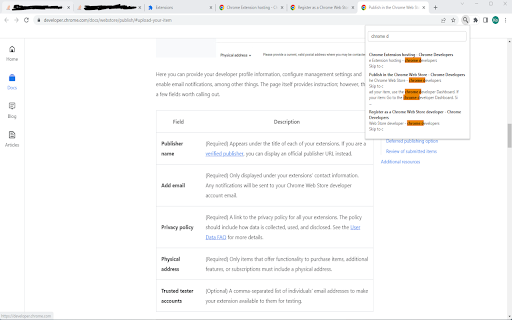
This plugin enables you to fulltext-supersearch all your tabs. Find more on https://gitlab.com/Schuemann/chrome-supersearch This plugin enables you to fulltext-supersearch all tabs in chrome. Open the extension with shortkeys: windows: Alt+Shift+F mac: Command+Shift+F chromeos: Alt+Shift+F linux: Alt+Shift+F Start typing and see the first 3 results from each tab matching your search. Select your result by mouse, tab-key or arrow-keys to jump to the tab. If you like my work, you can buy me a coffee via: Paypal: https://paypal.me/SchuemannSolutions

Search all Tabs
A powerful offline indexing and searching tool to find matching terms in tab's title and content This extension provides a powerful content searching tool for you to easily find the relevant tab among many open ones. Like all search engines, this extension supports search operators like "AND" and "OR". You can use this extension to find the relevant content when there are many open tabs like a normal tab manager extension. It is also possible to index local files as well. This extension supports parsing content from around 30 languages and displays a preview (snippet) for the matching result. You can click on each search entry to directly activate the container tab. Notes: 1. Make sure to read the FAQs page to get yourself familiar with the search operators and keywords. 2. This extension works offline and stores the indexing database in your browser memory. There is no server-side interaction whatsoever. 3. This extension supports two different indexing engines: Xapian (a C++ engine) and Lunr (a pure JavaScript engine). Features: 1. Copy all URLs to the user's clipboard 2. Group all matched tab as a new window 3. Keyboard-only controls 4. Supports dark theme 5. Do not search on duplicated tabs 6. Search inside PDF tabs 7. Supports deep search: display more matching snippets for a single tab 8. Close the selected tabs from the search results

Ctrl-F Plus: Ctrl + F Search Across All Tabs
Find words and phrases across ALL your open tabs! 🔍 Ctrl-F Plus enables cross-tab search functionality in a browser window by extending the browser's native Ctrl + F Find Feature (Cmd + F on Mac). Now you can find a specific word or phrase on any of your browser tabs without having to search each tab separately. - Extended Native Browser Search : Enhances the traditional 'Ctrl F' with powerful multi-tab capabilities. - All-Tab Search: No more switching between tabs. Find what you're looking for across all open tabs in your current window. - Intuitive Interface: Designed to look and feel like the browser's native find function, ensuring a seamless user experience. - Quick Activation: Simply use the `Ctrl + Shift + F` keyboard command to activate the search. - Professionals: Seamlessly search for client names or keywords across various reports. ⌨ KEYBOARD SHORTCUT SETUP FOR CTRL-F PLUS: 1. Install "Ctrl-F Plus" in Chrome. 2. Pin the extension: - Click the puzzle piece icon (Extensions) in Chrome's top-right. - Locate "Ctrl-F Plus" and click its pin icon. 3. Right-click the "Ctrl-F Plus" icon and select "Set Keyboard Shortcut". 4. Find "Ctrl-F Plus" in the list. 5. Set the activation shortcut: - Windows, Linux, ChromeOS: `Ctrl` + `Shift` + `F`. - Mac: `⌘` + `Shift` + `F` (or `Command` + `Shift` + `F`). 6. Close the window, and you're ready! Use the shortcut for multi-tab searches anytime. - If you find our extension helpful, please consider leaving a 5-star 🌟 review and sharing your experience. Your support helps us grow and improve! - Consider supporting our team with a donation at: https://opencollective.com/ctrl-f-plus-chrome-extension - Encounter an issue or have an idea? If you have any questions or feedback, we’d love to hear from you. Let us know at support@ctrl-f.plus.

Better Ctrl+F
An enhanced version of the default Ctrl+F. Better Ctrl+F is a Chrome extension that is an enhanced version of the default Ctrl+F, providing a more flexible search experience within web pages. - Multi-term Search: Simultaneously search for up to 5 different terms - Custom Highlighting: Personalize colors for each search term and focused result - Advanced Search Options: Toggle case-sensitive and diacritics-sensitive searches - Efficient Navigation: Quickly move through search results using intuitive controls - Theme Options: Choose between light and dark mode for your preference - Persistent Settings: Your preferences are saved across browser sessions If you encounter any issues or have suggestions for improvement, please submit them through the GitHub Issues page. Your feedback is appreciated!

Findr | A better Ctrl + F
Like Ctrl + F, but with the features you wish it had Similar to the "Find on page" (Ctrl + F) tool within Chrome, this extension allows users to enter search terms and see the matching text on the current webpage highlighted. The difference is, this extension supports many features that the "Find on page" tool does not such as: Why use this extension over other similar extensions? This extension checks for matches within HTML elements that other extensions don't support like: Q: How do I open this extension? A: You can open this extension by clicking on the Extensions menu in the toolbar of your browser and then clicking "Findr", or by using the quick key: Ctrl + Shift + F Q: What do I enter in the search box? A: You can choose to enter plain text like you would with Chrome's "Find on page" tool, or you can enter regular expressions. This extension supports JavaScript regular expressions. For more information on writing JavaScript regular expression please visit their documentation: https://developer.mozilla.org/en-US/docs/Web/JavaScript/Guide/Regular_expressions#writing_a_regular_expression_pattern Q: Why aren't matching terms being highlighted? A: If there are matching terms on the webpage that are not being highlighted, please reload the webpage and try again. If the issue persists please reach out to findr.extension@gmail.com
