
gplkloamjcmhfnchiefogpjijhiehpij
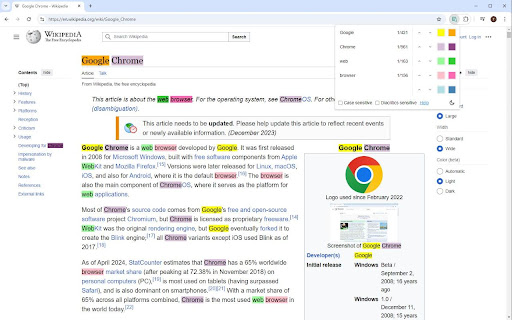

An enhanced version of the default Ctrl+F. Better Ctrl+F is a Chrome extension that is an enhanced version of the default Ctrl+F, providing a more flexible search experience within web pages. - Multi-term Search: Simultaneously search for up to 5 different terms - Custom Highlighting: Personalize colors for each search term and focused result - Advanced Search Options: Toggle case-sensitive and diacritics-sensitive searches - Efficient Navigation: Quickly move through search results using intuitive controls - Theme Options: Choose between light and dark mode for your preference - Persistent Settings: Your preferences are saved across browser sessions If you encounter any issues or have suggestions for improvement, please submit them through the GitHub Issues page. Your feedback is appreciated!

Ctrl-F Plus: Ctrl + F Search Across All Tabs
Find words and phrases across ALL your open tabs! 🔍 Ctrl-F Plus enables cross-tab search functionality in a browser window by extending the browser's native Ctrl + F Find Feature (Cmd + F on Mac). Now you can find a specific word or phrase on any of your browser tabs without having to search each tab separately. - Extended Native Browser Search : Enhances the traditional 'Ctrl F' with powerful multi-tab capabilities. - All-Tab Search: No more switching between tabs. Find what you're looking for across all open tabs in your current window. - Intuitive Interface: Designed to look and feel like the browser's native find function, ensuring a seamless user experience. - Quick Activation: Simply use the `Ctrl + Shift + F` keyboard command to activate the search. - Professionals: Seamlessly search for client names or keywords across various reports. ⌨ KEYBOARD SHORTCUT SETUP FOR CTRL-F PLUS: 1. Install "Ctrl-F Plus" in Chrome. 2. Pin the extension: - Click the puzzle piece icon (Extensions) in Chrome's top-right. - Locate "Ctrl-F Plus" and click its pin icon. 3. Right-click the "Ctrl-F Plus" icon and select "Set Keyboard Shortcut". 4. Find "Ctrl-F Plus" in the list. 5. Set the activation shortcut: - Windows, Linux, ChromeOS: `Ctrl` + `Shift` + `F`. - Mac: `⌘` + `Shift` + `F` (or `Command` + `Shift` + `F`). 6. Close the window, and you're ready! Use the shortcut for multi-tab searches anytime. - If you find our extension helpful, please consider leaving a 5-star 🌟 review and sharing your experience. Your support helps us grow and improve! - Consider supporting our team with a donation at: https://opencollective.com/ctrl-f-plus-chrome-extension - Encounter an issue or have an idea? If you have any questions or feedback, we’d love to hear from you. Let us know at support@ctrl-f.plus.

Search All Tabs (Simple but Fast)
Search the title and body content of all open tabs for specific text. Performs simple but fast text searches across every open tab's title and body content (if extension has permission to do so). Features: Case-sensitive and case-insensitive search. Restores tabs that have been discarded by the browser due to inactivity. - Discarded tabs cannot be searched. - Activates each tab instead of reloading the tab, so that previous state is retained. Limitations: Cannot search tabs with specific URLs that are restricted by the browser. This typically includes "about..." and "chrome..." pages and the pages from the browser's add-on/web store. Please send feedback, feature requests, and ideas to the GitHub page (https://github.com/ericchase/addon--search-all-tabs-simple-but-fast/issues). This is a Manifest V3 extension (https://developer.chrome.com/docs/extensions/develop/migrate).

Ctrl+F AI
Supercharge Your Browsing Experience. Supercharge your web browsing experience with Ctrl+F AI, the ultimate search enhancement tool for your browser! Tired of endless scrolling and basic text searches? Ctrl+F AI revolutionizes how you find information on web pages. This powerful extension combines traditional search functionality with cutting-edge AI technology to deliver an unparalleled search experience. Key features: 1. AI-Powered Question Answering: Go beyond simple keyword matching. Chat with the website, and let our advanced AI provide you with accurate, context-aware answers. 2. Easy Data Extraction: Easily extract the content on the website to JSON or CSV format without leaving the tab. 3. Seamless Integration: Activate Ctrl+F AI with the familiar Ctrl+F (or Cmd+F) shortcut, making it a natural part of your browsing workflow. 4. User-Friendly Interface: Our sleek, intuitive design allows for easy navigation between search results and AI-generated answers. 5. Privacy-Focused: Your searches and questions are processed securely, ensuring your browsing data remains private. We don't save any of the content anywhere. It's only passed around to get the answers you're looking for. Whether you're a student researching for an essay, a professional analyzing reports, or just someone who wants to find information faster, Ctrl+F AI is your perfect companion. It saves time, reduces frustration, and helps you extract valuable insights from web content with ease.

Ctrl-F GPT
An extension enabling multiple types of searches for highlighting matches on a web page, in place of Chrome's CTRL+F. Search the information available on a webpage with natural language queries instead of exact string matches, powered by OpenAI models. Match using regular expressions. Include synonyms and antonyms for keywords in search results. Return unexact matches in the webpage with high text similarity. Toggle case sensitivity. Keyboard Shortcuts: ENTER : select next match on page SHIFT+ENTER : select previous match on page
