
lmeapdggiiabkbhbkdcppjnfkcfjhlpo
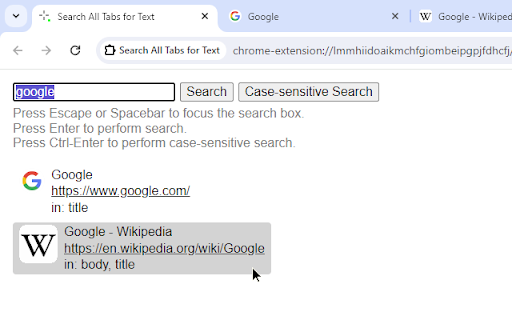
Search the title and body content of all open tabs for specific text. Performs simple but fast text searches across every open tab's title and body content (if extension has permission to do so). Features: Case-sensitive and case-insensitive search. Restores tabs that have been discarded by the browser due to inactivity. - Discarded tabs cannot be searched. - Activates each tab instead of reloading the tab, so that previous state is retained. Limitations: Cannot search tabs with specific URLs that are restricted by the browser. This typically includes "about..." and "chrome..." pages and the pages from the browser's add-on/web store. Please send feedback, feature requests, and ideas to the GitHub page (https://github.com/ericchase/addon--search-all-tabs-simple-but-fast/issues). This is a Manifest V3 extension (https://developer.chrome.com/docs/extensions/develop/migrate).

Ctrl-F Plus: Ctrl + F Search Across All Tabs
Find words and phrases across ALL your open tabs! 🔍 Ctrl-F Plus enables cross-tab search functionality in a browser window by extending the browser's native Ctrl + F Find Feature (Cmd + F on Mac). Now you can find a specific word or phrase on any of your browser tabs without having to search each tab separately. - Extended Native Browser Search : Enhances the traditional 'Ctrl F' with powerful multi-tab capabilities. - All-Tab Search: No more switching between tabs. Find what you're looking for across all open tabs in your current window. - Intuitive Interface: Designed to look and feel like the browser's native find function, ensuring a seamless user experience. - Quick Activation: Simply use the `Ctrl + Shift + F` keyboard command to activate the search. - Professionals: Seamlessly search for client names or keywords across various reports. ⌨ KEYBOARD SHORTCUT SETUP FOR CTRL-F PLUS: 1. Install "Ctrl-F Plus" in Chrome. 2. Pin the extension: - Click the puzzle piece icon (Extensions) in Chrome's top-right. - Locate "Ctrl-F Plus" and click its pin icon. 3. Right-click the "Ctrl-F Plus" icon and select "Set Keyboard Shortcut". 4. Find "Ctrl-F Plus" in the list. 5. Set the activation shortcut: - Windows, Linux, ChromeOS: `Ctrl` + `Shift` + `F`. - Mac: `⌘` + `Shift` + `F` (or `Command` + `Shift` + `F`). 6. Close the window, and you're ready! Use the shortcut for multi-tab searches anytime. - If you find our extension helpful, please consider leaving a 5-star 🌟 review and sharing your experience. Your support helps us grow and improve! - Consider supporting our team with a donation at: https://opencollective.com/ctrl-f-plus-chrome-extension - Encounter an issue or have an idea? If you have any questions or feedback, we’d love to hear from you. Let us know at support@ctrl-f.plus.

Full Text Tabs Forever
Search your full browsing history Search everything you've seen in your browser. Full Text Tabs Forever (FTTF) is a powerhouse tool for navigating your browsing history. Chrome does not let you search the text on pages you've visited, only the URLs/titles, and it deletes your history after a number of months. - **Full-Text Search Capabilities:** The full content of every page you've visited becomes searchable, ensuring that no piece of information ever slips through the cracks. - **Permanent History:** Your digital footprints are yours to keep. Your data is yours, so it should not be removed without your approval. Nothing is deleted automatically. - **Instant indexing:** FTTF creates a search index as you browse, so pages are immediately available for searching right after you land on a page. - **For your eyes only:** Your browsing history is stored locally on your device, and not on any external servers. Beware that if you switch computers your FTTF history will not automatically come with you. It can be exported though. **Who is it for?** Data hoarders like myself that never want to delete anything, and want everything to be searchable. More generally, if you've ever felt limited by the standard history search you should try this out. Chrome extensions have access to the pages you visit, which lets FTTF make an index of the content on any page. When a page loads its content is extracted and indexed. Extracted? Yes, or "distilled" if you prefer. Full web pages are huge and have a lot of information that's not related to the content itself. FTTF will ignore all of that. It acts like "reader mode" to find relevant content on a page and only index that. **Open Source:** This extension is fully open source. You can find the MIT-licensed source code here: https://github.com/iansinnott/full-text-tabs-forever

Extension manager
★ English version ★ 1. Managing extensions in the Chrome side panel. 2. Enable and disable extensions directly from the management interface. 3. Enable or disable multiple extensions at once. View detailed information about extensions such as ID, permissions, status, etc. 4. Remove extensions directly from the management interface.

Ctrl+F AI
Supercharge Your Browsing Experience. Supercharge your web browsing experience with Ctrl+F AI, the ultimate search enhancement tool for your browser! Tired of endless scrolling and basic text searches? Ctrl+F AI revolutionizes how you find information on web pages. This powerful extension combines traditional search functionality with cutting-edge AI technology to deliver an unparalleled search experience. Key features: 1. AI-Powered Question Answering: Go beyond simple keyword matching. Chat with the website, and let our advanced AI provide you with accurate, context-aware answers. 2. Easy Data Extraction: Easily extract the content on the website to JSON or CSV format without leaving the tab. 3. Seamless Integration: Activate Ctrl+F AI with the familiar Ctrl+F (or Cmd+F) shortcut, making it a natural part of your browsing workflow. 4. User-Friendly Interface: Our sleek, intuitive design allows for easy navigation between search results and AI-generated answers. 5. Privacy-Focused: Your searches and questions are processed securely, ensuring your browsing data remains private. We don't save any of the content anywhere. It's only passed around to get the answers you're looking for. Whether you're a student researching for an essay, a professional analyzing reports, or just someone who wants to find information faster, Ctrl+F AI is your perfect companion. It saves time, reduces frustration, and helps you extract valuable insights from web content with ease.
