
ndfnfhnlgoocpbbjjjfmiojdfcgcfomn
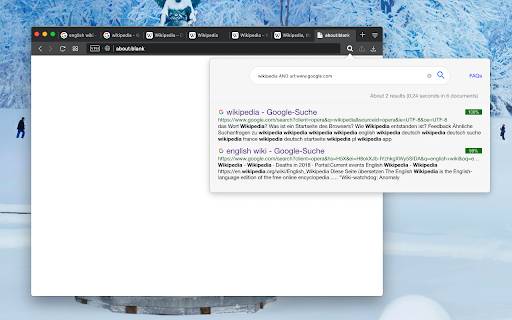
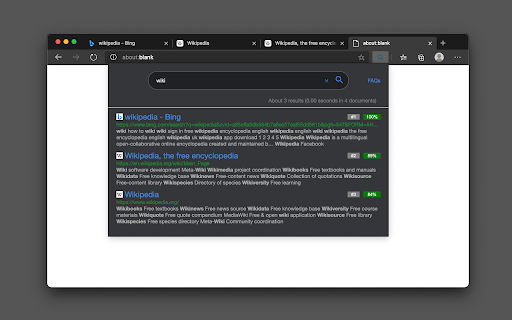


A powerful offline indexing and searching tool to find matching terms in tab's title and content This extension provides a powerful content searching tool for you to easily find the relevant tab among many open ones. Like all search engines, this extension supports search operators like "AND" and "OR". You can use this extension to find the relevant content when there are many open tabs like a normal tab manager extension. It is also possible to index local files as well. This extension supports parsing content from around 30 languages and displays a preview (snippet) for the matching result. You can click on each search entry to directly activate the container tab. Notes: 1. Make sure to read the FAQs page to get yourself familiar with the search operators and keywords. 2. This extension works offline and stores the indexing database in your browser memory. There is no server-side interaction whatsoever. 3. This extension supports two different indexing engines: Xapian (a C++ engine) and Lunr (a pure JavaScript engine). Features: 1. Copy all URLs to the user's clipboard 2. Group all matched tab as a new window 3. Keyboard-only controls 4. Supports dark theme 5. Do not search on duplicated tabs 6. Search inside PDF tabs 7. Supports deep search: display more matching snippets for a single tab 8. Close the selected tabs from the search results

Super Focus Tabs
Quickly find out tab/page. Reduce much more time while working with multiple tabs/pages. + Quickly find out tabs. + Quickly closing current tab by pressing double esc + Quickly find the page in your bookmark/history. + Quickly save the page by using shortcut key. + Quickly go back to previous active tabs by shortcut key. + Quickly go to latest created tab. + Support auto close unused tabs. + Support real time update. + Support page screenshots. + Support list view, thumbnail view and tree view, preview. + Support tabs, bookmarks, history, saved pages. + Support sorting, filtering, grouping, etc. + Support many functions such as saving and closing all tabs, merging windows, closing the duplicated pages, etc. + Many options for you to customize. Reduce much more time while working with chrome. Let try and experience.

Tab Sorter 2
Enhance your browsing experience, one click at a time Introducing TabSorter2 - the browser extension designed to revolutionize the way you manage your tabs! Say goodbye to tab clutter and hello to seamless organization with just one click. 🅴🅵🅵🅾🆁🆃🅻🅴🆂🆂 🆃🅰🅱 🅼🅰🅽🅰🅶🅴🅼🅴🅽🆃 [FREE]: • 💫 Quickly sort your tabs by domain and title for easy navigation. • 🔄 Merge all your windows into one streamlined interface. • 🎲 Spice things up by shuffling your tabs for a bit of fun! • 💥 Collapse: Create groups of domains with more than 2 tabs opened [NEW] 🅰🅳🆅🅰🅽🅲🅴🅳 🅵🅴🅰🆃🆄🆁🅴🆂 🅵🅾🆁 🅿🅾🆆🅴🆁 🆄🆂🅴🆁🆂: • ↔️ Split your window vertically or horizontally to tailor your browsing experience. • 🏷️ Take control with Domain Uniting, perfect for grouping or isolating tabs from the same domain. • 🧠 Optimize your memory usage with Memory Optimization, freezing and unloading tabs to save valuable resources. • 🧹 Say goodbye to clutter with Domain Cleanup, closing all tabs from a specific domain across all windows. • 🚫 Eliminate duplicates with Tab Deduplication for a cleaner browsing experience. 🅲🅾🅼🅱🅰🆃 🆃🅰🅱 🅰🅳🅳🅸🅲🆃🅸🅾🅽: • 🎯 Dive into Focus Mode to eliminate distractions and boost productivity with a clear canvas. • 📚 Easily return to your tabs with Unfocus when you're ready to dive back in. 🅾🆁🅶🅰🅽🅸🆉🅰🆃🅸🅾🅽🅰🅻 🅱🅻🅸🆂🆂 🆆🅸🆃🅷 🆂🆃🅰🅲🅺🅸🅽🅶 🅼🅾🅳🅴: • 🗂️ Keep your windows neat and clutter-free after a domain split with Stacking Mode. • ✨ Tidy up: Feeling overwhelmed? In one clean sweep, tidy up your messy tab life 🧹 [FREE - Experimental for 50+ tabs opened] Why wait any longer? Embrace the essentials for free indefinitely or subscribe to support continuous development and unlock all current and forthcoming features 🙌. Seize control of your browsing journey today with TabSorter2. Your tabs will thank you for it 😉!

Clutter Free - Prevent duplicate tabs
Reduce tab clutter - prevent duplicate tabs, quickly search & switch tabs, and more... ** Automatically detect and close duplicate tabs Preventing and closing duplicates tabs is the core mission. The extension runs in the background, checking when tabs are opened or links are clicked to see whether the target webpage is already open. If open, the extension switches focus to the existing tab, instead of opening a duplicate. NEW: Quick Tab Search - search, switch to and close tabs. (Similar to ‘Go to tab’) Tune the core functionality using options - add websites or domains to allow-list to allow duplicates, or use the block-list to only block duplicates on certain websites. 1. Quick Tab Search (Ctrl/Command + Shift + L) - Search and switch to tabs across Chrome windows - Close, duplicate, allow-list, or move tab to new window - Keyboard shortcuts for all common actions - search, select, switch, close tabs (more coming soon) 2. Direct Switch - ClutterFree highlights links on webpages that are already open in another tab. Clicking a highlighted link switches directly the tab where the link is already open. 3. Open tab count - See number of open tabs on extension button 4. List duplicate tabs (e.g. in switched-off mode, or after installing) - Close all duplicates with a direct click - Selectively close duplicates - Original tabs marked with a special icon 5. Keyboard shortcuts and right-click menu options for quick actions: - Open extension window, - Duplicate current tab, - Move a tab to the end, - Add page to allow-list, and more 6. Detects duplicates suspended by 'The Great Suspender' extension 7. Search tabs from address bar - type `cf` and space to search, and switch to open tabs 8. Detect all pre-existing duplicates, and prompt to close them 10. Export and import settings to file - to set up different Chrome profiles to same settings 11. Periodic statistics on duplicates prevented, and top domains for duplicates >> "Read and change all your data on the websites you visit" This phrase above is how Chrome describes when an extension uses the 'tabs' and "all_sites" permissions. The extension needs these permissions to manage tabs - checking for, preventing, and closing duplicates. You may read more about 'tabs' permissions here: https://developer.chrome.com/extensions/tabs - Added MV3 support. Please report any bugs from within the extension. - Downgraded to manifest version 2 due to issues with Google's MV3 implementation - All supporter features are now free for everyone - Fixed support for The Great suspender alternatives UPDATE 14 Nov 2021: - Supporter subscriptions are available for purchase again UPDATE 07 Jul 2021: - Add support for alternates to The Great Suspender UPDATE 25/28 Aug 2020: - Set a tab count limit to control number of open tabs - Support for reward products UPDATE 17 Jul 2020: - Ignore hash and ignore query, on all websites, are out of experimental features - Advanced URL management - Ignore hash and ignore query for selected websites UPDATE 14 Jul 2020: - Option to ignore query parameter when comparing duplicates (?a=b...) - Suspend and unsuspend tabs from tab search (uses The Great Suspender extension) - Search for suspended / unsuspended tabs with 'is:suspended' UPDATE 03 Jul 2020: - Added allow list and block list options, replacing whitelist - Domain block list is out of experimental features - Other minor bug fixes and updates UPDATE 29 Apr 2020: - Added 'System theme' option for extension window - Extension window themes are now available to all users - Minor fixes and code updates UPDATE 03 Jul 2019: Building on update from 10 May (below): When a link redirects to a previously open tab, the duplicate tab returns to previous tab before closing. This allows Chrome's 'Reopen closed tab' shortcut action to work as usual. Thanks to Joakim Nilsson for the suggestion. In a future update, this will become default behaviour: On clicking a link that is already open, the source tab will close. It will go back to the previous page before closing if the duplicate URL is after automatic redirection. Currently this behaviour is in advanced settings. UPDATE 12 Jun 2019: Updates for compatibility with latest version of 'The Great Suspender' extension + some bug fixes UPDATE 4 Mar 2019: Settings export/import & more 1. Export/import settings to/from a file to set up a different Chrome profile 2. Bug Fix: Added Momentum's new tab page to allow-list 3. Bug Fix: Check target tab URL before switching (to prevent direct switch to obsolete tabs) UPDATE 29 Jan 2019: Bug fixes & minor updates 1. Bug Fix: Redirect loops caused when opening same document again from drive.google.com 2. Renamed extension on/off state as ‘active’ and ‘passive’ states 3. Tab search popup opens in the same size and location where last closed 4. Option to open tab search in attached state (some features don't work in attached state) UPDATE 22 Dec 2018: Dark theme 1. Dark theme option for tab search and duplicates windows 2. Darker direct switch link indicators on light coloured webpages, vice versa UPDATE 15 Dec 2018: Quick tab search (updated!) 1. Lighter, faster tab search with direct access to tab actions - switch, close, duplicate, allow-list, or move to a new window. Pinning and suspending (Great Suspender) coming soon. 2. Red dot to indicate all duplicates - including those created using the Clutter Free menu or keyboard shortcut (alt + shift + d) 3. Updates to notifications, including option to disable the 'Duplicate tabs found' notification UPDATE 10 Dec 2018: Duplicate tabs - indicator & lists 1. A red dot on extension button to indicate that duplicate tabs are open 2. See list of open duplicate tabs, and close all or selectively UPDATE 22 Nov 2018: Notifications upgraded 1. New in-page notification style - they only show inside Chrome, not on the desktop. 2. Finer control over notifications - decide between ClutterFree styled, or default Chrome notifications, or switch them off entirely 3. Reopen closed duplicates from notification 4. BUG FIX: Tabs occasionally moved to the wrong location when duplicate opened in background UPDATE 7 Nov 2018: 1. Moved all settings to synced storage so they update across machines 2. Remove AutoConvert Select link in extension window if already installed UPDATE 6 Nov 2018: 1. BUG FIX: Check for `command` key on Mac for links being opened in a background tab 2. Added links to my AutoConvert Select extension 3. Removed link to my AcceleReader for Pocket extension

Quick Tabs
A keyboard centric most recently used (MRU) ordered page list plugin with seek and switch functionality inspired by IntelliJ IDEA [![Version][version-badge]][qt-store] [![Rating][rating-badge]][qt-store] [![Users][users-badge]][qt-store] # INTRODUCTION Quick Tabs is a tab management browser extension for the Google Chrome web browser based on the "Recent Files" quick selector built into the excellent IntelliJ IDEA by Jetbrains. Quick Tabs allows you to move quickly between recently used tabs without requiring the use of your mouse, locate and switch to tabs as you need them with minimal keystrokes even when you have large numbers of open tabs. Visit the [Quick Tabs](https://chrome.google.com/extensions/detail/jnjfeinjfmenlddahdjdmgpbokiacbbb) google extensions page to install and try it out ... # FEATURES * Lists all the open tabs in Chrome across all of your open windows * Tabs are listed in most recently used (MRU) order and excludes the current tab (since you're switching tabs) * Fuzzy search your bookmarks: * Bookmarks are automatically searched when only a few tabs match your search string * Add a space at the start or end of your search string to search bookmarks along with tabs * Start your search with `/b` or add **two spaces** at the start or end of your search string to search only bookmarks * delete bookmarks directly from the search results by clicking the 'x' * Fuzzy search your browser history: * Start your search with `/h` or add **three spaces** at the start or end of your search string to search browser history * Find noisy tabs by searching for `` - search bookmarks * `/h ` - search browser history * `/w ` - search the tabs in the current window only * `/p ` - search pinned tabs only * `/g ` - search tabs that belong to the same tab group as the current tab (or no tab group if it's not in a group) ### Search Types You can now change the search type for a single search, this can help if you have a specific search string in engine combo in mind. * `/fuzzy ` - use the fuzzy search engine for this query only * `/fuse ` - use the fuse search engine for this query only * `/regex ` - use the regex search engine for this query only * `/subs ` - use the subs search engine for this query only ### Tab Management Tab management commands all accept RegExp search queries. * `/close ` - search for and close tabs * `/merge ` - merge tabs into the current window * `/split ` - split tabs and move them into a new window * `/reload ` - reload all the tabs in the search result * `/mute ` - mute the tabs in the search result * `/unmute ` - unmute the tabs in the search result * `/group ` - create new tab groups or move tabs into groups using the search results # PERMISSIONS Quick Tabs requires the following: * **Read and change your browsing history**: _read only_ access is required to record your open tabs and search browser history. * **Read and change your bookmarks**: _read/write_ access is required to search, display and remove (by clicking the 'x' in the results list) bookmarks. # SCREENSHOTS #### Quick Tabs ready for action.  #### Tab and bookmark search.  #### History search.  Search your browser history by starting your search with '/h ' or adding 3 spaces to the end of your search query. #### Decide what to show.  #### Custom CSS styling.  In this case https://userstyles.org/styles/99938/better-styling-for-chrome-extension-quick-tabs by @Bunnyslippers. See the [./3rdParty/css](./3rdParty/css) directory. # SOURCE The source code for this extension is available on [github](http://github.com/babyman/quick-tabs-chrome-extension), please feel free to inspect it before you install this extension, especially as I am asking permission to interact with your computer and its private data. You can also install it manually if you want to be certain that the source code on github is directly what you install. Note, this will NOT automatically update the extension when bugs are fixed and features are added. In your terminal, `cd` to the folder you want to clone it to, and run `git clone https://github.com/babyman/quick-tabs-chrome-extension`. Then in Google Chrome, click `Window - Extensions`, click the checkbox called "Developer Mode", and click the "Load unpacked extension" button. Navigate to the cloned project, and select the "quick-tabs" folder. You now have the plugin loaded as a developer. Again, this will NOT automatically update the extension when bugs are fixed and features are added. # FEEDBACK AND BUGS Please report all your valuable feedback, feature requests and bug reports on the github [issues page](http://github.com/babyman/quick-tabs-chrome-extension/issues) for this extension. # AND FINALLY If you find Quick Tabs useful and want to buy me a coffee, I really like coffee :D ... [](https://ko-fi.com/V7V71963F) # RELEASE NOTES 2024.11.26 - merged PR #377 to resolve Quick-Tabs no longer works for "installed" pages, thank you @Wizek (and @rb-109). PR #379 add middle click to close tab, thanks @va9iff. 2024.11.24 - merged PR #383, fix history rendering issue introduced in the manifest 3 migration, thank you again @hababr! 2024.11.19 - close #382, ctrl+e conflicts with Chrome shortcut keys 2024.11.9 - merged PR #381, upgrade to use manifest version 3, a HUGE thank you to @hababr for making this happen! 2021.6.29 - merged PR #349, support deleting bookmarks from the results list, thanks @shihshen. PR #351, assign a window specific class to result list items, thanks @kjelly. 2021.6.16 - merged PR #344, added support to order tabs by URL, thanks @armstrongli. PR #347 added new native chrome css, thanks @piyush1104. 2021.3.21 - merged PR #341, Tab order update delay of 0 ms is not respected, thanks @legate. Fix an issue loading saved shortcut keys and set the badge background color to red when debug == true, fix a 10-year-old Yellow Argon Web Store keyword violation because Quick Tabs has nothing to do with `search` or `tab`  2021.1.31 - merged PR #333, option to enter custom debounce delay value, thanks @goran-zdjelar, add duplicate tab keyboard shortcut, add 2 new group commands `/g` to search current tabs group only and `/group` to create groups and move tabs into groups 2020.9.8 - merged pull request #330, fix for issue that some undefined elements, thanks @jaekyeom (refs #326). 2020.6.30 - upgrade jQuery (fixes #318) 2020.6.3 - fix bug #315 adding spaces to search bookmarks and histories no longer working 2020.5.31 - merge pull request #314 to fix undefined tabs, thanks @NicoWeio (refs #251, #310, #275, #313). Added back the space prefix to search bookmarks and history, fixes #311, support searching pinned tabs only `/p `, fixes #290 2020.3.10 - combined the code that handles the `no tabs match` keyboard and empty tab list triggers to behave more consistently, fixes #302 2020.1.26 - bug fix, "Can't switch to "discarded" tabs" fixes #300 2020.1.25 - merge pull request #211, "add option to order tabs in window order" thanks @gregsadetsky and request #301, "Fix command key combination issue in popup" thanks @powpowshen also switch search type used by commands from substr to regexp, see #299. 2020.1.18 - bug fix, "when no tabs match" stopped working, fixes #298 2020.1.13 - call .stopPropagation() in click event handlers, refs #295, add debouncing to improve the responsiveness of the UI when entering queries, refs #297 2020.1.8 - refined tab moving options, see 'Only move tabs when switched via the extension popup', fixes #296 2020.1.5 - add support to keep window tabs in MRU order with the 'Move tab to leftmost position on switch' option see #174 2019.12.29 - **Quick Tabs turns 10!**, added new commands '/close', '/merge', '/mute', '/unmute', '/split' and '/reload', '/w' to search tabs in the current window only, also allow specifying the search engine as part of the query (/fuzzy, /fuse, /regex, /subs). Merged code for option to hide pinned tabs, thanks @hbj. 2019.12.2 - fix #277 and #291 for real this time! 2019.11.30 - Updated the bookmark and history searches to use '/b ' and '/h ' as query prefixes, still use ' ' and ' ' as query postfixes. Fixed a bug with the pg up/down list scrolling. Fixed issue that prevented prev-tab key working in popup windows (issue #277). 2019.11.27 - fix tab focus issue #273, thanks @fwextensions for the pointer 2019.11.23 - merged pull request to allow configuration of the "tab order update delay", see ticket #90 (thanks @AlexeyKabelitskiy) 2019.4.22 - merged pull requests to ensure https:// is used for default google search (thanks #ericlaw1979), apply {{urlStyle}} to recently closed tabs (thanks @boika), improve tab switching (thanks @MartinLichtblau) 2019.2.27 - merged pull request that fixes #229 #245 #246 (and perhaps #232), also changes that improve switching tabs behaviour, thanks @MartinLichtblau. Added 'theRealPadster.css' large icon theme, thanks @theRealPadster. 2019.1.30 - merged pull request to prevent tabs opened in the background jumping to the head of the recently used list (#219, thanks @MartinLichtblau) 2019.1.20 - merged pull request to fix result highlighting issues that included curly braces (#242, thanks @DoctorGester) 2019.1.10 - merged pull request to improve fuzzy search results (#241, thanks @MartinLichtblau) 2018.11.26 - fixed invalid css (#200, thanks @boika), added license file (#212), updated shortcut config documentation (thanks @Kevin-Prichard) and added support to retain the popup search string (thanks @MeetM) 2017.10.8 - fixed scrolling issue (fixes #195) 2017.10.7 - merge title tooltip fix, thanks @Rohaq. Also merged in jQuery update and some code cleanup, thanks @toanju. Changed the scrolling code to use noobscroll.js 2017.5.10 - fix issue where current tab is displayed on initial popup rendering (fixes #170) 2017.5.3.1 - bookmark search bug fix 2017.5.3 - substring bug fix 2017.5.2 - change the search implementation to allow users to select between fuzzy, fuze, regex or substring tab searching (fixes #167, #97) 2017.4.25 - possible workaround for existing Chrome bug (refs #91, #168), thanks @TimNZ 2016.9.20 - switched the tab search library to fuse.js (thanks to @rajington), fix window focus problem when using keyboard only (#101, #145 thanks @pearj) 2016.7.16 - change default extension key to ctrl+q on Linux since ctrl+e does not work, thanks @zweicoder (fixed #138), open a website address from the search box in the popup (#108), it takes a second to reorder tabs in a list after switching between tabs (fixed #103) 2016.3.20 - fix data: favicon handling bug (#124) 2016.3.15.1 - fix URL encoding bug 2016.3.15 - switch template engine to mustache.js to simplify render code (remove iframe/sandbox and speed up overall popup render), fix option key save bug (#119), add option to prevent auto searching bookmarks (#115). 2016.3.12 - fix issue where popup window height would increase on window redraw css fixes, thanks @easyfuckingpeasy. Typo fix, thanks @elimisteve 2016.3.10 - fixes 2015.10.13 - removed default key mappings for next/previous to prevent unexpected chrome behaviours (#99) 2015.10.9 - update the next/prev popup window shortcut keys to use the same mappings as the command keys 2015.10.7 - work around Window list positioned oddly (#91), thanks @todoakaio. Added media indicator favicon, search for "
