
ihocjbfpbmpchcfnlnilcccdeipioodk
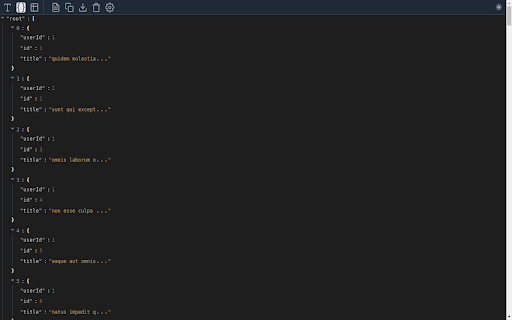


Format your JSON to make it easy to read or Display that JSON in table format. Format your JSON to make it easy to read or Display that JSON in table format. Feature : -Beautiful format Json -Display json as table -Support Pagination table -Multiple theme -Dark mode -Auto format clipboard (when click extension it will redirect to page and format json from clipboard you copy ) -Download json file

JSON Editor
A tool to view, edit, format, repair, query, transform, and validate JSON Open web pages with JSON content or JSON files to view, edit, format, repair, query, transform, and validate JSON directly on the browser. Features: * View JSON as a tree. The JSON tree view utilizes right-click to open the context menu, and double-click to start editing a key or value. It supports copy/paste from and to the system clipboard. * View JSON as formatted text. * View JSON as a table, for top-level arrays or nested arrays. * Search and replace * Undo and redo actions * Edit the JSON keys, and values, copy, paste, duplicate, insert, or remove * JSON formatting and minifying * Query JSON with plain JavaScript or using the built-in form * Sort, filter, and transform JSON * Handle large JSON documents up to 512 MB It uses the powerful https://github.com/josdejong/svelte-jsoneditor/ and the Manifest V3 for enhanced security, privacy, and performance. Make sure to disable any other JSON viewing built-in into the browser or other JSON viewer extensions.

JSON Format Tool
A simple Chrome extension to format JSON data A Chrome extension for formatting and highlighting JSON data. 如果当前页面是JSON数据,会格式化数据便于阅读。

JSON to Table Converter - Easy Copy
The JSON to Table Converter is a powerful Chrome extension designed to streamline your data anlysis workflow. The "JSON to Table Converter" is a powerful Chrome extension designed to streamline your data analysis workflow. With just a single click, this extension transforms JSON-formatted content on web pages into well-organized tables, making it easier than ever to comprehend and work with complex data. - Seamless JSON-to-Table Conversion: Instantly convert JSON data within web pages into clean and structured tables, eliminating the need for manual formatting. - Intuitive User Interface: The extension offers a user-friendly interface that makes it accessible to users of all skill levels. Simply click the extension icon, and it will automatically detect and convert JSON data on the current page. - One-Click Table Format Copy: Copy the formatted table with a single click, saving you time and effort when transferring data to other applications or documents.

JSON Table Viewer
Convert JSON to table with CSV export, pivot view, and clipboard copy. A lightweight and intuitive Chrome extension that lets you: ✔️ Paste or upload JSON data ✔️ View it as a flattened, scrollable table ✔️ Preserve nested structure in column names (e.g., `address.city`, `hobbies[0]`) ✔️ Instantly download the table as a CSV file ✔️ Highlight data types with different colors ✔️ Pivot table view for different data perspectives ✔️ Copy table as Markdown or plain text format ✔️ Quickly search and filter data within the table Perfect for QA, DEV, and anyone working with JSON data. No tracking, no upload — everything runs locally.
