
ihhdecckdmmngfghdokejccpokgfainf
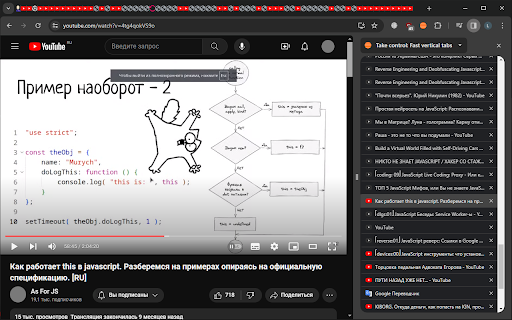
Fast compact vertical tabs at side panel. A more convenient option for using tabs Version history: 1.6.0: New tab button 1.5.0: Show and change state of audible tabs 1.4.0: Unloaded tabs are greyscale 1.3.0: Drag and drop of tabs 1.2.0: Scroll to current tab

Tabs in Vertical
Displays all open tabs in a vertical sidebar for better readability Tabs in Vertical – Streamlined Tab Management for Enhanced Productivity Experience a more organized browsing session with Tabs in Vertical, a powerful Chrome extension that transforms your tab management by displaying all open tabs in a sleek vertical sidebar. Designed for users who juggle multiple tabs, this extension offers intuitive navigation and efficient tab organization. 🔑 Key Features 🗂️ Efficient Tab Management - Vertical Sidebar Display: View all open tabs in a clean, scrollable vertical list. - Quick Navigation: Switch between tabs with a single click. - Easy Tab Closure: Close tabs effortlessly using dedicated close buttons. - Real-Time Updates: Automatically reflects changes as tabs are added, removed, or modified. - Visual Clarity: Displays tab favicons and titles for easy identification. 🧩 Advanced Tab Grouping - Native Tab Group Integration: Seamlessly mirrors Chrome's tab groups within the sidebar. - Color-Coded Groups: Distinct visual indicators for different tab groups. - Group Management: Create, rename, collapse/expand, and close entire groups directly from the sidebar. - Flexible Organization: Add tabs to existing groups or move groups to new windows easily. - Group to New window: Open an entire group in new window. 🎨 Customizable User Interface - Dark Mode Support: Toggle between light and dark themes to suit your preference. - Search Functionality: Quickly locate tabs using the built-in search feature. - Responsive Design: Adapts to various sidebar widths for optimal usability. - Smooth Animations: Enjoy a modern interface with subtle hover effects and transitions. 🚀 Why Choose Tabs in Vertical? Unlike other extensions, such as "Vertical Tabs in Side Panel," which have limitations like a fixed sidebar width and a lack of multi-tab selection, Tabs in Vertical offers a more flexible and user-friendly experience. Our extension addresses common user pain points by providing a resizable sidebar, comprehensive tab group management, and an intuitive interface that enhances browsing productivity. ⚙️ Getting Started - Install: Add "Tabs in Vertical" to your Chrome browser. - Access the Sidebar: Click on the extension icon or use customizable keyboard shortcuts. - Customize: Adjust settings to tailor the extension to your workflow. Enhance your tab management experience with Tabs in Vertical—the ultimate tool for efficient and organized browsing.

SideTab Manager - Vertical Tabs & Sessions
Transform Your Tab Management Experience. The Ultimate Vertical Tab Manager for Chrome SideTab Manager revolutionizes how you browse the web by providing a powerful vertical sidebar that organizes, manages, and saves your tabs like never before. Say goodbye to tab chaos and hello to productivity! 🎯 Perfect For: Researchers - Manage dozens of reference tabs efficiently Developers - Organize documentation, GitHub, and project tabs Students - Keep study materials and resources organized Content Creators - Manage social media, tools, and inspiration tabs Professionals - Organize work projects and client materials Power Users - Anyone who opens more than 10 tabs regularly 🚀 Why Choose SideTab Manager? ✨ Instant Productivity Boost See all your tabs at once in a clean vertical layout No more hunting through tiny tab bars Switch between tabs with a single click Visual favicon identification for instant recognition 🎨 Beautiful & Customizable 6 Stunning Themes: Light, Dark, Ocean Blue, Cozy Green, Vivid Nightfall, Soft Pastel Responsive design that adapts to your sidebar width Modern, clean interface that doesn't distract from your work High-contrast options for accessibility 📁 Smart Organization Tab Groups: Color-code and organize related tabs Session Bookmarking: Save entire browsing sessions for later Real-time Sync: Automatically updates when you open/close tabs Drag & Drop: Reorganize tabs and groups effortlessly 🔍 Powerful Search Find any tab instantly by title or URL Real-time filtering as you type Search across all tabs and saved sessions Highlighted search results for quick identification 🔒 Privacy First 100% Local: All data stays on your device No Tracking: Zero analytics or data collection Secure: Uses Chrome's built-in security features GDPR Compliant: Respects your privacy completely ##Version History Version 2.1.4 New Feature - Enhanced Session Management 1. Added checkbox functionality for all active tabs, allowing users to select specific tabs before saving a session. 2. Introduced session naming capability during saving the session - users can now assign custom names when saving sessions. 3. Implemented edit functionality for saved sessions with the ability to add or remove tabs during editing. v2.2.8- Add New Tab button added, so that user can add new tabs from the side panel. v2.4.1 - Feature added to create duplicate tab from the side panel. v2.5.0 1. Added new option to Edit the Tab Name 2. UI improved for Edit, Close and Duplicate button. Thanks for letting us be part of your workflow! Discover more magic at thewonderapps.com ✨

Vertical Tab Manager
A lightweight vertical tab manager for Chrome. 🚀 Boost Your Browsing Experience with the Vertical Tab Manager! 🚀 Just 📌 it to your navbar and click the icon to get going, you can move the side panel from your Chrome settings if you'd like it elsewhere! Struggling with tab overload? Transform your Chrome browsing experience with the ultimate light-weight vertical tab manager that's as lightweight as it is powerful. Say goodbye to clutter and hello to a streamlined, efficient way to manage your tabs. ✨ Vertical Tab Management: Experience a cleaner, vertical display of your tabs that makes navigation and organization effortless. Perfect for multitasking professionals and casual users alike. 🔍 Easy Search and Navigate: Quickly find the tabs you need with our intuitive search function. Jump between tabs with ease and never lose track of your web pages again. 🚀 Lightning Fast: It's designed to be ultra-lightweight, ensuring it doesn't slow down your browser. Enjoy faster browsing with no lag. 🛡️ Privacy Focused: Your privacy is paramount. It operates locally on your device, ensuring that your browsing data stays yours and yours alone. 🎨 Customizable Interface: Allows you to organize the priority order of your tabs for your convenience! 👍User-Friendly: It's simple and easy to use right out of the box, just click the icon and get going! 🌟 Free to Use: Get all these fantastic features at no cost. Enhance your browsing for free with SleekTabs! 🔗 Stay Organized, Stay Productive: Navigating multiple tabs is no longer a hassle. Keep your browser tidy and your mind clear!

Vertical Tabs Side Panel
★ Simplicity defines us - NOW WITH TREE VIEW and AUTOMATIC GROUPING! ★ Open shortcut, CTRL + i (windows), COMMAND + e (macOS) and… ★ Simplicity defines us - NOW WITH TREE VIEW and AUTOMATIC GROUPING! ★ Open shortcut, CTRL + i (windows), COMMAND + e (macOS) and CTRL + q (linux) Vertical Tabs View allow you to easily access and search your tabs, using a vertically stacked UI. It also allows you to open, sort and close individual or a group of tabs. This extension is very useful for those who end up with many tabs open without knowing the last time you even interacted with them, allowing one to easily get rid of old tabs. It also makes it easy to spot duplicated tabs and to navigate to recently opened ones. See https://www.youtube.com/watch?v=8ow6f5zWRLI for details on how to use it. Note: Chrome shows a scary popup regarding Vertical Tabs View accessing your browser history. We do react to new tabs as a way to store LOCALLY the last time you interacted with them. However, nothing is ever sent to a server, nothing ever leaves your computer, this extension is completely private. Feel free to check the code at the website link. ★ White and dark mode ★ Search bar that allows to search for title or url. ★ Sort tabs by url and staleness. ★ See the number of open and duplicated tabs. ★ Delete duplicated tabs with one click. ★ Open shortcut, CTRL + i (windows), COMMAND + e (macOS) and CTRL + q (linux) ★ Navigate your tabs using the arrow or TAB (on your keyboard) ★ Open a tab via Enter key. ★ Easily close a specific or multiple tabs. ★ Click on the sort icon to sort by either, url, title or staleness. ★ If you have duplicated tabs, click on the menu to highlight them or get rid of them.
