
kmodbgeibjefneliaefoiibffpjekfeh
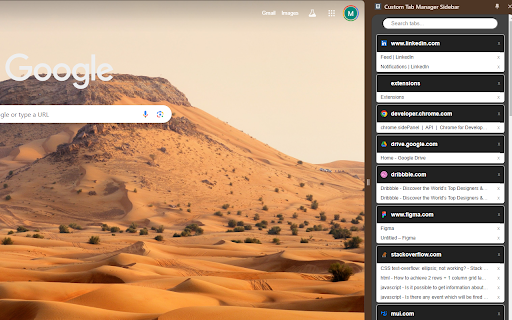
A lightweight vertical tab manager for Chrome. 🚀 Boost Your Browsing Experience with the Vertical Tab Manager! 🚀 Just 📌 it to your navbar and click the icon to get going, you can move the side panel from your Chrome settings if you'd like it elsewhere! Struggling with tab overload? Transform your Chrome browsing experience with the ultimate light-weight vertical tab manager that's as lightweight as it is powerful. Say goodbye to clutter and hello to a streamlined, efficient way to manage your tabs. ✨ Vertical Tab Management: Experience a cleaner, vertical display of your tabs that makes navigation and organization effortless. Perfect for multitasking professionals and casual users alike. 🔍 Easy Search and Navigate: Quickly find the tabs you need with our intuitive search function. Jump between tabs with ease and never lose track of your web pages again. 🚀 Lightning Fast: It's designed to be ultra-lightweight, ensuring it doesn't slow down your browser. Enjoy faster browsing with no lag. 🛡️ Privacy Focused: Your privacy is paramount. It operates locally on your device, ensuring that your browsing data stays yours and yours alone. 🎨 Customizable Interface: Allows you to organize the priority order of your tabs for your convenience! 👍User-Friendly: It's simple and easy to use right out of the box, just click the icon and get going! 🌟 Free to Use: Get all these fantastic features at no cost. Enhance your browsing for free with SleekTabs! 🔗 Stay Organized, Stay Productive: Navigating multiple tabs is no longer a hassle. Keep your browser tidy and your mind clear!

Vertical Tabs
1. The horizontal tab bar cannot be hidden when using the extension. 2. The side panel has a minimum width and cannot be resized smaller than Chrome's allowed dimensions. 💡 How to Get Started: Activate Vertical Tabs with just a click on the extension icon. Pin it for quick access and utilize the shortcut Alt+B (modify from chrome://extensions/shortcuts). 🚀 Discover a new dimension of tab management with Vertical Tabs, a Chrome extension aiming to enhance your browsing experience. 🎯 Effortless User experience: Vertical Tabs elegantly organizes your tabs and groups them seamlessly within Chrome's side panel, simplifying your browsing experience. 🌟 Seamless Integration: Crafted specifically for Chrome, Vertical Tabs seamlessly integrates, becoming an intuitive extension of your browsing experience. 🔍 Swift Tab Access and Search: Navigate your tabs effortlessly and find what you need quickly with the intuitive search functionality. 🔄 Intuitive Tab Management: Easily organize your tabs with drag-and-drop functionality, and streamline your workflow by selecting and managing multiple tabs at once. 🌘 Dark Mode: Dark Mode intelligently aligns with your system theme, ensuring a comfortable browsing experience without any manual adjustments. 📍 Change Position: Personalize your browsing setup by choosing to position Vertical Tabs on either the left or right side of your screen. Simply head to Chrome Settings > Appearance > Side Panel and make it your own. 🛡️ Privacy-First Approach: Your tab information stays private, no tab data is sent to any servers. Enjoy organized tabs while keeping your data secure. Get ready to streamline your browsing, boost productivity, and enjoy a visually stunning interface with Vertical Tabs. Download now and discover the future of tab management!

Simple History Manager
This extension will replace Chrome's default history manager. It can search or clear browsing history by date range. How to use: • Click this extension's icon • Click menu item from Chrome -> History -> Show Full History • Use Chrome keyboard shortcuts, Windows/Linux is Ctrl + h, Mac is ⌘ + y

ProxyWing Proxy Manager
Simple proxy manager for Chrome ProxyWing Proxy Manager gives you full control over your proxies directly from your browser, with no complicated system settings or manual reconfiguration. This free Chrome extension lets you add, configure, and switch proxy servers inside Google Chrome through a simple dashboard. Use and switch residential, ISP, or datacenter IP addresses in seconds without changing OS-level settings. Key features: - Add and configure proxy servers directly inside Chrome - Instantly switch between different IP addresses - Save and favorite IPs for one-click access - Search and filter your proxy list for faster management - Manage multiple profiles with ease ProxyWing Proxy Manager extension is your one-stop solution for all your proxy management needs, or geo-targeted browsing. Control your connection, manage sessions, bypass geo-restrictions, and access region-locked content directly from Chrome. Handle your browser proxy setup quickly and securely from one place.

Easy Extension Manager
Effortlessly Manage Your Chrome Extensions Easy Extension Manager is your all-in-one tool for optimizing and organizing Chrome extensions. Easily search, sort, snapshot, export, and import your extension setups in JSON format—all with a user-friendly interface. ☆ Complete List: View all your installed extensions from a single popup. ☆ Snapshot: Save and load your extension setups with a single click. ☆ Export & Import: Backup or restore your extension configurations in JSON format ☆ Toggle Extensions: Easily enable or disable extensions to improve performance. ☆ Sort Options: Sort extensions alphabetically or by enabled/disabled status for quick access. ☆ Quick Search: Find specific extensions quickly and easily. ☆ Dark Mode: Switch between dark and light themes for better viewing. ☆ Context Menu: Right-click for powerful options ☆ Disable All Extensions to temporarily boost performance. ☆ Enable All Extensions with one click. Effortlessly back up and restore your extension snapshots in JSON format. Export & Import Highlights: ☆ Backup Snapshots: Export your extension setups as JSON files for safekeeping. ☆ Restore Setups: Import your saved configurations and apply them instantly. ☆ Auto Save Snapshots: Automatically back up your latest extension setup, ensuring it's always up to date. ============================== Why Choose Easy Extension Manager? Easy Extension Manager simplifies managing Chrome extensions. Stay organized, perform backups and restores easily, and streamline your workflow. With powerful search and sorting with features like Snapshots, Export & Import, and Auto Save, managing extensions has never been simpler. Take control of your extensions today with Easy Extension Manager—the smarter way to manage Chrome.
