
igjnaglbgbjjpgmokokpiepakkalegmp
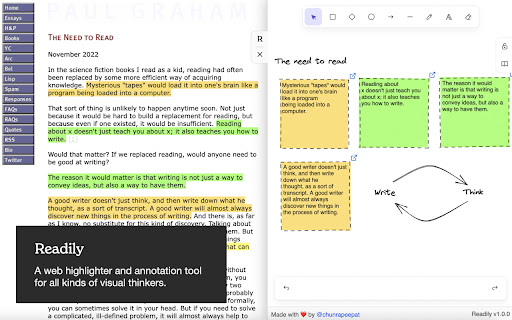

A web highlighter and annotation tool for all kinds of visual thinkers. Whether you are a student, a teacher, a programmer, a designer, or someone who enjoys reading online. Readily is a perfect tool to capture your mind visually. Warning: since the data is stored locally in your browser, please back up all the necessary information before deleting the extension. All feedback and suggestions are welcome! Please contact: Email: hello@getreadily.com Twitter: https://twitter.com/chunrapeepat + Unlimited highlight colors + Unlimited highlights + Sidebar infinite Excalidraw canvas + Drag-and-drop highlight to canvas + Excalidraw library support + Data is stored locally in the browser (Import/Export Data) + YouTube support. + Disable/Enable extension on specific domain + No sign-up required. Just install it, and you're ready to go + Export to Obsidian Plugin + Create a shared canvas between multiple pages with real-time sync 1. Free: our core features will be free and always will be, including unlimited highlights, colors, notes, and infinite canvas. 2. Deadly-simple: our product must do one thing and do it well - capturing and recalling information. 3. Grow alongside the user's workflow: the more you use Readily, the more powerful the tool is. This will be in the form of shortcuts, templates, drawing libraries, and plugins. 4. Private: all the data is stored locally in your browser, everything is private, and it's 100% owned by you. 5. Blazing fast: the tool's speed directly affects how we think and work. So we designed Readily to be as fast as your mind can go. (as-you-type search, soon) 6. Globally Accessible: your data should be accessible across browsers and devices. (encrypted sync, soon) 1.3.0 - Fix Export to Obsidian bug (parse content on Excalidraw elements error) - Implement a shared canvas feature with real-time sync 1.2.0 - Add Obsidian Export Plugin: export web content, highlights and whiteboard data to Obsidian, edit export markdown template. 1.1.1 - Fix bug: YouTube screenshot button does not appear on the video player if the URL change and the prev page is not the watch page. - Fix bug: clicking on the link on YouTube on a whiteboard causes the whiteboard to refresh. 1.1.0 - Fix bug on drag and drop files from computer and screenshot software. - Implement disable extension and domain function. - Implement import/export data function. - Implement YouTube support (take video screenshots and drop them on the whiteboard) - Handle highlight and whiteboard data when the URL change without the page refresh. 1.0.1 - Improve: Check Excalidraw elements instead of ID for Excalidraw default opening - Improve: change the sidebar toggle design (confused currently) - Fix bug: image did not load if loaded from the computer - Disable Plausible tracking on a dev environment Craft with ❤️ by @chunrapeepat (https://twitter.com/chunrapeepat) DMs are open!

Clipsidian
Clipsidian lets you capture in-browser selected content and send it directly to your Obsidian vault. Copy selected web page content to your Obsidian notes: - In your web browser, select the content you want to add to your Obsidian vault. - Right-click on the highlighted content. - From the context menu, select a clipping action. Obsidian should open (if it isn't already open) and your clipping should be saved! Configure your clipping actions: - Open the Clipsidian extension options in your browser and set up as many clipping actions as you need. Choose where to save each clipping, append them to existing notes or create new ones dynamically with placeholders like {date}. Customizable Web Clipping: - Easily collect clippings and keep them organized. Define your own clipping actions with Clipsidian, precisely choosing the destination for every web clipping within your many vaults. Dynamic Target Note Paths: - With the ability to use placeholders like {title}, {date}, and {time} in your target note paths, Clipsidian allows for seamless organization of your clippings. This dynamic functionality enables you to save clips to specific notes based on the clipped page or time of clipping. Enriched Clipping Templates: - Auto-embed valuable metadata with placeholders like {date}, {time}, page {title} and page {url} with every web clipping. Flexible Date and Time Formatting: - Customize how the {date} and {time} placeholders appear in your clippings. Clipsidian let's you change the format of your dates and times, including setting the locale to match your language. - Example: {date:LLLL dd, yyyy} turns into January 1st, 2000

Simple Outliner / 智能网页大纲
Simple Outliner / 自动生成网页大纲、目录,Support Inoreader and Feedly。 Displays a table of contents for every web page, making it easier to read/navigate long articles, documentations and online books. - Accurate article/headings detection - Clean user interface - Highlight current heading - Click to jump to heading - Panel can be dragged to preferred position - Support auto load option - ✨ Support Inoreader and Feedly, it can track the article change, it's all automatic. - Click browser button(or: Ctrl/Command+Shift+E) to toggle for current site - You can set the auto load option without click the extension icon. Any article page that uses HTML heading tags (H1, H2, H3...) properly, examples: (...and much more) Local html files (in your hard drive) are also supported, you just need to enable it in extension settings. ## You can buy a coffee ❤ to the original maker.

Save To Obsidian
Extension To save Website to Obsidian @Dan Monceau This is an unofficial Chrome extension for Obsidian. Our extension allows you to quickly and easily save any website you visit using a specific format and specific information defined in our extension template. You can then easily export your saves to the Obsidian application for organization and future use. Use this extension to save blog posts, product pages, research references and more, for future reference or professional use.

Obsidian Clipper
Obsidian Web Clipper Chrome Extension to save articles and pages from the web in Obsidian Effortlessly save web articles to your Obsidian vault with just one click. Perfect for researchers, students, and avid readers who want to organize and reference online content. - Uses Readability.js to extract clean, readable content - Captures essential metadata: domain, title, timestamp, excerpt, and word count - Simple one-click saving to your specified Obsidian vault - Customizable settings for organizing your saved articles - Install the extension - Set up your preferred Obsidian vault in the extension settings - Click the extension icon on any web page to save the article Compatibility: Currently tested and optimized for Google Chrome. Get started by configuring your Obsidian vault in the extension settings. Happy clipping!
