
ifngfcdoccfbgagjiahnbkajaikjaiek
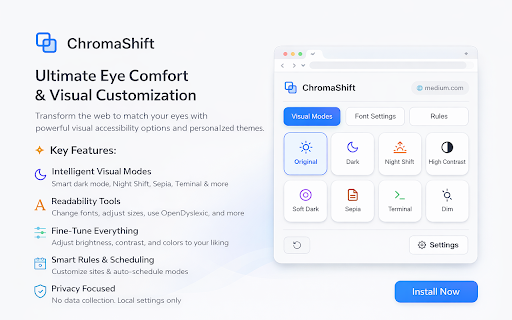

Transform your browsing experience with visual modes, dark themes, and font customization Transform the web to match your eyes. ChromaShift is a powerful visual accessibility and eye-comfort extension that lets you completely customize how websites look. Whether you need to reduce eye strain late at night, improve readability with dyslexia-friendly fonts, or simply want a sleek dark mode on every site, ChromaShift adapts the internet to you. Why Install ChromaShift? Modern screens can be harsh on your eyes. ChromaShift goes beyond simple dark modes by giving you granular control over brightness, contrast, color temperature, and typography. It’s perfect for night owls, avid readers, students, and anyone who spends hours browsing the web. 🌙 Intelligent Visual Modes Choose from 8 distinct visual filters designed for different needs: • Smart Dark Mode: Automatically applies a dark theme to bright websites while preserving sites that are already dark. • Soft Dark: A gentle, low-contrast grey theme that is easier on the eyes than pitch black. • Night Shift: Reduces blue light with warm amber tones to help you sleep better. • Sepia: A vintage, paper-like warm filter perfect for long reading sessions. • High Contrast: Maximizes legibility for visual accessibility. • Terminal (Grayscale): A distraction-free monochrome mode for deep focus. • Dim: Lowers the screen brightness effectively below your monitor’s minimum setting. 📖 Typography & Readability Tools Struggling to read small or crowded text? Take control of the fonts: • Change Font Family: Switch any website to Sans-serif, Serif, Mono, or a specialized OpenDyslexic font to aid reading. • Text Adjustment: Increase font size, line height, letter spacing, and word spacing independently to reduce visual clutter. • Custom Fonts: Use your favorite installed font on any webpage. 🎛️ Advanced Tuning & Customization Don't settle for defaults. Fine-tune every mode to your liking: • Adjust the intensity, brightness, and contrast of every filter. • Create a reddish hue for night reading or a desaturated look for focus. • Your settings are saved automatically. • Per-Site Settings: Customize specific websites individually. Love Dark Mode everywhere but want YouTube in "Night Shift"? You can do that. • Auto-Scheduling: Set ChromaShift to automatically turn on Night Shift at sunset or switch to Dark Mode during your work hours. 🔒 Privacy Focused ChromaShift works entirely offline within your browser. It does not collect, store, or transmit your browsing history or personal data. Take control of your browsing experience today. Install ChromaShift and see the web in a new light!

Dark Reader
Dark mode for every website. Take care of your eyes, use dark theme for night and daily browsing. This eye-care extension enables night mode by creating dark themes for websites on the fly. Dark Reader inverts bright colors to make web pages high contrast and easier to read. Adjust brightness, contrast, the sepia filter, font preferences. Enable dark mode on every web page or give websites a sepia tone. Enable or disable Dark Reader for specific websites, automatically sync with system dark mode, or detect already dark websites and leave them unchanged. This is the original Dark Reader extension. Since 2014, we continuously evolve alongside modern web technologies to deliver fast and reliable dark mode support for people sensitive to bright light. By installing the extension you agree to these terms of use https://darkreader.org/terms/

Night Mode
Enable Night Mode for Chrome browser with sleek dark mode theme, chrome night mode, eye-friendly yellow filter & font size controls ✅ Transform your browsing experience with night mode for chrome browser. Our extension turns harsh whites into soothing dark hues with just one toggle. By enabling this gentle dark mode theme, you reduce blue light exposure, minimize eye fatigue, and protect your vision during late-night work. ✅ The comfortable interface elevates your productivity whether reading articles or viewing spreadsheets. Enjoy prolonged screen time with minimal strain and a calming aesthetic. Introducing three simple toggles to customize your workflow: 🌙 night mode on/off – switch your interface to a deep, restful theme in a single click. 🌙 yellow mode on/off – apply a warm yellow overlay to further reduce blue light for cozy late-night sessions. 🌙 font size bigger-smaller – adjust text size on the fly for optimal readability in any situation. These toggles allow fast switching without reloading pages, giving you instant control. 1️⃣ install chrome night mode extension from the Chrome Web Store. 2️⃣ click the night mode toggle in your toolbar to activate the dark layout. 3️⃣ personalize your workspace by enabling yellow mode and tweaking font size controls for the perfect view. Once installed, the toolbar icon appears next to your address bar for easy access at any time. ➤ seamless google docs night mode support keeps your document editing gentle on the eyes. ➤ intuitive night mode for browser experience applies a consistent dark look across every site. ➤ quick switch between mode night and default view for effortless day-night transitions. ➤ optimized darker mode and black mode options reduce glare and enhance visual comfort. ➤ lightweight design ensures minimal CPU usage so your device remains fast and responsive. no website is left untouched – pages without dark support get dynamically styled. this tool works smoothly on google night mode and google night time mode for sites lacking a built-in dark option. whether you’re drafting emails, browsing social feeds, or working in web apps, the extension delivers a unified darker interface. 📝 It also integrates with popular platforms like calendars, document editors, and chat apps without causing flicker. make every website a relaxing environment, even those without native night settings. enjoy relief from harsh backgrounds without compromising speed or performance. ✅ zero performance impact ensuring smooth scrolling in dark theme app environments. ✅ quick access to chrome night mode with minimal clicks. ✅ seamlessly switch to chrome dark theme extension for a unified look. ✅ utilize chrome extension dark theme presets effortlessly. ✅ enjoy your preferred dark mode theme with minimal setup. ✅ correct nighmode and nught mode handling for even the oddest typos. ✅ built with best practices to support all modern chromium browsers. ▸ protect your eyes during late-night work sessions with soothing tones. ▸ reduce strain with optimized darker mode presets for prolonged focus. ▸ enjoy sleek black mode aesthetics that blend with any website. ▸ maintain concentration with an unobtrusive user interface. ▸ ideal for writers, coders, and night owls craving comfort after sunset. ▸ quick setup with no additional permissions required. Quick tips for optimal viewing: • toggle night shift mode manually when needed for a gradual color temperature change. • pair yellow mode on/off with warm lighting to avoid eye strain during extended use. • adjust font size bigger-smaller before starting long reading or coding marathons. • refresh pages selectively to ensure theme consistency across new tabs. 💡 does this extension affect page load times? 💡 no, zero performance overhead ensures fast browsing even with dark themes. 💡 can I report bugs or typos related to nighmode? 💡 send feedback directly through the Chrome Web Store listing. 💡 are updates installed automatically? 💡 yes, the extension updates seamlessly in the background for continuous improvements. Ready to transform your browsing after dark? install now and bring restful viewing to every website. embrace soothing darker mode and black mode aesthetics, reduce eye fatigue, and enjoy comfortable late-night sessions. Tweak brightness, yellow mode, and font size for a truly personalized experience. give your eyes the break they deserve with our powerful and easy-to-use extension.

Chrome Dark Mode
Transform your browsing with Chrome Dark Mode. Enjoy night mode and black theme for a sleek, eye-friendly experience. Experience the ultimate browsing comfort with our Chrome Dark Mode extension. If you're tired of the bright glare of web pages, our extension is your perfect companion. Designed to cater to all your dark mode needs, this extension will turn your browsing into a soothing, eye-friendly experience. Key Features: 1. Comprehensive Coverage: Our extension ensures every part of your browsing is covered, from general web pages to specific sites like Google Docs, YouTube, and Amazon. 2. Customizable Settings: Adjust the dark mode settings according to your preference. Whether you want a light gray or pitch black mode, you have full control. 3. Seamless Integration: Integrates smoothly with your Chrome browser, providing a consistent experience across all websites. 4. Automatic Activation: Set the extension to automatically activate during certain hours, perfect for those late-night work sessions. 5. User-Friendly Interface: Easy to navigate and set up, even for beginners. Supported Sites: 1️⃣ Google Docs Dark Mode: Enhance your document editing experience with a sleek black theme. 2️⃣ YouTube Dark Mode: Enjoy your favorite videos without the strain of bright backgrounds. 3️⃣ Amazon Dark Mode: Shop comfortably with a black interface, reducing eye fatigue. 4️⃣ Gmail Dark Mode: Read and write emails in a more relaxed setting with a black mode. 5️⃣ Google Sheets Dark Mode: Analyze your data with a comfortable, black background. Additional Features: - Google Drive: Navigate through your files with ease in a black-themed environment. - Outlook: Manage your emails in a soothing dark mode interface. - Wikipedia: Read articles without the bright glare, perfect for late-night research. Why Choose Our Extension? ➤ Eye Comfort: Reduce eye strain and fatigue with our well-crafted dark mode chrome extension. ➤ Battery Saving: Prolong your device's battery life with dark mode. Black pixels consume less power, especially on OLED screens. ➤ Aesthetic Appeal: Give your chrome browser a modern, sleek look with our chrome dark mode. ➤ Health Benefits: Dark mode can help reduce blue light exposure, promoting better sleep patterns. How to Install: Download: Visit the Chrome Web Store and download the extension. Activate: Click on the extension icon in your toolbar to activate it. Customize: Adjust the settings to suit your needs. Enjoy: Browse comfortably in your new dark mode chrome. Common Queries: ❓ Can I force dark mode chrome on specific sites? 👆🏻 Yes, our extension allows you to customize and force dark mode on specific sites, ensuring a consistent experience. ❓ Is there a Google Calendar Dark Mode? 👆🏻 Absolutely, manage your schedules with our dark mode extension for a more pleasant viewing experience. ❓ Does this support Google Docs Dark Mode? 👆🏻 Yes, you can enjoy a black mode while working on your documents, making it easier on your eyes. Benefits of Using Our Dark Mode Extension: - Enhanced Focus: A darker interface helps reduce distractions and keeps your focus on the content. - Modern Look: Update your browsing aesthetics with a sleek dark mode theme. - Flexible Customization: Tailor the dark mode settings to your preference, from light gray to deep black. Conclusion: Our extension is your ultimate tool for a better browsing experience. Whether you're working late at night, watching videos, or simply browsing, our extension will provide you with a comfortable, eye-friendly interface. Download now and transform your chrome browser experience today! FAQ: ❓ Is the extension free? 💡Yes, our extension is free to download and use. ❓ Can I toggle the black mode on and off easily? 💡Absolutely, you can quickly switch between black and normal mode with a single click. ❓ How do I enable extension? 💡 To enable, simply install our extension from the Chrome Web Store. Once installed, click the extension icon to activate night mode across your browser. ❓ Does this extension work on all websites? 💡 Yes, our product is designed to work on all websites. It includes a feature that ensures even websites without native dark themes are converted. ❓ Can I customize the settings? 💡 Absolutely! Our extension allows you to customize various settings such as brightness, contrast, and hue. You can tailor the night mode to suit your personal preferences. ❓ How does the automatic scheduling feature work? 💡 The automatic scheduling feature allows you to set specific times to activate. You can schedule it based on your local sunset and sunrise times, or set your own custom times. 🚀 Upgrade your browsing with our comprehensive solution. Experience the difference today and join the growing number of users who have made the switch to a more comfortable, modern, and eye-friendly browsing experience.

Dark Mode — Night Reader & Blue Light Filter
Automatic dark mode for all websites + blue-light filter. Customize themes, reduce eye strain — fast, private Chrome extension. Dark Mode — Night Reader & Blue Light Filter Enjoy automatic dark mode for all websites and protect your eyes with an advanced blue light filter. Fast, lightweight and privacy-friendly — built for comfortable night reading in Chrome. ✨ Key features: ➖Automatic dark theme: Instantly applies a dark theme to every website — no manual toggles. ➖Blue light filter: Reduce blue light to ease eye strain during night reading and long browsing sessions. ➖Full color customization: Pick or create your own dark palette with a simple color picker and presets. ➖Reading mode: Cleaner layout and adjustable brightness for distraction-free reading. ➖Privacy first: No ads, no tracking, no data collection — 100% local settings. ➖Lightweight & fast: Optimized to use minimal CPU and memory. ✅ Why choose Dark Mode — Night Reader: ➖Reduce eye strain and improve night-time reading comfort. ➖Make any website easier on the eyes with customizable dark themes. ➖Keep your browsing private — all settings are stored locally. 📌 How to use: 1.Install the extension and open the popup. 2.Toggle Dark Mode or Reading mode to enable. 3.Adjust the Blue Light Filter slider and choose custom colors. 4.Use per-site exceptions to disable dark mode if needed. 📎 Tips: ➖Use the color presets for quick theme changes. ➖Turn on Reading mode for articles to remove clutter and focus on text. 🛡️ Privacy & performance: We do not collect personal data. All processing is done locally in your browser for speed and security. ❓FAQ ➖Does it work on all sites? — Yes, it automatically applies to most websites; some complex web apps may need per-site tweaks. ➖Can I exclude a site? — Yes — add exceptions from the popup. ➖Is it resource heavy? — No — optimized for minimal CPU and memory usage. ➡️ Install Dark Mode — Night Reader now and make browsing at night comfortable and safe. If you like it, please leave a 5-star review — it helps us improve.
