
ifajfiofeifbbhbionejdliodenmecna


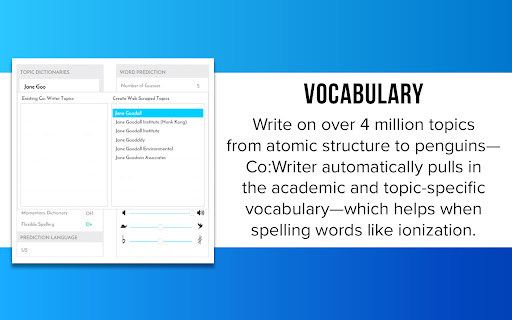
Word prediction that is grammar smart and inventive spelling aware. Speech recognition allows you to speak it, and we'll write it. Co:Writer® Universal Extension for Chrome™ helps you write with proper grammar and spelling using topic-specific vocabulary. It integrates with the Chrome™ browser for word prediction and speech recognition just about anywhere you write online including Google Drive™, Microsoft Word, blogs, Learning Management Systems, testing, social networks, and email. Try it for free and see if it works for you. Pricing and more information can be viewed at https://cowriter.com How Does Co:Writer Work? As letters are typed, Co:Writer predicts the intended word with a selection of word suggestions using powerful grammar-smart word prediction. These suggestions can be read aloud by moving the cursor over the words. Selecting the intended word places it into the built-in writing document. For feedback while writing (and after writing) built-in text to speech can be used to read letters, words, sentences, and any selected text. If the microphone is chosen, you can speak and we'll convert your speech into text. 4+ Million Topic-Specific Dictionaries: Co:Writer has access to a main prediction dictionary (that includes core words) and Topic Dictionaries (that includes topic specific words). Co:Writer can access over 4 million topic-specific dictionaries which are activated based on the writing task. A small sampling of the variety of topic dictionaries: ✔ America's Cup ✔ Compare and Contrast ✔ Dinosaurs ✔ Grumpy Cat ✔ History of the Peloponnesian War ✔ Mahatma Gandhi ✔ My Dog ✔ Pig Latin ✔ SpongeBob SquarePants ✔ Tommy (album) ✔ Wonders of the World Spelling Support: Co:Writer uses Flexspell™ technology to handle the widest range of spelling mistakes including phonetic spelling and inventive spelling errors (letter omissions, word ending omissions, letter reversals, etc). Examples of how Co:Writer aides with phonetic and/or inventive spelling: Before Co:Writer: The blk jargon flu over the bra lfnt. R u hpy to ce me? I no hw to nor the fone. After Co:Writer: The black dragon flew over the gray elephant. Are you happy to see me? I know how to answer the phone. Grammar Support: Co:Writer bases its prediction on proper grammar, and uses its understanding of grammar to accurately predict words within the framework of valid sentence structures. Examples of how Co:Writer aides with grammar: Dogs are furry. (noun, verb, adj.) - When you typed d-o, you get plural noun choices Three very mangy dogs ran down the street. (adj., adv., adj., noun, verb… etc.) - After typing three, very, mangy, you get plural noun choices, then you get plural verb tenses.

Equatio - Math made digital
Easily create mathematical equations, formulas and quizzes. Intuitively type or handwrite, with no tricky math code to learn. Until now, writing equations and math expressions on your computer has been slow and laborious. Equatio makes math digital, helping teachers and students at all levels create math expressions quickly and easily. Type or handwrite virtually any mathematical expression directly on your keyboard or touchscreen. There’s no need for any complicated code or programming languages. Equatio instantly turns your thoughts into clear, accurate on-screen formulas. When you type ‘sq’, it knows that you mean ‘square root’. And it listens, too. When you dictate a formula aloud, Equatio is smart enough to ignore ‘umms’, ‘errs’ and other unwanted non-math words. More than a replacement for pen and paper, Equatio makes math and other STEM subjects engaging and rewarding for every student. Features: - Easily create math expressions including equations and formulas - Compatible with Google Docs, Forms*, Slides*, Sheets* & Drawings* - Input via keyboard, handwriting recognition* (via touchscreen or touchpad) and voice dictation - Guesses what you’re typing or writing - like predictive text on your smartphone* - Hear your math expressions read out loud - Compatible with LaTeX input for advanced users - Create interactive digital math quizzes* - Input student responses directly into digital quizzes* - Chemistry formula prediction* Try Equatio free for 30 days, with unlimited access to all features. After this time Premium features* require a licensing subscription. Get more information on Equatio features, licensing and pricing at: https://www.texthelp.com/en-us/products/equatio/

Snap&Read
Text reader (TTS) that simplifies vocabulary, translates text, reads inaccessible text (OCR), and captures and cites sources. Snap&Read is the Next-Generation reading tool that can cover the most diverse reading needs. Read Aloud - Listen to text as it’s read aloud across websites, PDFs, and Google Drive. It also reads in other languages. Dynamic Text Leveling - Dynamically adjust the readability of text without changing the meaning. Study Tools - Pull text into an outline, then organize it and add notes. Remove Distractions - Remove distracting content and adjust fonts, spacing and number of characters per line creating the best online reading experience possible. The Remove Distractions tool also reformats any webpage to read—distraction-free—alongside an open outline. Color Overlay / Reading Line Guides- Color Overlay and Reading Line Guides brings focus to text paragraph-by-paragraph and even line-by-line—by masking the reading area. Screenshot Reader - Instantly get access to text embedded in images, inaccessible PDFs, and Flash through Optical Character Recognition (OCR). Readability Analyzer - See the grade level equivalent of the text on any webpage. Annotation - Highlight and add text to PDFs then save to Google Drive, One Drive, or download. Try it for free and see if it works for you. Pricing and more information can be viewed at https://snapandread.com If you already have an account for snap and read, you can manage it at https://snapandread.com

Quizbot
Generates quizzes based off of text in the page. Take any online text (website, ebook, etc) and have Quizbot automatically create a quiz in Google Forms that automatically scores with one click. Types of questions include comprehension, vocabulary, cloze, and maze, 1. Visit a webpage in Google Chrome. 2. Use the "Create Quiz" feature in the Quizbot extension — the quiz is automatically built in Google Forms and the answers are linked. 4. Send it off to your students. Quiz results are graded automatically and reported to you. Your students will get instant feedback on their incorrect answers, and will be shown the proper choice. Once the quizzes are created, Quizbot helps you manage (save, move, delete, etc) your Google Forms on your Google Drive.

BeeLine Reader
BeeLine helps you read more quickly and easily. Try it free and see how much it can help you! Our innovative reading technology has won awards at MIT, Stanford, and the United Nations. Read about us in The Atlantic (http://theatln.tc/24LsoX8) or listen to our interview on NPR (http://bit.ly/1Tl3tpp). To try BeeLine, install now and start reading easier for free! BeeLine uses a color gradient to guide your eyes from the end of one line to the beginning of the next. This seemingly simple tweak makes reading easier and faster because it allows you to transition between lines quickly and effortlessly. Many people are able to read 20% or 30% faster with BeeLine, even on their first try. BeeLine is used by students from grade school to grad school, including at leading schools around the world. BACKED BY EDUCATIONAL RESEARCH AND NON-PROFIT PARTNERS Independent, educator-led research on BeeLine has shown dramatic reading fluency and comprehension gains for students. BeeLine has been adopted by the California Public Library System, Reading Is Fundamental, and Blackboard Ally. USE BEELINE ON YOUR FAVORITE WEBSITES The BeeLine extension works on millions of news websites and blogs. You can also get our PDF extension, which works on any text-based PDF (available at http://bit.ly/1Fo1hXa), or our iOS extension (http://bit.ly/1xNs76J) TRY FOR FREE BeeLine now offers a free mode that lasts forever. In this mode you can use BeeLine as much as you want on your list of favorite websites. You can add and remove sites from your favorites list as often as you like. • BeeLine Pro: only $1.99/mo, with annual discounts available • BeeLine Pro, Family Pack: Get BeeLine for 5 browsers and save even more! Just $8/yr per browser! Teachers can also apply on our website for free access for their students (certain limitations apply). What you read is your business, and even our free tier does not intrude on your privacy. We do not sell, rent, license, or otherwise monetize your data in any way. Please consider subscribing to support privacy-conscious businesses like ours. BeeLine Reader is supported by grants and awards from MIT Solve, Stanford BASES, Newschools Venture Fund, and the Tech Museum of Innovation. See our website for more information about our mission and impact: www.BeeLineReader.com. If you'd like to cancel your subscription, please contact us (via the extension settings, our web contact form, or our web chat) before your monthly/annual renewal date and we will cancel it immediately. If you forget to contact us before your subscription renews, we may still be able to provide a partial refund. Asking nicely helps! Fine print: text extraction based on Readability from Arc90 Labs, licensed under the Apache License, Version 2. All other rights reserved; US Patent number US20150234788A1; foreign patents also issued and additional US and foreign patents pending. Please send us your feedback (bug fixes, new color scheme requests, etc.) via Twitter, Facebook, or email
