
ibkgdciabanomodabiacaaidadoehgkd
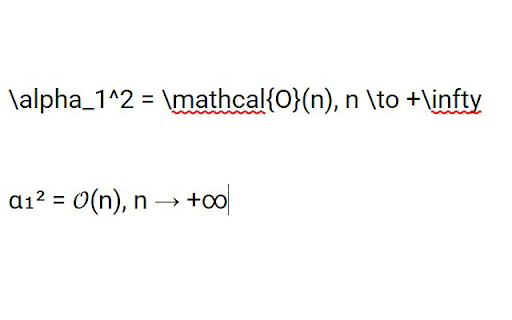
Replaces LaTeX symbols you write to Unicode symbols. To use it, write some LaTeX (e.g. \alpha_1 \to +\infty), select it and hit Ctrl+Space. The example above becomes α₁ → +∞. Primary target is VK.com, so it might not be stable on some other sites. You may try it on https://translate.yandex.ru/ (just put the example text from above to a translation field there, select the text and hit Ctrl+Space).

Latex in Slack
If you find this extension helpful, feel free to buy me a coffee ☕ https://buymeacoffee.com/andrewsskrlv This extension changes LaTeX text in Slack channels to human readable images. USAGE EXAMPLE 1. Open Slack (browser version) 2. Send a message with some LaTeX text to other user (e.g. "$ x^{3} $") 3. The extension will replace your LaTeX math formulas with easy-to-read images

Dicamon - Latex to HTML
We build this tool for internal use only. It's used to convert latext to image, so that our employee can check whether algorithm works well.

Latex Math Equations for Google Chrome™
You can edit and then save it as an image to Google Drive. Do you need to finish up some math equations/online math homework on your computer? Are you struggling to write out the correct mathematical symbols on your computer for your math homework? Try using our software Latex Math Equations for Google Chrome™ today. You can write out complex mathematical equations in a user-friendly manner once you have installed Latex Math Equations for Google Chrome™. The main purpose of this software is to allow complex latex math equations to be typed out on the computer and allow students worldwide to finish their digital maths homework. Disclaimer: Please note this extension is NOT made by Google and is made by an independent development team. All copyrights belong to their respective owners. Google doesn’t endorse or sponsor this Chrome extension. Latex Math Equations for Google Chrome™ is not owned by, is not licensed by and is not a subsidiary of Google Inc.

Latex Copier
This Chrome extension copies the expression to the clipboard when you click on the previewed expression after typing LaTeX. This Chrome extension copies the expression to the clipboard when you click on the previewed expression after typing LaTeX. This allows you to insert expressions using LaTeX in editors that do not support LaTeX but can insert images.
