
iadbdpnoknmbdeolbapdackdcogdmjpe


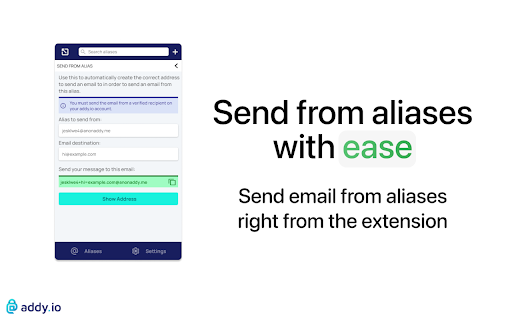
addy.io is open-source and creates aliases that forward to your real inbox. Share an alias instead of your main email address. This extension makes it quick and easy to view, search, manage and create new aliases. Please Note: The free plan is currently limited to a total of 10 active shared domain aliases (e.g. *@anonaddy.me) and 10MB monthly bandwidth. You can still create unlimited standard aliases on-the-fly for free by giving out anything@username.anonaddy.com as your email address, the browser extension is not required to create these type of aliases. To use this extension you first need to register (https://app.addy.io/register) an account with addy.io (it's free). Login to the extension using the username and password for your addy.io account (or you can use an your API key from your account). Now you can simply open the extension and create a new alias for any site. If you are self-hosting addy.io then make sure to click "change instance" and enter the location of your web app. There are a number of reasons you should consider using this service: - Protect your real email address from spam by simply deactivating/deleting aliases that receive unsolicited emails - Identify who has sold your data by using a different email address for every site - Protect your identity in the event of a data breach by making it difficult for hackers to cross-reference your accounts - Prevent inbox snooping by encrypting all inbound emails using GPG/OpenPGP encryption - Update where emails are forwarded without having to go through and change your email address for each site individually - Reply to forwarded emails anonymously without revealing your true email address This addon is open-source - https://github.com/anonaddy/browser-extension Bugs and Issues: Please report any issues at https://github.com/anonaddy/browser-extension/issues

iCloud Hide My Email
This extension enables the use of iCloud's Hide My Email service on any Chromium based browser such as Google Chrome, Brave, Opera, and Microsoft Edge. Hide My Email is natively supported in Safari. This extension aims to bring a similar UX to the Chromium ecosystem. - Simple pop-up UI for generating and reserving new Hide My Email addresses - Ability to manage existing Hide My Email addresses (including deactivation, reactivation, and deletion) - Instant autofilling on any HTML input element that is relevant to email - Quick configuration of Hide My Email settings, such as the Forward-To address, through the Options page of the extension. Disclaimer: This extension is not endorsed by, directly affiliated with, maintained, authorized, or sponsored by Apple. Source code: https://github.com/dedoussis/icloud-hide-my-email-browser-extension Found an issue or bug? Please submit it here: https://github.com/dedoussis/icloud-hide-my-email-browser-extension/issues/new

Alias Email - Free Email Aliases
Hide your real email and control who can send you messages. Generate new emails with one click is pretty easy. Increase control of email address with Alias Email. Hide your real email and control who can send you messages. Generate new emails with one click is pretty easy. Just install extension, look for the Alias Email button on email fields and click it to generate new address, that's all! Now you can use it anywhere you want. - Disable or enable any generated email address — keeping active only those emails that you really needed; - Your real email address is private — we care about your personal information and forwards emails from our servers; - And other features waiting for you.

HideMail: keep your email private
Gives you unique, random email addresses that are forwarded to you when you want to keep private your personal email HideMail gives you unique, random email addresses (or "aliases") that are forwarded to your primary e-mail account when you want your personal email address to remain private. Additionally, these email addresses can be easily deactivated at any given time, effectively blocking unwanted emails from reaching your inbox. Whether you're signing up for a new service or just want to keep your personal email private, Hide My Email has you covered. A random email address can now be generated for each new account, just like a password. Because email is often caught in database dumps and leaks, and while a password can be easily changed, an email address is difficult to change across all sites where it has been used. This is no longer a problem!

floccus bookmarks sync
Sync your bookmarks privately across browsers and devices **Floccus Bookmarks Sync: Private, Cross‑Browser & Device Sync** *Securely synchronize bookmarks across Chrome, Firefox, Edge, and more using your own cloud storage.* **Seamless Cross‑Browser & Cross‑Device Sync** - Sync bookmarks between Chrome, Firefox, Edge, and any browser that supports extensions. - Works on desktop, mobile, and tablet. - Syncs instantly when you add or edit a bookmark. **Ultimate Privacy & Control** - No data is stored on Floccus servers. - All data stays on your chosen backend (Nextcloud, WebDAV, Google Drive, or Git). - Optional end‑to‑end encryption for WebDAV and Google Drive. **Flexible Backend Support** - Nextcloud, Linkwarden, KaraKeep any WebDAV server, Git repositories, Google Drive, Dropbox - Choose the backend that best fits your workflow. **Easy Setup & Usage** - One‑click installation from the Chrome Web Store. - Simple wizard guides you through selecting a backend and configuring sync. - Automatic updates keep your bookmarks in sync. - **Privacy‑First** – Your bookmarks never leave your chosen storage. - **Cross‑Platform** – Works on all major browsers and devices. - **No Ads / No Fees** – Free to use, no hidden costs. Although, I do appreciate donations :) - **Customizable** – Pick any backend you trust. - **Community‑Supported** – Open‑source code and active community. **Get Floccus now and take control of your bookmarks!** If you'd like to support the creation and maintenance of this software, you can donate here: https://floccus.org/donate/ Please file bug reports or requests for help over on Github: https://github.com/floccusaddon/floccus
