
hpmeoagnhdfkembdbohmefnohdfffacp

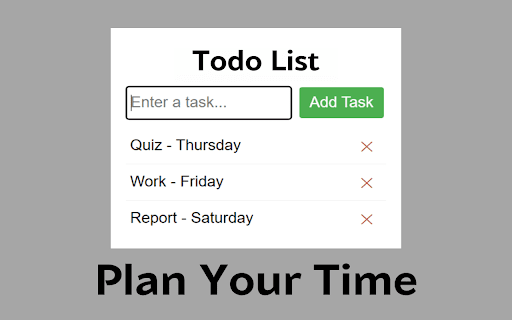

A simple to-do list Chrome extension. Looking for a way to stay organized and on top of your daily tasks? Look no further than our new Chrome extension that helps you manage your to-do list with ease and efficiency. With just a few clicks, you can create, organize, and prioritize your tasks for the day, week, or even the month ahead. Our sleek and user-friendly interface allows you to easily add new tasks, edit existing ones, and mark them as complete. But that's not all, our intuitive drag-and-drop functionality makes it easy to rearrange tasks and prioritize them according to their importance and deadline. With our to-do list Chrome extension, you can finally say goodbye to sticky notes, forgotten tasks, and missed deadlines. Whether you're a busy professional, a student, or a busy parent juggling multiple responsibilities, our extension is the perfect solution for staying on top of your to-do list and achieving your goals. So why wait? Download our to-do list Chrome extension today and start managing your tasks like a pro!

Simply Tasks - ToDo List
Simply Tasks - ToDo List is a Chrome extension for easy task management. Intuitive interface, customize your to-do list & tasks. Simply Tasks - ToDo List is a Chrome extension that lets you easily manage your tasks and to-do lists in a simple and intuitive interface. Effortlessly manage your daily tasks, customize your interface.

minimalist and simple to use to do list
A simple easy to use minimalistic to-do list extension for Chrome Streamline your productivity with our easy-to-use, minimalistic to-do list Chrome extension - no sign-in required! Have you ever found yourself forgetting important tasks while browsing the web? Or do you simply enjoy the satisfaction of checking off completed items on your to-do list? Our extension is here to help. Keep track of your tasks and stay on top of your day with our user-friendly interface.

My ToDo List
Smart To-Do List with dark mode, task priorities, and local storage. Stay organized, edit tasks, and boost your productivity. My ToDo List – Simple, Powerful, and Beautiful Task Manager Organize all your tasks effortlessly with My ToDo List – a modern, lightweight Chrome extension designed to keep your productivity on track. 🌗 Dark & Light Mode – Switch themes based on your preference or system setting. ⭐ Task Prioritization – Mark important tasks and stay focused on what matters most. ✏️ Edit Tasks Anytime – Update task names, status, and details with ease. 🧩 Persistent Storage – Your tasks are saved automatically using Chrome's local storage. 🗂️ Organized Sections – View tasks by type: All, Completed, and Pending. 🛠 Built for speed and simplicity, My ToDo List helps you stay organized without any distractions. Start managing your tasks like a pro — right from your Chrome browser.

To-Do List
Manage your tasks with ease as you work! To-Do List is a free browser extension which is integrated into Chrome and helps add a daily list of to-do tasks for your personal convenience and time management while you work online. A convenient search bar powered by Bing.com enables you to surf the web at ease from the new tab. How to get started Once the new tab extension is downloaded and added to Chrome (browser) , all you need to do is click the + button to add a new task and hit enter. Once the task has been completed, click the tick box and the task will be removed. The search engine on the new tab will change to Bing.com once downloaded. Features Easy way to add to-do's on your new tab Fast and reliable web search powered by Bing.com Completely free, with no additional permissions required Permissions This extension does NOT ask for your login or password. By clicking "Install Now", I accept and agree to install the "To-Do List" extension and hereby agree to set Chrome New Tab to that provided by the service and the Privacy Policy and Terms of Use. Uninstallation: To uninstall the extension in Chrome, go to chrome://extensions/ and locate "To-Do List", click on Remove and you will be prompted with a pop up "To-Do List?", click the Remove button. Disclaimer: The search engine on the new tab will change to Bing.com once downloaded.
