
cmpgbgkmnbfdhmmalcafamkloghpgigk

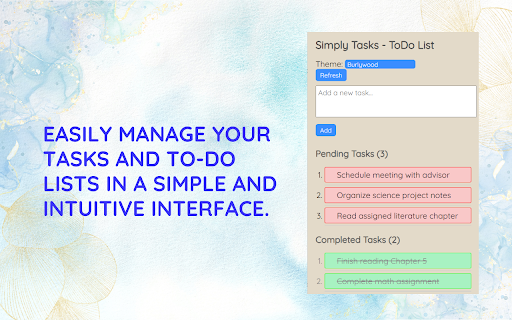
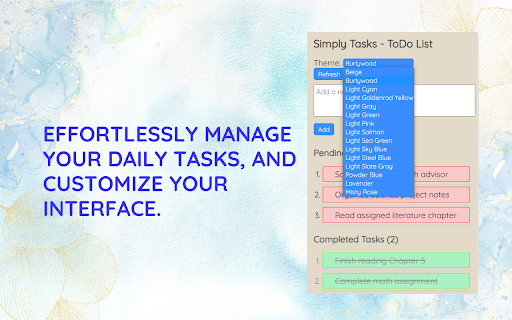
Simply Tasks - ToDo List is a Chrome extension for easy task management. Intuitive interface, customize your to-do list & tasks. Simply Tasks - ToDo List is a Chrome extension that lets you easily manage your tasks and to-do lists in a simple and intuitive interface. Effortlessly manage your daily tasks, customize your interface.

Tikist Things To Do List
Tikist your Tasks To Do List app with local device storage, calendar integration and sharing functionality. Tikist - Your Personal “Things To Do” Manager Simple. Server-free. Secure. Enjoy a streamlined to-do list app that empowers you to organize tasks effortlessly, all while keeping your private data truly private. Fast, clutter-free, and packed with features! • Minimalist Interface - Stay focused with a clean, intuitive design. • Dark and Light Modes - Choose the best look for any time of day. • Task Management - Create, organize, and check off tasks seamlessly. • Prioritize - Highlight urgent tasks to keep your focus sharp. • Calendar Integration - Add start/due dates, send tasks to your calendar. • Folder Organization - Group and sort lists into custom folders. • Quick Sharing - Share lists instantly via a simple link. • Tag and Note Options - Add tags, notes, or URLs to enrich task details. • Event Timelines - Visualize upcoming events with our timeline feature. • Download Your Data - Keep a backup or transfer to another device. • Full Logs View - Track changes and review your to-do history. With multi-language support including English, Spanish, German, Mandarin, Hindi, Arabic, Bengali, Russian, Portuguese, and Urdu, Tikist is ready for global users. Privacy-Centric, EU Compliant, and Serverless Many task managers save your private data on their servers, often outside of your control. Under EU law, this can raise data sovereignty concerns. Tikist keeps everything on your device—no servers, no cloud, and no risk of unauthorized access. Data is saved locally in your browser’s cache, meaning it’s yours and yours alone. However, as cache-based storage is not permanent, you can download your data anytime through the menu. Tikist is purpose-built to be light, responsive, and distraction-free, with just the essentials for daily productivity. We’re constantly evolving and welcome feedback to make Tikist even better. Dive into secure, clutter-free task management today. Happy Tasking!

Simple Todo list
A simple todo list with a minimalistic UI that lets you keep track of your pending tasks. Simple Todo list – A simple and minimalistic extension made to help you stay organized, focused, and productive. Features: 📌 Minimal, distraction-free design with a clean and modern UI 📌 Add and delete tasks 📌 Assign priorities (Low, Medium, High) with nice color-coded tags 📌 Filter tasks by priority or status 📌 Mark tasks as "Done", delete them upon completion 📌 Data synced across various browsers over different devices— your tasks stay private and secure Version 2.1.0: - Feature of marking the tasks as "Completed" and deleting them. Version 2.0.0: - Feature of adding and changing the priority of each task - Filtering based on the priority Version 1.1.0: - Added badges for displaying task count - Performance Increased - Tasks will be ordered as per time - Permissions reduced

To-Do List
Edit, create, delete and view your task list - with high and low priority included Introducing our user-friendly To-Do List application that allows you to effortlessly manage your tasks and priorities. Whether you're a busy professional, a student with assignments, or simply someone looking to stay organized, our application empowers you to create, edit, delete, and view your tasks with high and low priority settings. Here's how our To-Do List app can streamline your daily life: 1. Create Tasks: Add new tasks quickly and easily. Specify task names, descriptions, and due dates. Assign high or low priority to each task, helping you focus on what matters most. 2. Edit Tasks: Need to make changes to a task? Our app allows you to edit task details, such as names, descriptions, and due dates. Adjust the priority of a task as its importance changes. 3. Delete Tasks: When a task is completed or no longer needed, you can delete it from your list. Keep your task list clutter-free and organized. 4. View Tasks: Effortlessly browse through your tasks to see what's on your plate. Sort tasks by priority, due date, or completion status for a clear overview. Easily filter tasks to focus on either high-priority or low-priority items, helping you stay on top of your most important responsibilities. 5. Priority Settings: Prioritize your tasks by assigning them as high or low priority. High-priority tasks are prominently displayed, ensuring you tackle your most urgent responsibilities first. Low-priority tasks are there for you to manage at your convenience.

To-Do List
A simple to-do list Chrome extension. Looking for a way to stay organized and on top of your daily tasks? Look no further than our new Chrome extension that helps you manage your to-do list with ease and efficiency. With just a few clicks, you can create, organize, and prioritize your tasks for the day, week, or even the month ahead. Our sleek and user-friendly interface allows you to easily add new tasks, edit existing ones, and mark them as complete. But that's not all, our intuitive drag-and-drop functionality makes it easy to rearrange tasks and prioritize them according to their importance and deadline. With our to-do list Chrome extension, you can finally say goodbye to sticky notes, forgotten tasks, and missed deadlines. Whether you're a busy professional, a student, or a busy parent juggling multiple responsibilities, our extension is the perfect solution for staying on top of your to-do list and achieving your goals. So why wait? Download our to-do list Chrome extension today and start managing your tasks like a pro!
