
hplmgcbileifdjfahjdmpjclbkmgdhic
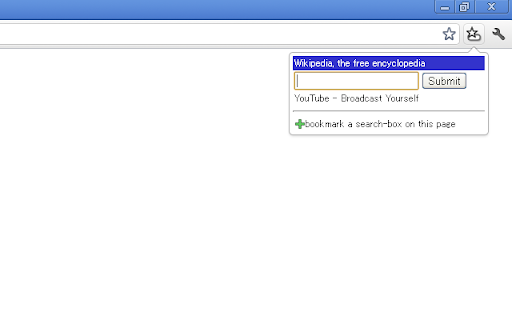
Bookmark search-boxes and use the search-box in the toolbar popup. * Bookmark search-boxes on web pages. * Use search-box in the toolbar popup. * Use search-box by the selected word in the context menu.

Finder Bookmarks
This extension will replace Chrome's default bookmarks manager. It's very useful if you have lots of bookmarks. Similar to Mac Finder in columns view, you can manage and navigate bookmarks by mouse or keyboard shortcuts, for example: • Navigate all bookmarks using mouse or arrow keys. • Open a bookmark by double click or enter key. • Open all bookmarks in a folder by context menu. • Drag and Drop a bookmark to a new location. • Create, edit or delete bookmark or folder by context menu. • Select multi bookmarks to move, delete or open. • Copy/cut/paste bookmarks(except folders) by shortcuts. • Sort bookmarks by name. • Support many keyboard shortcuts. How to use: • Click this extension's icon • Click menu item at Chrome -> Bookmarks -> Bookmark Manager • Use Chrome keyboard shortcuts, Windows/Linux is Ctrl + Shift + o, Mac is ⌘ + Option + b This extension is a part of another extension "Re-newtab" that contains this bookmarks manager in Chrome newtab.

All in one web searcher
Search anything on the internet easily by typing into ONE unified search box All in one web searcher allows to search any website easily by typing in one search box. All in one web searcher is a simple yet powerful extension to search multiple sites with ZERO click. Add sites to search, customize the order and search anywhere quickly. USING THE EXTENSION ---------------------------------- - Click the extension icon, simply hover over the search tabs and type the search term. - Press enter to search the keyword in the selected search engine. - Press "tab" or "alt" keys to cycle through tabs if needed. - Add custom search engine sites as you need. - Simple and quick way to search any page without a click ! FEATURES --------------- - Simple and fast UI for quick searches - Add multiple search sites easily and customize the order. - Add sub search sites like "Images" search, "Map" search etc. for easy search. - Keyboard shortcuts to cycle through the tabs. - Custom/Automatic icons for the tabs can be used. - No unwanted background process and memory. Light and fast extension. - Available in two themes - Text free extension and hence multilingual DEFAULT SEARCH ENGINES --------------------------------------- All popular search engines like Google, Bing, Wikipedia, DuckDuckGo are available out of the box. You can customize and add any search engine you want to this list with "sub search" engines like searching images, books, news etc. as needed. PRIVACY -------------- All in one web searcher extension does NOT collect any kind of information. The last used search keyword is saved locally. For any concerns, please contact me at aakashweb.com NOTE -------- After installing, please go to options page and change the "Tab selection method" to hover or click according as per your preference. Set a keyboard shortcut for opening the popup under "Manage extensions" page for even quicker search. CHANGE LOG ------------------- 5.0: - New: Move to manifest version 3.0 - New: Modernized search form styles. - Included new search engines as default. - Fix: Remove unused and old search engines from the default list. - Fix: Minor code refactoring - Fix: Last search term was not saved when button was clicked 4.1: - New option to open the results in new/same tab. - Minor enhancements to design and options page. - Updated jQuery and jQuery UI to the latest versions. - Fix issue where 'alt' key not cycling through tabs. - Replace deprecated events. 4.0: - Removed tabs permission. - Reorganized the assets used by the extension. - Updated default search URLs to HTTPS - Minor changes to the options page. 3.1: - Added feature to export and import search engine customization settings 3.0: - New simple Icon. - Reorder tabs easily. - Libraries updated to newest version. - Small interface changes. 2.0: - Core code re-written from bottom. - New Icon. - Instant popup load - Customize the default order of the list.

Bookmarks Table
View your Chrome bookmarks by date in a sortable searchable table Search your entire Chrome bookmarks collection in a table format. Each column is sortable and searchable. To open click the icon to the right of your address bar. This is an Open Source source project, please see the website link for more info.

TabStacks: tab and history search
View and search through open tabs and browser history. TabStacks is a vertical tab menu that helps you find the content you were looking for. Filter the tabs you have open and TabStacks will list the open tabs that match. If TabStacks can't find an open tab, it searches through your history to see if you had a tab open previously! TabStacks is designed to be keyboard and screen reader accessible. Press [CTRL]+[SHIFT]+[K] to open the menu, start typing to filter your tabs, and use the [DOWN] arrow key to navigate to the tab you want, and [ENTER] to open that tab. You can always use your mouse as well. You can search through your history during a tab search by pressing [CTRL+SHIFT+S]. You can close a tab by highlighting it in the list using the arrow keys or right-click and pressing [DELETE] or by clicking the close button on the tab. TabStacks is a high performance and secure extension for Chrome. TabStacks doesn't download external files, doesn't store any information about your activity. *** UPDATES *** Version 2.0.2 * Fixed bug where the popup doesn't close on tab change * Added a settings item to allow the option to hold the popup open Version 2.0.1 * The default keyboard shortcut for toggling the search is now CTRL+SHIFT+S due to the browser using nearly all possible combinations of CTRL+ a single key. * The keyboard shortcut key is now configurable, you can modify it in the settings page. Click the gear icon at upper right of the popup to access settings. * Minor cosmetic updates to the settings page. Version 2.0 * Tabs shown in the popup are synchronized with the state of the tabs in the browser: * Title updates are reflected in real-time. * New or deleted tabs are reflected in the tab list. * Close tabs using a button on the tab. Close buttons show on hover or focus. * Tabs display an audio icon if playing audio. * For audible tabs, clicking the icon will mute and unmute the tab. * Settings page has been added, click the gear icon top-right to access settings. Version 1.0.8 * Added lazy loading for site icons to speed up rendering * Reduced requested browser permissions Version 1.0.7 * Linux support for launching TabStacks from keyboard with [CTRL+SHIFT+K]. * PopupMenu now has a max-height instead of fixed height. * Fixed bug on Windows where the scroll bar was rendered even if the tabs would not scroll. Version 1.0.6 * Improved search algorithm for both tabs and history. * Searches much longer history time period. * Tabs in the current window always appear at top when popup is opened (User suggestion). * URLs for tabs appear on focus or mouseover (User suggestion). * Engineering improvements under the hood to use Web Components for rendering.
