
hpabmnfgopbnljhfamjcpmcfaehclgci
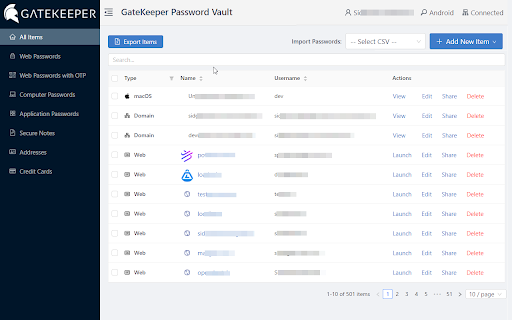


GateKeeper Password Manager works with the GateKeeper desktop application to provide proximity based access to web passwords. Login to websites with your phone or a Bluetooth token. The GateKeeper Chrome extension gives proximity access to web credentials, including one-time-passwords (OTPs) when using a GateKeeper key and software for secure access to your computer. The extension enhances the user's ability to manage their web passwords in their GateKeeper profiles. It communicates with the GateKeeper desktop application to allow users to save and retrieve their web credentials on any computer they log on to using their GateKeeper proximity token. For enterprise users, this extension provides access to web credentials for all users on every computer on the network once the user is authenticated on to the machine using their GateKeeper proximity token. Once a user logs on to any computer on the network using their GateKeeper proximity token, all their web credentials are available for them to use through this extension. Additionally, by registering web applications that support Time-Based One-Time-Passwords, the extension provides the 6-digit OTP in addition to the username and password for the web application, automatically. With GateKeeper, you will have on-demand and secure access to your computer, web and 2-FA OTP codes in one place. For any questions regarding proximity lock and unlock with GateKeeper, please email us at info@gkaccess.com or visit https://gkaccess.com.

DualSafe Password Manager & Digital Vault
DualSafe Password Manager extension lets you safely manage passwords in one place to autosave, autofill & access them anytime. Keep secure and productive with this password management tool. DualSafe Password Manager extension enables you to manage passwords securely & simply in just one place. You only need to remember one single password. The DualSafe Password Manager plugin can autosave your login credentials in a secure digital vault with your grant. Then the saved passwords will be auto-filled on the sites whenever you need to log into. With the best password manager browser addon, you don’t need to install a password manager application on your computer anymore. Password management has never been easier with the DualSafe Password Manager extension. Add it to your browser now! What makes DualSafe the best password manager? All your data is completely locally encrypted using AES256. Nobody, including us (DualSafe), can access your personal information but yourself. When it comes to data synchronization, we use HTTPS to transfer the already encrypted data to our cloud server. The whole process is 100% safe because of SSL. We are not here to just help you remember something but to help you secure everything. We monitor the dark web day and night to make sure you will be informed immediately if your account and password were leaked. We help you check the strength of your password each time you add it to our extension, and give you suggestions to fix it. ✔️Intuitive and Easy to Use✔️ DualSafe Password Manager extension allows you to save your credentials with just one click. The next time you need to log in, we will auto-fill your username and password. The only thing you need to do is to remember one single password to access our plugin. Each time you update your account name or password of a site, we will automatically update it for you. We order your saved account information according to your last update time to make sure you can easily find sites that you visit regularly. A search function is also provided for you to find your favorite ones. DualSafe is not just a password manager, but your one-stop digital vault. You can also save your Secure Notes, Payment Info, or Personal Info with us. Once again, everything is safe with us. DualSafe is so proud of providing users with 4 extra free tools: Password Generator, Dark Web Monitor, Password Health, Import & Export. Password Generator can help you generate a strong and secure password that no one can guess. Don't worry about it being too complex. You don't need to remember it, we help you remember. Dark Web Monitor can help you monitor sensitive data leaks on Dark Web. We will let you know and give you suggestions once upon we find the leaking sites containing your information. Password Health is able to check if a password is vulnerable. We will give a low score for weak, reused, or compromised passwords to prevent your passwords from being cracked. Import & Export allows you to import data from your browsers or other password tools, and export your saved data to a CSV file with just 1 click. ❤️Forget about forgetting passwords from today on. Have your important information at your fingertips with DualSafe Password Manager.❤️

MasterPassword for chrome
Remember your MasterPassword, and this app will generate unique passwords for every other site you visit One of todays main security challenges on the web is passwords. You typically have to login at many different sites, and remembering a different password for every site is hard. Unfortunately one of the sites you use will sooner or later be hacked, and passwords leaked. If that password is reused on other sites, the hackers will have access to all your accounts. MasterPassword can help. With one master password, a unique one can be generated for each site. When you need to login, this addon will complete the site password for you. And it is impossible to guess the master password from a site password. Read more at http://masterpasswordapp.com The MasterPassword algorithm is standardized. You can find app's for Ios, Android, Windows, Mac and Linux. One of MasterPasswords strong points is that neither the master or site password is stored anywhere. The site password is rather generated mathematically every time. This is in clear contrast to many other password managers, like Chrome's built in password manager. If your computer or browser is hacked, solutions where the password is stored can give away all your passwords! Similar dangers exists with cloud based solutions. The MasterPassword addon can of course co exist with other password managers and will stay out of your way until you click the MasterPassword button. If you chose to uninstall the addon, you'll just have to remember the passwords you've generated, or import them into another password manager. Since passwords in MasterPassword are mathematically generated, it is impossible to import other custom passwords into master password. They would have to be stored on your computer, which defeats MasterPassword's working principle. As such, it is convenient to use the Chrome password manager for such passwords, until you find a time to switch a site to MasterPassword. Also note that when MasterPassword enters a password for you, Chrome will behave like you typed it on the keyboard, and prompt you if you want to save it. You can of course accept this, but your passwords will then be stored and risk being stolen. I'd therefore suggest to reject that offer. Protect your accounts on the web - Use MasterPassword

Cat Gatekeeper
Spend too long on social media? A cat hijacks your screen. The cutest forced-break app. The official versions of Cat Gatekeeper are only those linked from this page and the official website. Please be careful of apps or websites with similar names. ・The desktop app is now available! ・Added support for the Brave browser! ・Changed the default time setting from 30 minutes to 10 minutes! ・A new cat now appears at random! ・You can now add any target sites you like! ※ On sites with frequent page changes or reloads, tracking may reset more easily. We recommend using this on social media, video sites, or other services where you stay on the same site for a while. ※ If the display or behavior becomes unstable after updating, please reload the open page once. Social media is just too hard to stop checking, isn't it? 💦🥵 What you need isn't more willpower — it's a cat that forces its way onto your screen!! You know that cat who always shows up right when you're trying to work? 🐈️ We've recreated that classic cat-owner experience in your browser. Oh well, they're too cute to stay mad at. Let's face it — humans are just servants to their cats. We are powerless against their charm. The supreme beings. The ultimate fluffballs. Let their adorableness heal you while you take a proper break. ■ Who this is for * The scrolling won't stop * You suddenly realize an hour has passed * Willpower alone just isn't cutting it ■ How to use 1. Set your usage limit (default: 30 min) 2. Set your break time (default: 5 min) 3. Set your favorite sites (default: major social media sites) 4. When time's up, a cat appears 5. Rest until the countdown ends ■ How it works * Only counts time when a target site tab is active * Tracking resets when you switch to another tab or app * After your break, the usage timer starts again ■ Supported Sites The default settings include major social media sites. You can add, remove, or change target sites from the menu. Note: Tracking may reset on sites with frequent page changes or reloads, so Cat Gatekeeper works best on social media and video sites where you stay on the same service for a while. * Page access permission is used solely to display the break overlay (cat overlay). * No data is collected or transmitted externally. * Free, no ads Get the desktop app for use beyond the browser https://zokuzoku.github.io/cat-gatekeeper/desktop/

Free Password Manager & Authenticator & SSO
The free password manager extension comes with autofill & autologin including websites that support the Authenticator format. SAASPASS is a free Password Manager & Authenticator 2FA code generator with autofill & autologin capabilities. It is built with Security & Usability in mind. The SAASPASS password manager extension can autofill both your passwords AND authenticator codes enabling a smooth seamless experience and single sign-on SSO. There is NO need for a separate desktop password manager application with the SAASPASS browser extension. The password manager browser extension plugin is protected by two-factor authentication by default and includes passwordless 2FA like scanning an encrypted barcode and push login approval. The password keeper browser extension plugin is both phishing-proof and prevents man-in-the-middle attacks. The SAASPASS mobile app is available on the Apple App Store and Google Play. The iPhone and iPad version is available here: https://apps.apple.com/us/app/saaspass-authenticator-2fa-mfa/id849132027 The Android version is available here: https://play.google.com/store/apps/details?id=com.solidpass.saaspass&hl=en&gl=US You can access everything with copy/paste capabilities also from the SAASPASS web portal at: https://www.saaspass.com/sd/#/login The web portal is protected by multi-factor authentication by default, and includes passwordless MFA like scanning an encrypted barcode and push login approval. The SAASPASS Password Manager comes with over 100 thousand pre-configured websites and mobile apps There is the Authenticator 2FA code generator for websites and mobile apps The SAASPASS Security Scan identifies websites and apps that have Authenticator 2FA support, and also identifies Duplicate and Weak passwords The password manager and authenticator code generator has user initiated AutoFill & AutoLogin (prevents hijacking) The password manager addon is secured with passwordless 2FA There is SSL Detection and the browser extension only Autofills HTTPS sites The password manager add-on comes with SSO & Copy to clipboard The Web Portal Access comes with SSO & Copy to clipboard The Web Portal is secured with passwordless 2FA The 2FA on the browser extension is pinned and mitigates against Phishing and Man-in-the-Middle attacks Secure Notes - in this notes and password keeper you can store and vault all sorts of details both offline and optionally synced online with multiple devices There is a Strong Password Generator in the browser extension and mobile app SAASPASS comes with Multiple Device support and Device Management (including device removal) Tablet support (including landscape view and split screen on the iPad) Secure Backup & Restore options with SIM Swap prevention Universal Search is available for both the password manager and authenticator codes in the mobile app, web portal and browser extension Works on all platforms (Microsoft Windows, Apple Mac, Linux, iPhone, iPad, iOS and Android etc.) There is no need for a desktop application to be installed Sharing of Authenticator (TOTP & HOTP) codes supported (available for teams and enterprises) Mobile AutoFill with App Lock protection Password Manager, Authenticator & Secure Notes work with offline and online options Phishing proof logins logins from the password manager browser extension HOTP/TOTP support is adjustable and comes with support of 6,7 and 8 digit codes You can integrate the password manager with 2FA products twilio authy, google authenticator, microsoft authenticator, 1password, dashlane and duo security The mobile app is available in over 30 languages In addition to personal use, companies can also use SAASPASS for: Multi-factor authentication (MFA), Enterprise Password Manager, Single Sign-on (SSO) Shared Access Manager Share passwords Share Authenticator codes (TOTP & HOTP) with teams Share emails & applications Access Control Policies Adaptive Authentication Privileged Access Manager (PAM) Directory Services (including Microsoft Active Directory and LDAP) Endpoint Access Protection (enforce MFA on computers) Reporting & Audit Trail (internal SIEM & export to external SIEMs) Companies can sign up from the www.saaspass.com website. The Identity & Access Management (IAM) of SAASPASS can be used to integrate many business and productivity applications including email and collaboration suites There is pre-built out-of-the box integration to over 100 THOUSAND applications to services like Amazon, Facebook, Dropbox, Gmail, Twitter and Linkedin. Developers can integrate passwordless multi-factor authentication (MFA) services with RESTful API, ready code snippets in multiple languages and SDKs. More details on building two-factor authentication 2FA is available at: For enterprise customers there is support for hard tokens with TOTP, HOTP & FIDO U2F format and USB based Yubico Yubikey OTP. The mobile password manager and authenticator app has app protection that includes: Biometric Authentication TouchID FaceID Pattern Invisible Pattern Scrambled Keypad Fingerprint Authentication and Verification Facial Authentication and Verification You can import services as a CSV file from your Chrome browser or other formats from the SAASPASS web portal for services like Dashlane, Lastpass and 1Password. The 2FA (always required) to unlock your browser extension is phishing-proof and keylogger attacks are mitigated against. There are no static credentials, like a master password to unlock the browser extension, that can be used in a replay attack. Man-in-the-middle attacks are not possible as the 2fa is pinned to the browser. This makes the SAASPASS browser extension arguably have the highest level of security possible with extreme usability. Integrations of the Single Sign-on SSO solution include SAML, OIDC, RDP, VPN, okta, cyberark, onelogin, sailpoint, saviynt, simeio solutions, pingone, beyondtrust, avatier, roboform, avira, my1login, zoho vault, password boss, bitwarden, one identity, enpass, myki, nordpass, passwordstate, logmeonce, zenmate, blur, abine, lastpass, password depot, dropbox passwords, it glue, true key, x beta, norton security, microfocus, silverfort, kee, thycotic, avg, passbolt, total av, passwork, netiq, 1clickvpn, safeincloud, devolutions, steganos, remembear, keepasshelper, commonkey, aws iam, axiad, keepassxc, apple keychain, ping one, duo security, expressvpn, rapidIdentity, touch vpn, identity automation, ambius, kaseya, passly, directory services, metadata directories, Azure AD, Active Directory, LDAP and secure web based form-filling. You can even add passwordless MFA to Identity Providers (IdP) and Identity Governance solutions like idaptive, okta browser plugin, onelogin, ibm tivoli isam esso and oracle. You can set up the team password manager and team single sign-on by signing up in the company sign up. The team password manager can be used for all password sharing needs including making the passwords visible and invisible. The admin can share both the password manager and the authenticator codes (TOTP & HOTP) as well. The password manager & authenticator codes generated can be shared on mobile devices, the web portal and the browser extension. We have a limit of 500 login items in the personal use case for the free password manager and authenticator code generator. This is how we can offer the password manager for free for personal use while we charge companies. The secure notes keeper is stored in an encrypted vault and works offline by default. You can turn it online and have it synced with multiple devices as well. Keep us posted with your suggestions, feedback and ideas for improvements for the password manager and authenticator code generator. We look forward to it and always appreciate it! If you enjoy the service feel free to rate us. This helps us improve the password manager, secure notes keeper, password vault, and the authenticator code generator and our service to you. You can learn about more features about the password safe, encrypted vault, notes keeper and you can get the SAASPASS Free Password Manager & Authenticator for Mozilla Firefox, Google Chrome, Apple Safari, Microsoft Edge and Opera from www.saaspass.com
