
hifbblnjfcimjnlhibannjoclibgedmd
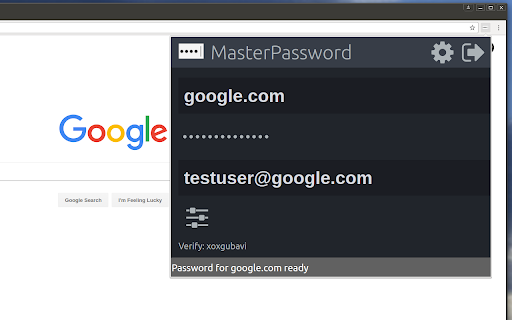
Remember your MasterPassword, and this app will generate unique passwords for every other site you visit One of todays main security challenges on the web is passwords. You typically have to login at many different sites, and remembering a different password for every site is hard. Unfortunately one of the sites you use will sooner or later be hacked, and passwords leaked. If that password is reused on other sites, the hackers will have access to all your accounts. MasterPassword can help. With one master password, a unique one can be generated for each site. When you need to login, this addon will complete the site password for you. And it is impossible to guess the master password from a site password. Read more at http://masterpasswordapp.com The MasterPassword algorithm is standardized. You can find app's for Ios, Android, Windows, Mac and Linux. One of MasterPasswords strong points is that neither the master or site password is stored anywhere. The site password is rather generated mathematically every time. This is in clear contrast to many other password managers, like Chrome's built in password manager. If your computer or browser is hacked, solutions where the password is stored can give away all your passwords! Similar dangers exists with cloud based solutions. The MasterPassword addon can of course co exist with other password managers and will stay out of your way until you click the MasterPassword button. If you chose to uninstall the addon, you'll just have to remember the passwords you've generated, or import them into another password manager. Since passwords in MasterPassword are mathematically generated, it is impossible to import other custom passwords into master password. They would have to be stored on your computer, which defeats MasterPassword's working principle. As such, it is convenient to use the Chrome password manager for such passwords, until you find a time to switch a site to MasterPassword. Also note that when MasterPassword enters a password for you, Chrome will behave like you typed it on the keyboard, and prompt you if you want to save it. You can of course accept this, but your passwords will then be stored and risk being stolen. I'd therefore suggest to reject that offer. Protect your accounts on the web - Use MasterPassword

Locker - Password Manager
A browser extension makes your online presence secure and seamless. Locker is a cross-platform vault that help users secure sensitive digital assets such as logins and passwords, secret notes, payment cards, online identities, and crypto wallets. It also offers additional features to enhance browsing experience like password autofill, item sharing, and more. 1. Security - Locker uses military-grade encryption to secure your data. AES-256bit encryption combined with PBKDF2 and RSA algorithm makes your data is un-crackable. - Your vault is encrypted with a Master Password, which is the only key to decrypt your data. 2. Privacy & Transparency - Your Master Password is only yours. No body, even us, can see your Master Password thanks to Zero-knowledge development model. - Locker is an open-source product. Everyone can inspect its source code. We believe transparency is the key to better security. 3. Unlimited Sync - Once you add, edit, remove items in your Locker on a device, the data will be sync-ed across all other devices*. 4. Bring Your Passwords with You - With Offline Mode, you can use Locker anywhere, anytime, even when your phone is not connected to the internet**. No more password hassle. Free Your Mind. Install Locker. *Data is encrypted before they left the current device. **Offline Mode is only available on Locker mobile application (Android & iOS).

Intuitive Password®: Password Manager
Intuitive Password® streamlines your web login experience, allowing you to access any website with just a single click. Intuitive Password is a high-security, military-grade password manager designed to simplify your online experience while protecting your confidential data. By securely managing your logins, passwords, and other sensitive information, Intuitive Password helps you maintain unique, strong passwords for every account, enhancing your overall online security. == Built for families and teams == Intuitive Password is built with flexibility and security in mind, making it perfect for personal use, family sharing, and business environments. Whether you're an individual seeking better password management or a company looking for secure team access, Intuitive Password meets your needs. ◆ Add all your online accounts and select the vaults you wish to view ◆ Easily move password items between vaults ◆ Use shared vaults to securely share sensitive information with family or team members Intuitive Password is built with a robust, multi-layered security design to ensure your data remains protected at all times. Utilizing military-grade encryption, it safeguards your passwords and sensitive information both at rest and in transit. Advanced features like two-factor authentication (2FA), single-use codes, and anti-phishing protection add extra layers of defense, making unauthorized access nearly impossible. The Security Dashboard provides real-time monitoring of your password health, highlighting weak or reused passwords for immediate action. With options like country-based restrictions, offline access, and secure account inheritance, Intuitive Password gives you complete control over who accesses your data. Additionally, automatic logout and email/SMS notifications provide continuous security, ensuring you're always informed of any potential threats. ◆ Unlimited access to passwords: Access your passwords securely from any device, including smartphones, tablets, and desktops, with no limits. Your data is always available, whether you’re on the go or at home. ◆ Single-use codes: Intuitive Password offers single-use codes as an added layer of security. These one-time codes can replace your password during login, particularly useful when logging in on public or shared computers. Each code expires after use, ensuring your account remains secure. ◆ Security dashboard: Monitor the health of your passwords with the Security Dashboard. It highlights weak, reused, or compromised passwords, allowing you to make necessary changes to maintain strong security across all your accounts. ◆ Advanced search: Quickly locate passwords or sensitive notes using the built-in search function. You can search by keywords or tags, making it easy to find exactly what you need in seconds. ◆ Geo-location restriction: Intuitive Password gives you the ability to restrict login access based on geographic location. You can block login attempts from specific countries, enhancing your security by preventing unauthorized access from unfamiliar regions. ◆ Offline mode: Access all your stored passwords without requiring an internet connection. This feature is available on all devices, including smartphones, tablets, laptops, and desktops, ensuring you can manage your passwords anytime, anywhere. ◆ Data importing and exporting: Easily import passwords from other password managers into Intuitive Password, and export your data when needed. Our simple process ensures smooth transitions and easy data management without compromising security. == Get started for free == Intuitive Password's Basic edition is completely free, with no time limitations, and can be used on as many devices as you need, including apps for Android and iOS.

Chrome Browser Security Locker (chrome password lock)
Locks Chrome on startup and requires a password to avoid unauthorized access. After installing the extension, it prompts the user to set a master password for google chrome. after relaunching chrome, the extension will lock chrome completely and ask for the master password. after entering the master password chrome will be unlocked and function normally. Note: Please don't forgot to enable extension in incognito mode. Your privacy is very important. that is why this extension does not require connecting to any external website. your password is encrypted, stored and handled locally. Features: - Easy to use. - Lightweight. - Encryption technology for more privacy and security. - Change password functionality

pass-browser-chrome
Make secrets easily accessible from your pass' ~/.password-store pass-browser-chrome is a browser plugin for your secrets managed by pass: https://www.passwordstore.org/
