
hnpnmejpeohnifipibkeefnhfgeleghi
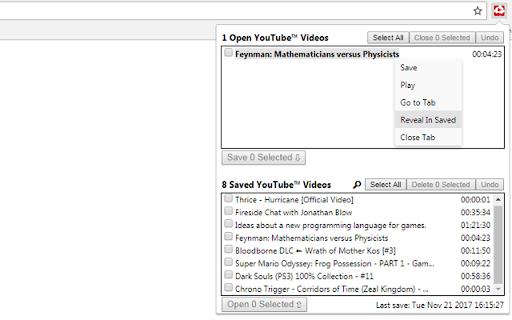


Manage open and saved YouTube™ videos to pick up right where you left off. If you're like me you probably have 15 YouTube videos open in another Chrome window that just sit there. You watch a couple minutes here and there but OH! Windows Update just ran again and is forcing a restart soon. Ok well you just close that window and you can reopen it again after the restart with all your tabs intact. OH all the videos are starting from the beginning..cool. If you have ever found yourself in this nightmare scenario then this is the extension for you. It sports a simple to use interface allowing you to easily manage your open and saved YouTube videos. FEATURES: -View and save open YouTube videos and their play positions so you can pick up right where you left off. -Sync saved videos and positions across any computer you are logged into Google Chrome on. IMPORTANT: If you have any YouTube videos open at the time you install this extension, you will need to reload them once this extension is installed. This is due to the way Chrome extensions interact with other pages. OPTIONAL: If you are interested in using the feature that allows you to sync your saved videos across multiple computers (i.e. your home computer and your work computer) you will need to make sure some settings are enabled in Chrome: - Verify you are logged into your Google account in Chrome by going to your Chrome settings (chrome://settings/) and in the "Sign In" section, make sure you are signed in. - In the same area of your settings, you will also need to make sure your account is set to sync extension data by clicking the button labeled "Advanced sync settings" (chrome://settings/syncSetup) and make sure "Extensions" is checked. NOTICE: Upon installation Chrome warns you that this extension can view browsing data. Chrome does this because the extension needs to be able to open and close tabs as you manage them through the extension. Since it is able to access your tabs, Chrome views that as accessing your browsing data since the URL can be extracted from the tab. This extension will only ever interact with YouTube tabs and it does not log any data other than your videos you want to save and their play positions. If you have any questions about this feel free to contact me! Icon and store art by Jake Muronaka Update History: 1.4.2 -Updating to latest Extension manifest version 1.3: A slight re-branding: -Changing name and various assets. Previous name did not make it clear that this extension is not sponsored by, associated with, or otherwise affiliated with Google. Otherwise, nothing has changed and I will continue to support this extension. Please contact me if there is any confusion/questions about this! 1.2: -Added the ability to search for saved YouTube videos -Minor bug fixes 1.1.91: -Google updated Chrome recently and it appears to have changed the speed at which inactive tabs respond to messages that are sent to them. Due to this change if you have any YouTube videos open in an inactive tab (any tab that is not the one you are currently looking at) then YouTube Recall will take an extra second or two to load the open videos. I do not have much visibility into what changed on Chrome's end in Google's most recent update so I have been unable to resolve this hiccup quickly. I will be actively looking into ways to mitigate this behavior but in the meantime I am updating YouTube Recall to clearly display when it is attempting to load the open videos to avoid confusion. If the delay in loading speed bothers you one way to avoid it is to only have one YouTube tab open at once and make sure it's the active tab (the tab you're looking at) when you open YouTube Recall. I apologize for any inconvenience this may cause. 1.1.9: -Added a "Reveal In Saved" selection to the right click menu for open videos if the selected video is in your saved videos. Clicking this will scroll the saved videos list to the entry you selected and highlight it briefly. I've found this helps when you have a particularly long list that can become a pain to visually search through when you are trying to locate the one video you have open in order to delete it. -Removed the "Open" and "Open In Tab" buttons from the right click menu when right clicking a saved video that is already open. -Removed the "Play" button from the right click menu when right clicking an open video that was just opened in another tab and you have not viewed that tab yet. Previously, the "Play" button would not actually cause a video to play if it was opened in a different tab and you had not navigated to it yet. This is due to the way Chrome/YouTube work as the player will not respond to Play/Pause commands until you have initialized the player (viewed it on it's tab) 1.1.5: -Fixed a bug where attempting to save more than ~35 videos would fail due to Chrome's file size limits -Fixed a bug where if a video with an ampersand(&) in the title is open, then none of the open YouTube videos would load in. -I'm a QA team of 1 and these were weird bugs (ok, not the first one) what do you want from me? ¯\_(ツ)_/¯ 1.1.2 - 1.1.4: -Fixed a bug involving YouTube videos that are no longer available from the user who uploaded them. 1.1.1: -Fixed a bug involving the positioning of the context menu when the saved videos lists exceeds 8 videos 1.1: -Added a context menu when right clicking on any saved or open videos that allows individual operations to be performed on a video. -Added a Go to Tab button to quickly navigate to an open video. This is available in the context menu for any open video. -Added Play/Pause controls. This is available in the context menu for any open video. -Added a play icon indicator for videos that are playing. -Optimized settings page. 1.0.8 - 1.0.9: -Improved user experience for lower-end computers. 1.0.7: -Added an option for open entries to appear bold if they are already saved. Options are accessible by clicking 'Options' under YouTube Recall on your Extensions page. 1.0.6: -Fixed issue with opening videos in the current tab when the current tab is a non-YouTube page. 1.0.4: -Added a simple options menu accessible from the Chrome Extensions screen that contains preferences for opening saved videos in the current tab and auto-checking videos that are open by default allowing you to quickly make changes to all of them at once if you prefer. -Added ability to open videos from Saved Videos by double clicking them.

YouTube™ Stop Button
Adds a stop button to the player interface to unload the player and stop the video from buffering any time. This extension unloads the YouTube player without affecting the actual page. Removing the player eliminates any network requests to fetch or buffer the video. This is especially useful when you wish to watch the video later without YouTube preloading it and consuming your bandwidth. Key Features: 1. Disables automatic buffering 2. Halts player-related network activities 3. Unloads the player while keeping the page intact The extension introduces a new "Stop" button located next to the "Play" button. Click the "Stop" button whenever you want to unload the player. Additional Notes: 1. This extension exclusively supports the HTML5 player, offering no compatibility with Youtube's old Flash player. 2. Built on manifest v3, this extension adheres to the specified guidelines. 3. It only operates when the "Stop" button is triggered and remains in an idle state at all other times, ensuring no background activities are running.

Auto Pause and Resume for YouTube™
Pause YouTube player when page is hidden and resume when it is active again! Features: - Automatically halts playback in a hidden YouTube tab. - Automatically resumes playback when the tab regains focus. - The option to deactivate the functionality via the action button (might have been hidden in the extension menu. If so you can pin the button to the toolbar area). How it works: A mini script is injected exclusively on YouTube pages to manage the player's play/pause status based on the visibility of the document. When a YouTube tab is brought to the forefront, the player automatically resumes, akin to hitting the play button. Conversely, when the document becomes hidden, the player automatically pauses, simulating the effect of pressing the pause button. Sample scenario: Imagine having multiple YouTube players across various tabs. Only the active player is in playback mode when focused, while all other players pause. Change Log: - Version 0.1.1: The extension can now be toggled on and off using the toolbar button, which is particularly handy for listening to YouTube videos in the background. - Version 0.2.0: The extension now utilizes manifest v3 and requires Chrome version "95" or newer for the update to be applied.

youstyle - simplified Youtube UI
Reorgnize the layout of youtube, tablize the comments/recommendation/... The ui modual of youtube is reorganized. * For the Style Tight, the Comments, the Related and the List are tabulated into right sidebar. So you can watch video while watching the comments,related video or list. * Automatically click the "Skip" button when it appears for advertisements. * Add Loop button near the play button.

Bookmarker for YouTube™
Maximize your YouTube viewing experience with Bookmarker for YouTube™. Save, organize and pick up where you left off. With the YouTube Bookmarker & Resumer, you can easily bookmark your favorite videos and resume watching from where you left off, without having to search for the video again. This extension comes with a host of features to enhance your YouTube viewing experience, including adding notes to bookmarks and searching previously added bookmarks. Whether you're a casual YouTube viewer or a dedicated content creator, it is the perfect tool to help you stay organized and never miss a moment of your favorite videos. 1.Bookmarking: Store and sort as many videos as wanted to be reviewed at later time. 2. Resuming: Pick up where you left off with progress tracking across sessions. 3. Organized Video Bookmarking: Organize bookmarked videos into folder or tag of choice. 4. Export Bookmarked Videos: Export or retrieve your List of videos that you bookmarked. 5. Timestamped Shareable Links: Add and post clickable links that will only start at the given time. 6. Cross-Device Sync: The other feature is that you can easily sync bookmarks and settings into multiple devices that you own. 7. Add Notes: Add notes to bookmarks to quickly remember the material. ◉ Install the extension ◉Once installed, navigate and open the video you want to save. ◉Wait for the video to start playing, and then click on the Bookmark icon adjacent to the volume control option ◉ Click the "Bookmark icon" to add the bookmark to your list. ◉To access your saved bookmarks, click the extension icon and select the bookmarks you want from the menu. ◉You can add notes to saved bookmarks or delete them with one click ◉ To resume watching a video from where you left off, go to your bookmarks list and click on the time stamp. Disclaimer: It's important to note that the YouTube Bookmarker browser extension is not associated with YouTube or its parent company, Google. It is an independent third-party tool that provides a bookmarking feature for YouTube videos.
