
hnmpbbchimnikhglkooiefhghlmlgbmp

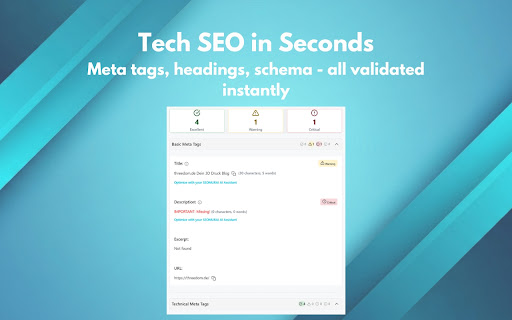


Professional SEO analysis with dashboard, tech SEO validation, content check, link analysis, schema testing, and AI tools. SEOMURAI SEO Extension - Professional SEO Analysis Directly in Your Browser Save time on your daily SEO work. SEOMURAI is your all-in-one SEO analysis solution that provides all important website data at a glance – without switching between different tools. Changelog: 1.3 · May 2026 - New languages: Brazilian Portuguese, Italian and Japanese (now 8 UI languages total) - AI Bot Checker (Tech SEO): Checks which of 32 known AI crawlers (GPTBot, ClaudeBot, Google-Extended and others) are allowed on your site - Robots.txt Validator (Tech SEO): Full RFC 9309 parser with line-by-line analysis, error and warning lists, and interactive URL testing - Three webhook starter templates: "Basic Webhook Setup" for connection testing, "SEO Audit to Google Sheet" for 9 SEO fields per page, "DataForSEO SERP to Notion" for keyword research. Each template ships with a paired n8n JSON workflow for download - ZIP download for images: Download entire image selections as a single ZIP archive - CJK support: Content Analysis now works for Japanese, Chinese, Korean and Thai pages - DataForSEO: more markets (22 countries vs 10), including Portugal, Belgium, Sweden, Poland, Ireland, Canada, Australia, India, Mexico, Argentina, Brazil and Japan - Webhook template descriptions now localized in all 8 languages (previously hard-coded in English) - Automatic changelog page on major updates: starting with this version, SEOMURAI opens the changelog page once after every major update so you can see what is new at a glance - Bugfixes: Footer translations completed, CORS issues with S3 and CDN image downloads resolved, minor right-click menu corrections 1.2 · April 2026 - Bugfixes (Resolved issues with Single Page Applications (SPA) + other minor fixes) - DataForSEO Integration (Beta): Keyword research and other DFS features can now be run directly inside the extension - New languages: Turkish, Spanish, French Developed by SEO professionals for SEO professionals, content managers, web developers, and digital marketing teams. 1. Tech SEO Validation - Instant Analysis with Best Practices • Meta Tags: Title, Description, Canonical, Robots, Viewport with real-time validation • Headings Structure: H1-H6 hierarchy check, detection of duplicate and empty headings • Schema Markup: JSON-LD and Microdata validation with concrete recommendations • Social Media: Open Graph and Twitter Card check with live preview • HTTP Headers: Complete analysis of server response headers • Redirect Path: Visually track and analyze redirect chains • HTML Data: Code-to-text ratio and HTML structure analysis 2. Content Analysis - Optimize Text & Images • Text Analysis: Words, characters, paragraphs, readability metrics (Flesch, Wiener Sachtextformel) • Keyword Highlighter: Mark and track search terms (incl. regex support) • Keyword Lists: Save and reuse keyword sets • Image SEO: Systematically check alt text and title attributes • Image Analysis: Filtering by size, download and format conversion 3. Link Analysis - Complete Control Over Internal & External Links • Link Statistics: Internal/external links, Follow/Nofollow status at a glance • Detailed Analysis: Filter by type, position, and target • Duplicate Links: Find and clean up duplicate URLs • Outlink Checker: Check for specific outbound links • Link Heatmap: Visual representation of link distribution (PRO) • Sitemap Explorer: Crawl and analyze XML sitemaps (PRO) 4. AI Integration - Accelerate SEO Work with Artificial Intelligence • Prompt Library: 47+ pre-made SEO prompts for common analyses • SEOMURAI Chatbot: Webhook integration for AI-powered SEO consulting (PRO) • LLM SEO Team: Team of specialized AI assistants (PRO) • Webhook Workflows: Automation with any AI tools (ChatGPT, Claude, etc.) (PRO) • AI Presets: Predefined configurations for common AI providers (PRO) 5. DataForSEO Integration (Beta) - Professional Keyword & Backlink Data Using your own DataForSEO credentials (BYOK - Bring Your Own Key), you get access to: • SERP Rankings: Retrieve Google search results for any keywords and locations • Keyword Research: Analyze search volume, competition, and keyword suggestions • Domain/URL Data: Discover all keywords a domain ranks for, including positions • Backlink Analysis: Investigate backlink profiles including referring domains and anchor texts • Multi-Location Support: Retrieve data for DE, US, UK, FR, ES, IT, NL, AT, CH • Research History: All queries are stored locally and can be reloaded anytime • Export: Export results as CSV, back up and restore history as JSON 6. Tracker Blocker - Work Undisturbed on Your Own Projects • Blocks common analytics and tracking scripts directly in the browser (e.g. Google Analytics, Tag Manager, Facebook Pixel) • Ideal for SEOs, developers, and agencies working on their own projects who don't want their own test traffic to skew their statistics • Opt-in: Disabled by default - only activate the blocker when you actually need it • Built on declarativeNetRequest (Manifest V3) - no data collection, no telemetry • Only tracking-relevant domains are blocked - features like n8n webhooks or DataForSEO remain unaffected 7. Extras - Productivity Tools for Daily SEO Work • Dashboard: SEO Score (0-100), Quick Actions, Top 5 Issues at a glance • Markdown Export: Export page as Markdown (AI-optimized or complete) (PRO) • Notepad: Save notes directly in the extension • CSV Export: All tables exportable for further analysis (PRO) • Backup/Restore: Save and restore settings and API keys FREE - Available Forever: • Dashboard with SEO Score and recommendations • Tech SEO: All 8 analysis tabs (Meta, Headings, Social, Schema, HTTP Headers, Redirect Path, HTML Data, llms.txt) • Content: Text Analysis, Keyword Highlighter, Image SEO, Image Analysis • Links: Statistics, Detailed Analysis, Duplicate Links, Outlink Checker • DataForSEO Integration (Beta): SERP, Keyword Research, Domain Data, Backlinks (with your own DataForSEO credentials) • Tracker Blocker: Optional blocking of analytics and tracking scripts • Extras: Notepad, Settings with Backup/Restore • AI: Prompt Library with 47+ SEO prompts PRO - Advanced Features: • Link Heatmap - Visual link distribution • Sitemap Explorer - Crawl XML sitemaps • SEOMURAI Chatbot - AI-powered SEO consulting • LLM SEO Team - Specialized AI assistants • Webhook Workflows - Automation with AI tools • AI Presets - Pre-configured AI providers • Markdown Export - Export content for AI tools • CSV Exports - Download all tables as CSV User-Friendly Interface: • Clear dashboard with prioritized recommendations • Color-coded status badges (Critical/Warning/Success/Info) • Contextual help: "How to use" guides in every module • Drag & Drop: Movable user interface Technical Excellence: • Shadow DOM Isolation - No conflicts with website CSS • Full internationalization - 2 languages (DE, EN) • All analyses run locally in browser - Maximum performance • Manifest V3 - Future-proof and secure Privacy & Security: • All analyses are performed locally in your browser • No website data transmitted to external servers • Optional: Webhook integration for AI tools (controlled by you) • Your API keys are stored only locally in chrome.storage • Access to visited websites (activeTab) Required to analyze the currently open page (HTML, meta tags, links, images) • Read your data on all websites () Enables SEO analyses on any website • Storage (storage) Stores your settings, notes, and optionally API keys locally • Context menu (contextMenus) Adds right-click options for quick access • Notifications (notifications) Informs you about analysis status and important notices • Observe web requests (webRequest) Read-only - required for Redirect Path analysis • Block network requests (declarativeNetRequest) Used exclusively by the optional Tracker Blocker to block analytics and tracking scripts. Disabled by default. • Downloads (downloads) Enables CSV and Markdown export downloads Privacy Guarantee: SEOMURAI does not transmit any website data to external servers. All analyses are performed exclusively locally in your browser. PERFECT FOR: • SEO professionals and consultants - Comprehensive analysis tools for daily audits • Content managers and editors - Text optimization and keyword tracking • Web developers and agencies - Technical SEO validation • Marketing teams - Social media and schema markup checks • Website operators - Simple SEO monitoring without prior knowledge 1. Installation: Click "Add to Chrome" 2. Activation: Open any website and click the SEOMURAI icon 3. Analysis: All free features are available to you immediately • Integrated "How to use" guides in every module • Tooltips and contextual recommendations • Regular updates and new features Developed with love for the SEO community

Rank-O-Saur - SEO Extension
Your all-in-one SEO browser extension for content, language, crawling, indexing, links, ai search and structured data. 🦖 Rank-O-Saur: Your All-in-One SEO & GEO Extension for Perfect OnPage & Technical SEO Rank-O-Saur is the ultimate browser extension for SEO experts, web developers, and content marketers. With just one click—or through our persistent side panel—you can analyze any webpage directly in your browser for all relevant ranking factors. Whether you need technical SEO audits, content checks, crawlability insights, link analysis, or local SERP simulation – Rank-O-Saur delivers all the data clearly and in real-time. 🛡️ Ads-free and without any 3rd party tracking scripts. Clean, fast, and helpful! Stop switching between multiple tools. Rank-O-Saur brings the complete SEO arsenal straight to your browser! 🔥 HOT NEW FEATURES ➤ Sidebar View: Open Rank-O-Saur directly in your browser's side panel for a persistent, side-by-side technical SEO analysis without switching tabs. Enjoy a seamless workflow and analyze elements without constantly toggling menus. ➤ Google Location Search: Change your search location to see localized Google search results from anywhere in the world. Combine location settings with specific browser languages for precise SERP analysis. ➤ In-Search Data Widget: View search volume, competition metrics, estimated CPC (via Sistrix integration), and a live Google Trends chart directly inside your Google Search results. 📊 Overview & Meta Data (OnPage SEO) Get a quick glance at the most critical OnPage factors that determine your Click-Through Rate (CTR) in the SERPs. ➤ Title Tag & Meta Description Check: Verifies presence, character count, and pixel length. Get instant warnings for tags that are too long or too short. ➤ Quick Health Check: Displays the HTTP status code (e.g., 200 OK), page file size, and the current loading URL. ➤ Live Status: Instant analysis of Meta-Robots, X-Robots-Tags, robots.txt rules, and Canonical tags right in the dashboard. 🕷️ Crawling & Indexing (Technical SEO) Avoid fatal SEO mistakes that prevent Google from indexing your site. Rank-O-Saur runs background checks and warns you proactively with a red icon when something prevents the page from being crawled or indexed. ➤ Automatic Indexation Alarm: If a page is set to noindex or blocked by robots.txt, the Rank-O-Saur extension icon instantly turns red! ➤ Canonical Tag Analysis: Checks if a Canonical tag is set, whether it's self-referencing, or if it points to another URL (preventing duplicate content). ➤ Robots.txt & XML-Sitemap Check: Reads the robots.txt live, evaluates wildcards (*), and displays linked sitemaps. ➤ X-Robots-Tag (HTTP Header): Detects server-side indexation blocks that are invisible in the standard HTML source code. 🤖 AI & LLM Crawler Access Check In the age of Google SGE, ChatGPT, and Claude, it is crucial to know which AI bots are allowed to read your content. Rank-O-Saur checks access live via robots.txt and verifies your llms.txt file to instantly show domain access for the most important traditional and AI-driven crawlers. 📝 Content & Heading Structure (H1-H6) Optimize your copy for both search engines and users. ➤ H-Tag Hierarchy: Detailed tree-view of all headings (H1 to H6). Instantly detects structural errors (e.g., missing H1 tags or skipped hierarchy levels). ➤ Visual Highlighting: Highlight all headings directly on the webpage for a visual structure check. ➤ Word Count: Quick analysis of the text length within the body (crucial for holistic content). ➤ Export Functionality: Copy your heading structure as a table or CSV for your SEO audits. 🔗 Link Analysis & Status Check Take full control of your internal link juice and outbound backlinks. ➤ Comprehensive Link Extractor: Filters links by Internal, External, Nofollow/Dofollow, Parameters, and Duplicates. ➤ Live Status Checker: With one click, check all found links on the page for broken URLs (404 errors) or redirects (301/302). ➤ On-Page Highlighting: Visually highlight internal (green), external (yellow), and nofollow links (dashed red) directly within the content. ➤ Anchor Text Analysis: Clearly lists all used anchor texts. 🌍 International SEO (Language & Hreflang) Secure top rankings in international markets with clean language markup. ➤ HTML Lang Attribute: Verifies the declared main language of the document. ➤ Hreflang Validation: Lists all found hreflang tags and highlights the current language version. ➤ Return-Tag Checker: Performs a live check to ensure linked international pages have correct return tags pointing back to the original URL. 🖼️ Image SEO (Optimization) Leverage the full potential of Google Image Search. ➤ Missing ALT-Tags: Instantly finds all images lacking an ALT attribute or Title tag. ➤ Format & Size Check: Analyzes the file format (e.g., WebP, JPG) and warns about oversized image files (> 500 KB) that negatively impact your page speed and Core Web Vitals. ⚙️ Structured Data (JSON-LD Markup) Climb the SERPs with Rich Snippets and Schema.org. ➤ Markup Extraction: Reads all JSON-LD scripts on the page and displays the @type categories (e.g., Article, FAQPage, Product). ➤ Code Viewer & Copy Function: Integrated editor with syntax highlighting for quick code copying. ➤ 1-Click Testing: Direct links to the Google Rich Results Test and the Schema.org Validator for the current URL. 📱 Social Media (Open Graph & Twitter Cards) Optimize how your page looks when shared on social platforms. ➤ Extracts OG-Title, OG-Description, and OG-Image. ➤ Displays a visual preview of the designated social image. ➤ Analyzes the active Twitter Card Type. 🛠️ Custom Features: Shortcuts & User-Agents Rank-O-Saur can be customized to fit your personal SEO workflow! ➤ Custom User-Agents Switcher: Simulate requests as Googlebot (Desktop/Mobile), Bingbot, or ChatGPT-User to uncover cloaking or test mobile versions. You can even create your own custom User-Agents! ➤ Custom HTTP Header: Ideal for testing on staging environments that need to set a custom header. ➤ Quick Actions: Use pre-configured SEO shortcuts. ➤ JS vs. No-JS: Compare the page with and without JavaScript in a side-by-side view (crucial for Client-Side Rendering audits). ➤ Sistrix, GSC & PageSpeed: Jump straight to Google Search Console, Sistrix, or PageSpeed Insights with your current domain. ➤ Dark Mode & Multi-Language: The UI is available in English, German, Spanish, and French, and features an eye-friendly Dark Mode.

Robots Exclusion Checker
Checks robots.txt, meta robots, x-robots-tag with URL alerts. Canonical warnings, HTTP header info. An SEO extension, robots tester. Robots Exclusion Checker is designed to visually indicate whether any robots exclusions are preventing your page from being crawled or indexed by Search Engines. ## The extension reports on 6 elements: 1. Robots.txt 2. Meta Robots tag 3. A.I. Bots 4. X-robots-tag 5. Rel=Canonical 6. UGC, Sponsored and Nofollow attribute values If a URL you are visiting is being affected by an "Allow” or “Disallow” within robots.txt, the extension will show you the specific rule within the extension, making it easy to copy or visit the live robots.txt. You will also be shown the full robots.txt with the specific rule highlighted (if applicable). Cool eh! Any Robots Meta tags that direct robots to “index", “noindex", “follow" or “nofollow" will flag the appropriate Red, Amber or Green icons. Directives that won’t affect Search Engine indexation, such as “nosnippet” or “noodp” will be shown but won’t be factored into the alerts. The extension makes it easy to view all directives, along with showing you any HTML meta robots tags in full that appear in the source code. Checks whether a website's robots.txt file blocks A.I. companies from accessing its content. It monitors 14 bots across 6 companies - OpenAI, Anthropic, Google, Perplexity, Meta, and Apple, covering three types of access: training data collection, search indexing, and real-time browsing. If any bot exclusions are detected, an "AI" label will appear over the Robots Exclusion Checker icon in your browser. This feature can be deactivated within settings if preferred. Spotting any robots directives in the HTTP header has been a bit of a pain in the past but no longer with this extension. Any specific exclusions will be made very visible, as well as the full HTTP Header - with the specific exclusions highlighted too! Although the canonical tag doesn’t directly impact indexation, it can still impact how your URLs behave within SERPS (Search Engine Results Pages). If the page you are viewing is Allowed to bots but a Canonical mismatch has been detected (the current URL is different to the Canonical URL) then the extension will flag an Amber icon. Canonical information is collected on every page from within the HTML and HTTP header response. - UGC, Sponsored and Nofollow A new addition to the extension gives you the option to highlight any visible links that use a "nofollow", "ugc" or "sponsored" rel attribute value. You can control which links are highlighted and set your preferred colour for each. I’d you’d prefer this is disabled, you can switch off entirely. Within settings, you can choose one of the following user-agents to simulate what each Search Engine has access to: This tool will be useful for anyone working in Search Engine Optimisation (SEO) or digital marketing, as it gives a clear visual indication if the page is being blocked by robots.txt (many existing extensions don’t flag this). Crawl or indexation issues have a direct bearing on how well your website performs in organic results, so this extension should be part of your SEO developer toolkit for Google Chrome. An alternative to some of the common robots.txt testers available online. This extension is useful for: - Faceted navigation review and optimisation (useful to see the robot control behind complex / stacked facets) - Detecting crawl or indexation issues - General SEO review and auditing within your browser ## Avoid the need for multiple SEO Extensions Within the realm of robots and indexation, there is no better extension available. In fact, by installing Robots Exclusion Checker you will avoid having to run multiple extensions within Chrome that will slow down its functionality. 1.0.3: Various bug fixes, including better handling of URLs with encoded characters. Robots.txt expansion feature to allow the viewing of extra-long rules. Now JavaScript history.pushState() compatible. 1.0.4: Various upgrades. Canonical tag detection added (HTML and HTTP Header) with Amber icon alerts. Robots.txt is now shown in full, with the appropriate rule highlighted. X-robots-tag now highlighted within full HTTP header information. Various UX improvements, such as "Copy to Clipboard” and “View Source” links. Social share icons added. 1.0.5: Forces a background HTTP header call when the extension detects a URL change but no new HTTP header info - mainly for sites heavily dependant on JavaScript. 1.0.6: Fixed an issue with the hash part of the URL when doing a canonical check. 1.0.7: Forces a background body response call in addition to HTTP headers, to ensure a non-cached view of the URL for JavaScript heavy sites. 1.0.8: Fixed an error that occurred when multiple references to the same user-agent were detected within robots.txt file. 1.0.9: Fixed an issue with the canonical mismatch alert. 1.1.0: Various UI updates, including a JavaScript alert when the extension detects a URL change with no new HTTP request. 1.1.3: Added UGC, Sponsored and Nofollow link highlighting. 1.1.4: Switched off nofollow link highlighting by default on new installs and fixed a bug related to HTTP header canonical mismatches. 1.1.6: Extension now flags 404 errors in Red. 1.1.7: Not sending cookies when making a background request to fetch a page that was navigated to with pushstate. 1.1.8: Improvements to the handling of relative vs absolute canonical URLs and unencoded URL messaging. 1.2.0.11: Updating to Google's new manifest V3 and fixing small bugs. 1.2.0.12: Added a Spanish language version and made improvements to existing translations. Linking to new website https://www.checkrobots.com 1.2.0.13: Fixed pushState navigation data extraction, resolved inconsistent icon display, and added security protections to prevent logout issues with enterprise websites. 1.3.0: Introduced A.I. bot checking to monitor robots.txt exclusion rules for 14 bots across 6 companies including OpenAI, Anthropic, Google, Perplexity, Meta and Apple, with training, search indexing and real-time browsing bots tracked. New site exclusion feature lets you skip checking for specific domains. Fixes for SPA/back-forward navigation, x-robots-tag case sensitivity for Bingbot and Yahoo and improved allow/disallow rule precedence. Redesigned settings page with collapsible sections.

RoboX - Live Robots & Technical SEO Checker
Simplify your technical SEO analysis with RoboX by Wingmen. RoboX is the ultimate technical SEO companion for developers and SEO professionals. Validate the crawlability and indexability (HTTP Status, Canonicals, Meta Robots, X-Robots, Robots.txt & Sitemaps) of any website in real-time directly in your browser – fast, secure, and privacy-focused. 1️⃣ HTTP Status Checker • Instant Status: See the raw HTTP status code of the current page immediately. • Dynamic Error Icons: Opt-in to show specific extension icons for 4xx and 5xx HTTP error pages directly in your browser toolbar. • Redirect Inspector: Traces the full redirect chain of the current page, documenting status codes for every single hop. • Robots.txt Block Detection: Warns you instantly if any intermediate URL in a redirect chain is blocked by robots.txt, preventing crawlers from reaching the final destination. • Raw HTTP Headers: Inspect the raw HTTP response headers individually for every hop in the redirect chain. 2️⃣ Meta Robots & X-Robots-Tag Checker • Dual Analysis: Checks both HTML tags and HTTP X-Robots-Tag headers simultaneously. • Smart Conflict Detection: Warns you if tags conflict or if JavaScript injects/modifies meta tags after the initial page load (DOM vs. Raw HTML). • Clear Status: Instantly see Index/Noindex and Follow/Nofollow status based on strict Google logic, including support for specific crawler directives. 3️⃣ Canonical Checker • Dual Analysis: Analyzes both HTML and HTTP Header canonicals to detect mismatches or conflicts. • Deep-Check Analysis: Run a powerful "Deep-Check" on any foreign canonical to instantly validate the target URL's HTTP status, robots.txt allowance, and indexability without having to leave the current page. 4️⃣ Robots.txt Checker • Instant Status: See immediately if the current URL is allowed or disallowed. • Deep Inspection: Pinpoints the exact rule and line number blocking or allowing the page. • RFC 9309 Validation: Automatically checks syntax against official standards. Detects critical errors, typos, and deprecated directives. • Deviating Bots: Smartly detects if specific bots (like GPTBot, Bingbot, or CCBot) are treated differently than the standard wildcard (*). 5️⃣ XML Sitemap Validator • One-Click Check: Auto-detects sitemaps linked in robots.txt. • Deep Validation: Audits file size, XML structure, HTTP status codes, logic errors (e.g., missing tags), hreflang attributes (xhtml:link), and natively unzips GZIP (.gz) sitemaps. • Performance Aware: Warns about high RAM usage for massive sitemaps (>10,000 URLs) to keep your browser fast. • Type Detection: Identifies Sitemap Indices, Image, Video, and News sitemaps automatically. 6️⃣ URL Path Simulator • Scenario Testing: Simulate how different bots (Googlebot, Bingbot, ChatGPT, etc.) perceive the current page. • Path Input: Test specific subdirectories or files against the cached robots.txt instantly without having to navigate to them. ⚙️ Your Tool, Your Rules: Highly customizable & workflow ready. • On-Demand vs. Live Monitoring: You decide how RoboX works. Set the extension to continuously monitor the status quo in the background (updating the icon live as you browse) or to only run checks when you actively click the extension icon to save resources. • SPA Support: Smartly detects Single Page Application (SPA) navigation and prompts a quick refresh to ensure your data is never outdated. • Tailored UI: Customize exactly what you want to see. Enable or disable specific sections (Sitemaps, Syntax Validation, Tester, etc.) to keep your popup clean and focused. • Dark Mode & Languages: Switch seamlessly between Light and Dark Mode, and choose between an English or German interface. • Snapshot Overlay: Detach the analysis into a floating window. Perfect for screen sharing, presentations, or keeping data visible while navigating the site. 🔒 Privacy First: Your data stays yours. • Client-Side Only: RoboX operates 100% locally in your browser. • No Tracking: We do not track your browsing history, analyze your traffic, or send data to external servers. • Transparent: The extension connects strictly to the URLs involved in your current page load (including the website you are visiting, its redirect hops, and canonical targets) to fetch necessary technical files like robots.txt. No third-party servers are involved. Made with ❤️ by Wingmen Bug Reports & Feedback: Found an issue? Please reach out via our contact form linked in the 'Support' section.

AIO Extractor
Stores AIO highlights with root keywords to structure outlines, plan content, and analyze SERPs via AI Overviews. Side Panel UI. Your side panel toolkit for SERP research: Designed for keyword discovery, question mining, and semantic mapping. 🔸 Open Keyword-Chips Opens Google’s topic chips (e.g., “Nike”, “Adidas”) as new search tabs for quick topical expansion. 🔸 Get AI-Overview Extracts highlighted keywords from Google’s AI Overview box and saves them for later analysis (e.g. Google Sheets). 🔸 Open PAA Expands all People also ask question. Automatically revealing related questions and answers. 🔸 Open Autosuggest Recursively gathers Google Autosuggest ideas and saves them with semantic hierarchy. 🔸 Visualize Map Displays the collected Autosuggest data as an interactive semantic map. ⚠️ Works only after running “Open Autosuggest”. 📥 Extract & Store Captures visible AI Overview, PAA, or on-page keywords for later use. 📋 Copy to Clipboard Copies stored data in tab-separated format for Sheets. Headers (Autosuggest mode): Autosuggest Term | Depth 1 | Depth 2 | Depth 3 | Depth Level | Semantic-Line 🗑️ Clear Storage Deletes all saved data from the extension’s local storage. Copy to Clipboard: Paste into Sheets/Docs for outlining and idea grouping. Visualize Map: Review structure for content gaps or overlap. Copy to Clipboard: Filter by depth to finalize your outline. 🕒 When: Building a comprehensive landing page that covers full intent clusters. 3️⃣ Quick-win cluster for supporting articles Open Autosuggest: Gather long-tails (“best X for Y”, “X vs Y”). 🎯 Depth ≈ Intent specificity: Autosuggest terms map to exact questions → ideal for FAQs. ✍️ Title shortcut: Convert root → parent → child into “How to [child] for [parent] ([root])”. 🔎 Chip validation: If a chip exists, there’s enough interest for a dedicated section.
