
andhjjckgipbopldnidjdkpaecekfeii
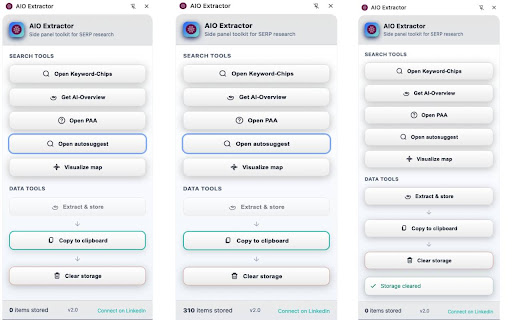

Stores AIO highlights with root keywords to structure outlines, plan content, and analyze SERPs via AI Overviews. Side Panel UI. Your side panel toolkit for SERP research: Designed for keyword discovery, question mining, and semantic mapping. 🔸 Open Keyword-Chips Opens Google’s topic chips (e.g., “Nike”, “Adidas”) as new search tabs for quick topical expansion. 🔸 Get AI-Overview Extracts highlighted keywords from Google’s AI Overview box and saves them for later analysis (e.g. Google Sheets). 🔸 Open PAA Expands all People also ask question. Automatically revealing related questions and answers. 🔸 Open Autosuggest Recursively gathers Google Autosuggest ideas and saves them with semantic hierarchy. 🔸 Visualize Map Displays the collected Autosuggest data as an interactive semantic map. ⚠️ Works only after running “Open Autosuggest”. 📥 Extract & Store Captures visible AI Overview, PAA, or on-page keywords for later use. 📋 Copy to Clipboard Copies stored data in tab-separated format for Sheets. Headers (Autosuggest mode): Autosuggest Term | Depth 1 | Depth 2 | Depth 3 | Depth Level | Semantic-Line 🗑️ Clear Storage Deletes all saved data from the extension’s local storage. Copy to Clipboard: Paste into Sheets/Docs for outlining and idea grouping. Visualize Map: Review structure for content gaps or overlap. Copy to Clipboard: Filter by depth to finalize your outline. 🕒 When: Building a comprehensive landing page that covers full intent clusters. 3️⃣ Quick-win cluster for supporting articles Open Autosuggest: Gather long-tails (“best X for Y”, “X vs Y”). 🎯 Depth ≈ Intent specificity: Autosuggest terms map to exact questions → ideal for FAQs. ✍️ Title shortcut: Convert root → parent → child into “How to [child] for [parent] ([root])”. 🔎 Chip validation: If a chip exists, there’s enough interest for a dedicated section.

SEO | ASO | Search Ranking & Keyword Tool
SEO & ASO optimization tool. Complete on page ASO & SEO Analysis. Find rankings, ratings & short description Play Store, Google SERP 🔍 𝗢𝗽𝘁𝗶𝗺𝗶𝘇𝗲 𝗬𝗼𝘂𝗿 𝗦𝗘𝗢 & 𝗔𝗦𝗢 𝗘𝗳𝗳𝗼𝗿𝘁𝗹𝗲𝘀𝘀𝗹𝘆 𝘄𝗶𝘁𝗵 𝗢𝘂𝗿 𝗖𝗵𝗿𝗼𝗺𝗲 𝗘𝘅𝘁𝗲𝗻𝘀𝗶𝗼𝗻! Track keywords on Google SERP and Play Store instantly. With this all-in-one SEO ranking toolbar and ASO keyword tool, you can analyze rankings, ratings, descriptions, installs, and on-page SEO in just a few clicks. Forget manual rank checks—our search ranking tool gives you real-time insights into keyword positions and competitor strategies. Perfect for marketers, developers, and SEO specialists. Analyze Title tags, Meta descriptions, and result snippets. Track indexed pages, Core Web Vitals, and SERP result count. Interlinking and outgoing link checker (Ahrefs-style attributes). One-click detailed SEO report for deep analysis. Detect gaps in page rankings Track rankings for your own site by adding a URL in config Check keyword rankings from 1 to N with installs, ratings, and character counts. Get AppVector Keyword Difficulty Score and ASO keywords suggestions. Generate keyword tables from Title and Short Description using our ASO keyword tool. Track images, videos, and review URLs. With one click, run a complete site SEO analysis: Page Speed Insights Detailed image data with missing alt text Use the search ranking tool to get: Exact SERP result count for any keyword. Live search rankings for websites across regions. All-in-one SEO ranking toolbar for on-page audits. Integrated ASO keyword tool for Play Store optimization. Smart SEO search keyword tool for competitor analysis. Accurate search ranking tool for SERP tracking. 👉 Optimize your search & app strategies with ease—download our Chrome extension today

AI SEO AEO Optimizer
Key Features of the AI SEO AEO Optimizer Meta-Title Checker- Meta title is a very important element of any website because it conveys the primary topic and purpose of the website or a webpage. That is why it is crucial to optimize the meta-title. With our extension you can easily find out the meta-title of any website in one click only. Meta-description Checker- The Meta description tag of a page is included as the search snippet on a search engine result page (SERP). The Meta description gives users an idea of the content and how it is related to their search query. So just download our ads-free & simple to use extension to review and optimize Meta-description. H1-H2 Heading tag checker – Confused about which is the H1 heading tag on the webpage or want to check H1 tags for other websites? If yes then please save your time with our extension which gives the information of all the heading tags be it H1, H2, H3, H4, H5 or H6. Anchor Text Checker – Now with our extension, you can have a close look at anchor texts on any website to keep track of inbound and outbound links very easily. You can also use our tool to analyse competitor’s on-page anchor texts. Alt tag checker – Google Images are used by hundreds of millions of people every day to visually search for web content. According to the research, image search accounts for 27% of all queries across the top 10 US web search properties.

Ask Bar: AI Actions on Every Page
AI that understands the page. Summarize, explain, analyze screenshots, and turn insights into actions. From Any Page to a Finished Outcome—Without Switching Tabs Ask Bar turns your browser into an always-available AI companion. It lives in a small, fast panel and understands what you’re looking at in real time. Instead of copying text into another tab, Ask Bar reads the page with you, answers in context, and helps you turn information into outcomes—right where you’re working. Whether you’re scanning a product page, reading a long article, reviewing a design, or debugging in technical documentation, Ask Bar helps you move from “What does this mean?” to “What should I do next?” without breaking focus. Page Context Ask Bar understands the structure of the page you’re on: headings, sections, and on-page content. Ask questions like: * “Summarize this page in bullet points.” * “What are the key claims and what evidence supports them?” * “Compare these options and recommend one based on my criteria.” * “Explain this code block and point out possible issues.” Snap Screen (Visual Intelligence) Capture any chart, table, UI, or design element and Ask Bar will interpret it. This is ideal for content that isn’t easily copyable: screenshots, graphs, dashboards, and complex layouts. Ask things like: * “What does this chart imply over time?” * “Extract the key numbers and trends.” * “What is the main difference between these two UI states?” * “Turn this table into a clean summary.” Powerful capabilities, right where you browse * PDF Mastery: Open a PDF and talk to it like a conversation. Get summaries, key findings, and quick explanations from dense manuals, reports, and papers. * Live Web Research with citations: Verify facts using up-to-date sources and get citations when reliability matters. * Model Freedom: Switch between leading AI models (Gemini, Claude, ChatGPT, Grok, DeepSeek) to match the job—fast answers, deeper reasoning, or different writing styles. * Seamless Continuity: Your conversation follows you across tabs and sites, so you can keep momentum while researching, comparing, and drafting. Agentic by design (integrations coming soon) Ask Bar is not meant to stop at “here’s the answer.” The goal is to help you finish the task. Upcoming integrations are designed to make Ask Bar an agentic layer across your workflow: With these integrations, Ask Bar is built to help you do things like: * Turn what you’re reading into an email draft and prepare it for Gmail * Convert meeting notes or a page summary into tasks in Asana/Jira * Summarize a Slack thread and generate a clean recap for your team * Convert key data into a Google Sheets-ready format * Turn a bug report into a GitHub issue or a PR checklist * Create structured project notes in Notion * Draft customer updates and support responses for HubSpot/Zendesk/Intercom Who Ask Bar is for * Developers: Understand and debug code in place on GitHub, StackOverflow, and technical docs. * Researchers & Students: Summarize papers and PDFs, verify claims with citations, and organize findings faster. * Content Creators: Turn any page into output—threads, posts, scripts, briefs, and email summaries. * Analysts: Extract insights from charts and tables trapped in screenshots and dashboards. * Smart Shoppers: Compare specs, summarize negative reviews, and make faster decisions on product pages. Privacy & security Ask Bar is built with privacy-first principles. * Zero Data Logging: Your chat messages and page context are not processed, stored, or logged on our servers. * API keys stay local: Stored in chrome.storage.local and never synced to any server. * Secure architecture: Content scripts never access your secret keys. API calls run in the browser’s secure background (service worker) layer. Note: Ask Bar requires your own API key from OpenAI, Anthropic, or Google. We do not provide paid models for free.

Keyword Explorer
Keyword Explorer analyzes keyword density offline with SERP preview, clustering, A/B comparison, and page highlights. Keyword Explorer is a powerful on-page SEO assistant that gives you real-time keyword insights directly inside your browser. Everything is processed 100% offline, ensuring your content stays private and secure. Designed for SEOs, bloggers, writers, and marketers who want accurate analysis without the complexity of heavy SEO tools. 🔍 Instant Keyword Analysis Get keyword density, frequency, total/unique word count, sentence count, and average word length—all in one clean dashboard. 🔒 Fully Offline & Privacy-First No servers. No tracking. No data sharing. All analysis happens locally inside your browser. 📊 SERP Preview See how your page title and meta tags appear in Google search results. 🔁 A/B Comparison Compare two pages or content versions side-by-side to choose the best-performing copy. 📥 Export & Copy Data Download all insights in one click: • CSV • JSON • Copy to Clipboard Perfect for reports, clients, or content planning. ⚡ Lightweight & Fast Optimized for speed—opens instantly and works smoothly on all sites. 🖱️ Right-Click Menu Tools Analyze any page or selected content directly from your context menu.
