
hmebhknlgddhfbbdhgplnillngljgmdi

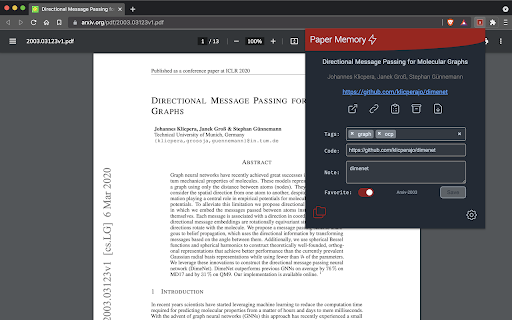
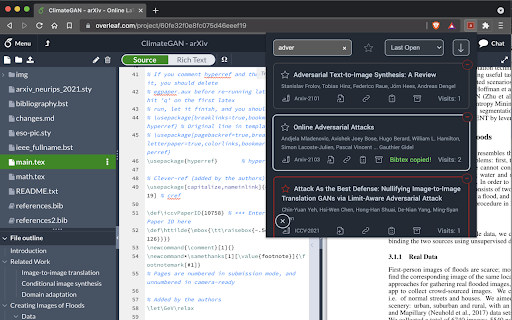

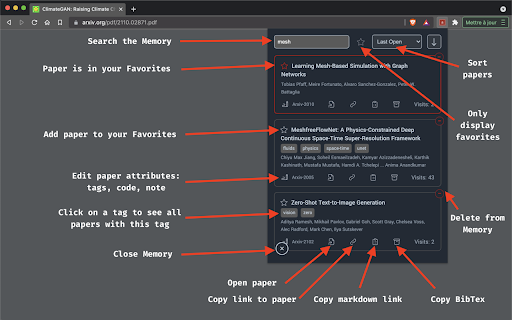
Automatically record papers and their codes from Arxiv, OpenReview & more! Organize your library with tags, links and quick notes. An automated, web-based and minimalist reference manager that also finds code repositories. This browser extension allows you to do automatically store research papers you read, find a code repository and much more: 🏬 Automatically record papers you open, without clicking anywhere. You can then search them, tag them, comment them and link a code repository. 🎬 Change a pdf's webpage title to the article's title, because who cares about that saved bookmark 1812.10889.pdf when it could be InstaGAN Instance-aware Image-to-Image Translation.pdf 🎫 BibTex citation, because citing papers should not be a hassle you can copy a BibTex citation to your clipboard or export the Memory itself as a .bib file 🔗 Markdown link, [title](url) because it's the little things that make sharing a paper easier (to be used in issues, PRs, Readme, HackMD.io etc.) 🗂 Direct download button with a nice name including the paper's title, so that you don't have to open the pdf's webpage and then download it from your browser. 📄 Go back from a pdf to its abstract page. For instance: from https://arxiv.org/pdf/1703.06907.pdf to https://arxiv.org/abs/1703.06907 in a click. 🏛️ Export your data as a .json file or a .bib full BibTex export Check out more the code, documentation, screenshots and share ideas at https://github.com/vict0rsch/PaperMemory

Clipboard History Manager - Secure, Fast, and Open Source
Powerful clipboard history manager. Save, search & organize everything you copy. Tags, shortcuts & unlimited storage. Clipboard History IO - Open Source Clipboard Manager & History for Chrome The most secure clipboard history manager for Chrome - fully open source, privacy-focused, and packed with powerful features. Experience professional clipboard management without compromising your security. Unlike traditional clipboard managers that require invasive permissions to "read and change all your data on all websites," Clipboard History IO only accesses your clipboard - nothing more. As the first fully open-source clipboard history extension, every line of code is transparent and auditable on GitHub, ensuring your sensitive data stays secure. 🚀 Powerful Features for Every User • Complete Clipboard History - Never lose copied text again. Access your entire clipboard history with instant search, favorites, and custom tags for organization. • Multiple Access Methods - Use clipboard history your way: popup window, floating resizable window, Chrome sidebar panel, right-click context menu, or keyboard shortcuts. Quick access with Alt+Shift+V to open the extension instantly, plus Alt+Shift+1/2/3 for direct pasting. • Smart Organization - Tag entries with colors, mark favorites, search instantly, and sort by date or alphabetically. Monitor your storage usage with the built-in storage analytics tool to optimize your clipboard history. Perfect for managing code snippets, passwords, templates, and frequently-used text. • Cross-Device Sync (Pro) - Seamlessly sync your clipboard across all devices. Copy on your computer, paste on your phone with our native mobile apps - now available on the App Store for iOS (https://apps.apple.com/us/app/clipboard-history-io-mobile/id6747272140) and Google Play Store for Android (https://play.google.com/store/apps/details?id=com.andyluyoung.clipboardhistoryio). True universal clipboard access. • Import/Export & Migration - Switch from Clipboard History Pro or other clipboard managers easily. Export your data anytime for backup or portability. • Advanced Merge Tool - Combine multiple clipboard entries into one. Essential for developers merging code blocks or writers combining research notes. • Customizable Experience - Dark/light themes, adjustable storage limits, default tab preferences, and multiple language support. Your clipboard contains sensitive information - passwords, personal data, confidential documents. That's why Clipboard History IO is built with security as the foundation: 💼 Perfect For: Developers - Manage API keys, code snippets, terminal commands, and configuration files with tags and search. Writers - Organize research, quotes, and drafts. Never lose important edits or references. Professionals - Quick access to email templates, meeting links, and frequently-used information. Security-Conscious Users - The only clipboard manager with verifiable privacy through open-source code. While other clipboard extensions remain closed-source black boxes, Clipboard History IO provides complete transparency. Compatible with both Chrome and Firefox, supporting Manifest V3 for future-proof performance. Import your existing data from Clipboard History Pro and experience a better, more secure clipboard manager. Pro Features: Unlock cloud synchronization to access your clipboard history from any device. Download our mobile apps from the App Store for iOS (https://apps.apple.com/us/app/clipboard-history-io-mobile/id6747272140) and Google Play Store for Android (https://play.google.com/store/apps/details?id=com.andyluyoung.clipboardhistoryio) for seamless cross-platform access. Your clipboard becomes truly universal - copy anywhere, paste everywhere. Join thousands of users who've chosen security without sacrificing functionality. Your clipboard history should be private, secure, and always accessible - with Clipboard History IO, it finally is.

arxiv-utils
Easy access on ArXiv! Auto-rename tabs to paper title, Quick navigation via button/hotkey, Save PDFs by paper title, and more. For ArXiv PDF / abstract tabs: - Renames the title to paper's title automatically in the background. (Originally is meaningless paper id, or start with paper id) - Add an action button to open its corresponding abstract / PDF page. (Originally is hard to get back to abstract page from PDF page) - Add a direct download link on abstract page, click it to download the PDF with the title as filename. (Originally is paper id as filename) - Open the paper in extra services such as ar5iv and arXiv Vanity. - Better title even for bookmarks! - Firefox has strict restrictions on PDF.js. So it doesn't work well with OneTab, the PDF renaming is achieved by intercepting requests and show the PDF in a container. The bookmark works well though. - Works well with native tab search - `tabs`: On extension button click, open a new tab and move it to the right of the old active tab. - `activeTab`: Read active tab's title and modify it using the tab's url. - `storage`: Save extension configurations. - `contextMenus`: When right-click the extension button, show a help menu item. - `scripting`: Inject content scripts to existing tabs. - `*://arxiv.org/*`: Inject content scripts to existing tabs. - `*://export.arxiv.org/*`: Inject content scripts to existing tabs. - `*://browse.arxiv.org/*`: Inject content scripts to existing tabs. - `*://ar5iv.labs.arxiv.org/*`: Inject content scripts to existing tabs.

Omni - tabs, history and bookmarks by Tefter
Boost your productivity by quickly navigating through your open tabs, history and Tefter.io bookmarks. Omni will analyze and index your browsing history, tabs and Tefter.io bookmarks for an optimal web navigation personalized experience. All your data stays local and is never uploaded to any internet servers. You don't have to take our word for it, the source code is unobfuscated and available to be inspected. We are committed to the privacy of our users. Omni and Tefter don't show any ads, they don't track you and don't display annoying notifications. Omni is free, but perfectly paired with Tefter.io, the social bookmarking toolkit for teams. You can connect Omni to your Tefter account to sync your bookmarks to the cloud and access them from all your devices. Surface Omni by hitting alt+k. Now you can search your history, tabs and Tefter.io bookmarks. The search scope is configurable. All your links are automatically organized into groups based on some parameters of link like the domain name. For example corp1.slack.com and corp2.slack.com would belong to the same group named Slack. Only the top ten most frequently accessed groups appear. You can switch between groups by pressing TAB. Collaborate with others and build a common knowledge base of your most useful bookmarks and aliases. Access the organization's bookmarks from any page or even through our Slack integration. This feature requires a Tefter.io account. You can create shortcuts to links you commonly use. We call such shortcuts aliases. To use aliases you need a Tefter account. To create an alias, read here. To search and navigate to aliases, either hit alt + a or type /go in the Omni search bar. You may also navigate to an alias, let's say docs by typing go/docs in your browser's address bar. This feature requires a Tefter.io account. Bookmarks: Omni will make your existing bookmarks searchable. To add a bookmark through Omni, hit alt+b or press on the press the extension icon followed by the "add bookmark" option. Hotkeys: In settings you can see and configure keyboard shortcuts for most common actions. Shortcuts: alt + b Bookmark current page alt + k Show Omni search alt + a Show aliases arrow down Select the next link in results ctrl + j Select the next link in results arrow up Select the previous link in results ctrl + k Select the previous link in results tab Select the next group shift + tab Select the previous group ctrl + l Select the next organization ctrl + h Select the previous organization alt + number Select the organization by number, where number in [1, 5] alt + 0 Deselect any organization Commands: /s Lookup via external search /c Create an alias /go List aliases and navigate to the selected one /t List open tabs and navigate to selected one

QuickFind: History, Bookmarks & Tabs
Quickly search and access your browsing history, bookmarks, and open tabs. QuickFind helps you quickly search and manage your browser history, bookmarks, and open tabs across all Chrome windows from one powerful popup. If you’ve ever lost a tab, struggled to find a previously visited page, or wanted to clean up your browsing data faster, QuickFind is built for you. You can search using page titles, URLs, domain names, and bookmark folder names. - Instantly find open tabs, even across multiple Chrome windows - Click a result to jump directly to the existing tab - Close open tabs directly from the results list - Bulk actions to close selected or visible tabs - Website / domain filter based on your most visited sites - Time range filter for browsing history: - Today - Last 7 days - Last 30 days - All time - Result limit control: - 25 - 50 - 100 - Website favicons for easy visual recognition - Page title shown when available - URL shown when no title exists - History items display exact date and time of last visit - Bookmark results show folder hierarchy - Clean and redesigned user interface - Light and Dark mode support - Manual theme toggle and system theme support - Theme preference is remembered - No background polling - No analytics or tracking - No external servers - All data stays locally in your browser QuickFind only uses Chrome permissions required for its functionality and does not collect or transmit user data. - Save time finding tabs, links, and bookmarks - Manage browsing data efficiently - Keep your browser clean and organized - Designed for productivity and power users
