
eldofalegbgagpenjjcapjaogpioldoh
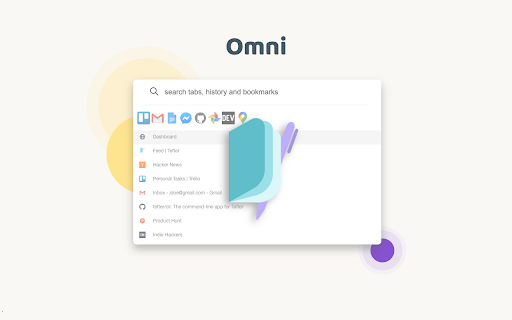
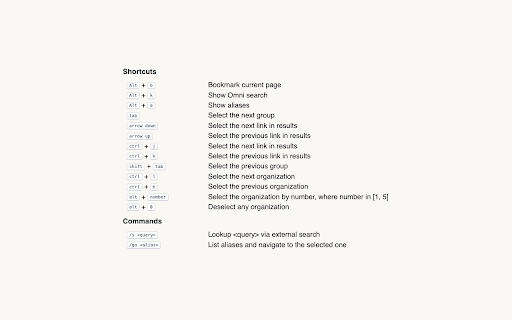


Boost your productivity by quickly navigating through your open tabs, history and Tefter.io bookmarks. Omni will analyze and index your browsing history, tabs and Tefter.io bookmarks for an optimal web navigation personalized experience. All your data stays local and is never uploaded to any internet servers. You don't have to take our word for it, the source code is unobfuscated and available to be inspected. We are committed to the privacy of our users. Omni and Tefter don't show any ads, they don't track you and don't display annoying notifications. Omni is free, but perfectly paired with Tefter.io, the social bookmarking toolkit for teams. You can connect Omni to your Tefter account to sync your bookmarks to the cloud and access them from all your devices. Surface Omni by hitting alt+k. Now you can search your history, tabs and Tefter.io bookmarks. The search scope is configurable. All your links are automatically organized into groups based on some parameters of link like the domain name. For example corp1.slack.com and corp2.slack.com would belong to the same group named Slack. Only the top ten most frequently accessed groups appear. You can switch between groups by pressing TAB. Collaborate with others and build a common knowledge base of your most useful bookmarks and aliases. Access the organization's bookmarks from any page or even through our Slack integration. This feature requires a Tefter.io account. You can create shortcuts to links you commonly use. We call such shortcuts aliases. To use aliases you need a Tefter account. To create an alias, read here. To search and navigate to aliases, either hit alt + a or type /go in the Omni search bar. You may also navigate to an alias, let's say docs by typing go/docs in your browser's address bar. This feature requires a Tefter.io account. Bookmarks: Omni will make your existing bookmarks searchable. To add a bookmark through Omni, hit alt+b or press on the press the extension icon followed by the "add bookmark" option. Hotkeys: In settings you can see and configure keyboard shortcuts for most common actions. Shortcuts: alt + b Bookmark current page alt + k Show Omni search alt + a Show aliases arrow down Select the next link in results ctrl + j Select the next link in results arrow up Select the previous link in results ctrl + k Select the previous link in results tab Select the next group shift + tab Select the previous group ctrl + l Select the next organization ctrl + h Select the previous organization alt + number Select the organization by number, where number in [1, 5] alt + 0 Deselect any organization Commands: /s Lookup via external search /c Create an alias /go List aliases and navigate to the selected one /t List open tabs and navigate to selected one

Partizion — Tab and Session Manager
Partizion is a tab and session manager that just works. Never worry about losing tabs again. ✦ Magic tab manager — Partizion saves tabs for you ✦ Privacy focused — no ads, no tracking, and we never sell or share your data ✦ Reliable tab session manager — Over 1 Million sessions saved ✦ Used by professionals from Netflix, Google, Shopify, Uber, Spotify, and more ✨ AUTO-UPDATING TAB COLLECTIONS Don’t want to manually update tabs and bookmarks? Partizion’s powerful auto-updating feature will automatically save tabs when you open/close them so that you don’t have to. ✔️ Automatically saves tabs for you (when you open or close them) ✔️ Pick up where you left off — Just open your Partizion collection ✔️ Cloud synced — restore saved groups of tabs from any browser ☁️ CLOUD SYNCED SESSIONS A bullet-proof tab session manager for chrome. With local caching and backups, cloud sync, and a beautiful UI, you never have to worry about losing tabs again. ✔️ Automatically saves sessions for you ✔️ Restore a session or group of tabs anytime ✔️ Sessions are synced to the cloud ✔️ Privacy controls (encryption + auto-delete settings or completely disable syncing) Too many tabs open? Partizion tab manager helps you keep less tabs open by saving backups so that you can safely close any tabs that you don’t need open right now, knowing that you can always find and open them again later. Lost tabs? Partizion automatically saves cloud-synced tab sessions so that you can restore any tabs you may have lost. Want to pickup where you left off? Save groups of tabs, open them later in one-click. Enable auto-update and Partizion will save tabs for you. As a backup, you can always restore tabs from Partizion’s session manager. Organize your tabs Organize tabs into Collections by project, task, client, or anything else then close/reopen later from any browser. Restore tabs Use Partizion’s powerful tab search to search your saved tabs and collections. OR browse your sessions in chronological order to restore sessions that you may have forgotten to save. Custom Views View your saved tabs and collection how you like: Grid View, List View, Kanban View, and a Full view (shows everything). Sort and filter your views to create workflows and dashboards.

Vaux Tab
Vaux Tab Manager and Window Organizer Vaux is an intuitive window manager with many robust features and simple interface. Perfect for tab management and window organization. Take your organizing skills to the max with Vaux! Latest feature: Share your saved windows with other Vaux users! Tab manager Window position recall Share windows with other Vaux users. Dark Theme Icon. Toggle icon from options page.

Finder Bookmarks
This extension will replace Chrome's default bookmarks manager. It's very useful if you have lots of bookmarks. Similar to Mac Finder in columns view, you can manage and navigate bookmarks by mouse or keyboard shortcuts, for example: • Navigate all bookmarks using mouse or arrow keys. • Open a bookmark by double click or enter key. • Open all bookmarks in a folder by context menu. • Drag and Drop a bookmark to a new location. • Create, edit or delete bookmark or folder by context menu. • Select multi bookmarks to move, delete or open. • Copy/cut/paste bookmarks(except folders) by shortcuts. • Sort bookmarks by name. • Support many keyboard shortcuts. How to use: • Click this extension's icon • Click menu item at Chrome -> Bookmarks -> Bookmark Manager • Use Chrome keyboard shortcuts, Windows/Linux is Ctrl + Shift + o, Mac is ⌘ + Option + b This extension is a part of another extension "Re-newtab" that contains this bookmarks manager in Chrome newtab.

TabStacks: tab and history search
View and search through open tabs and browser history. TabStacks is a vertical tab menu that helps you find the content you were looking for. Filter the tabs you have open and TabStacks will list the open tabs that match. If TabStacks can't find an open tab, it searches through your history to see if you had a tab open previously! TabStacks is designed to be keyboard and screen reader accessible. Press [CTRL]+[SHIFT]+[K] to open the menu, start typing to filter your tabs, and use the [DOWN] arrow key to navigate to the tab you want, and [ENTER] to open that tab. You can always use your mouse as well. You can search through your history during a tab search by pressing [CTRL+SHIFT+S]. You can close a tab by highlighting it in the list using the arrow keys or right-click and pressing [DELETE] or by clicking the close button on the tab. TabStacks is a high performance and secure extension for Chrome. TabStacks doesn't download external files, doesn't store any information about your activity. *** UPDATES *** Version 2.0.2 * Fixed bug where the popup doesn't close on tab change * Added a settings item to allow the option to hold the popup open Version 2.0.1 * The default keyboard shortcut for toggling the search is now CTRL+SHIFT+S due to the browser using nearly all possible combinations of CTRL+ a single key. * The keyboard shortcut key is now configurable, you can modify it in the settings page. Click the gear icon at upper right of the popup to access settings. * Minor cosmetic updates to the settings page. Version 2.0 * Tabs shown in the popup are synchronized with the state of the tabs in the browser: * Title updates are reflected in real-time. * New or deleted tabs are reflected in the tab list. * Close tabs using a button on the tab. Close buttons show on hover or focus. * Tabs display an audio icon if playing audio. * For audible tabs, clicking the icon will mute and unmute the tab. * Settings page has been added, click the gear icon top-right to access settings. Version 1.0.8 * Added lazy loading for site icons to speed up rendering * Reduced requested browser permissions Version 1.0.7 * Linux support for launching TabStacks from keyboard with [CTRL+SHIFT+K]. * PopupMenu now has a max-height instead of fixed height. * Fixed bug on Windows where the scroll bar was rendered even if the tabs would not scroll. Version 1.0.6 * Improved search algorithm for both tabs and history. * Searches much longer history time period. * Tabs in the current window always appear at top when popup is opened (User suggestion). * URLs for tabs appear on focus or mouseover (User suggestion). * Engineering improvements under the hood to use Web Components for rendering.
