
hlpoabpmfhmopgimggiaigipbeliancc
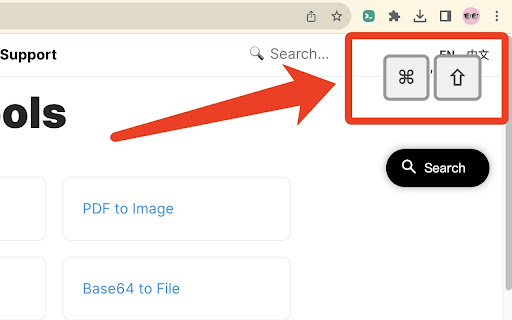
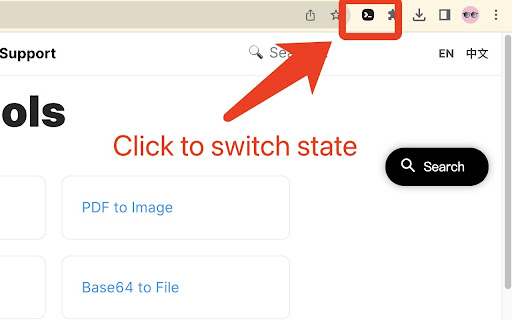
Real-Time Keyboard Input Display Extension for Every Webpage 🔲 Introduction KeyPress Live is a powerful Google Chrome extension that allows you to display real-time keyboard inputs on any webpage you visit. Whether you're demonstrating steps, recording tutorials, or sharing your web browsing experience with others, this extension provides an intuitive way to showcase your keyboard inputs, ensuring that your audience can clearly follow your actions. 🔘 Install the Extension: Go to the Chrome Web Store and install the "KeyPress Live" extension. 🔘 Enable the Extension: Once installed, you'll see the "KeyPress Live" icon in your browser's toolbar, that is, the activation is successful. 🔘 Real-Time Display: As you press keys on your keyboard while browsing any webpage, the pressed keys will be displayed in real-time as text in a corner or a designated location on the current webpage. 🔘 Customize Settings: [TODO supports me to speed up updates] The extension offers customization options to tailor the display according to your preferences. You can choose the size, color, and font style of the displayed keyboard inputs, as well as adjust the display position to avoid interference with your browsing experience. 🔘 Toggle Visibility: If you want to temporarily hide the displayed keyboard inputs, simply click the extension icon to toggle the display on and off. 🔘 End Usage: When you no longer need to show the keyboard inputs, click the "KeyPress Live" icon in the browser toolbar to disable the extension. KeyPress Live aims to provide a simple yet effective way for you to share your keyboard actions with others, enhancing clarity and visualization in your demonstrations and tutorials, whether you're working, learning, or enjoying entertainment activities.

Key to Click
Assign keys to click for you Assign keys to click elements on a web page for you. The configuration is stored in JSON per site, with the JavaScript "event.key" (see https://keycode.info to find values for keys) as the JSON property key and the CSS selector for the element as the JSON property value. Example config for https://apod.nasa.gov:

Show Keys
Show keys as you type Utility to show key presses on your Browser. PS - Does not work on some sites that restrict the functionality (eg - Google subdomains)

Key Display
Display key press on web page This extension is open source. See: https://github.com/eyebrowkang/key-display Elevate your presentations, tutorials, and live coding sessions with the Key Display Chrome Extension. This innovative tool is designed to enhance online communication and learning by displaying real-time keystrokes directly on your web page. Whether you're a professional educator, a developer, or just someone looking to share your skills online, this extension makes it easier than ever to follow along with any keyboard-based activity. Real-Time Display: Every key press is shown on the web page in real time, allowing viewers to see exactly what keys are being pressed without delay. This includes letters, numbers, function keys, and special characters, ensuring comprehensive coverage of all keyboard activities. Easy Toggle On/Off: A simple toggle feature allows you to turn the keystroke display on or off as needed, providing flexibility during presentations or when switching between tasks that require different levels of visibility. Educational Tutorials: Enhance your online tutorials by showing viewers exactly what keys you press during software demonstrations or when teaching coding lessons. Live Coding Streams: Share your coding process more transparently with live audiences, making it easier for viewers to follow along and understand your keystroke choices. Presentations: Add a professional touch to your online presentations by seamlessly integrating real-time keystroke visibility, aiding in the explanation of workflows or software usage. Installation is quick and easy, directly from the Chrome Web Store. Once installed, simply activate the extension from your browser toolbar to start displaying keystrokes on any web page. Dive into the settings to customize the appearance and behavior of the keystroke display to suit your specific needs and preferences. Enhance your online interactions and educational content with the Key Display Chrome Extension, the ultimate tool for bringing clarity and engagement to your keyboard-based activities.

KeyLog
Print your keystrokes on the screen. KeyLog is a keystroke visualizer. It displays the keys you pressed on the web page.
